
Take the Stress Out of Speaker Management

Trusted by 10,000+ Top Leading Brands

Trusted by 10,000+ Top Leading Brands
Eliminate Manual Data Collection
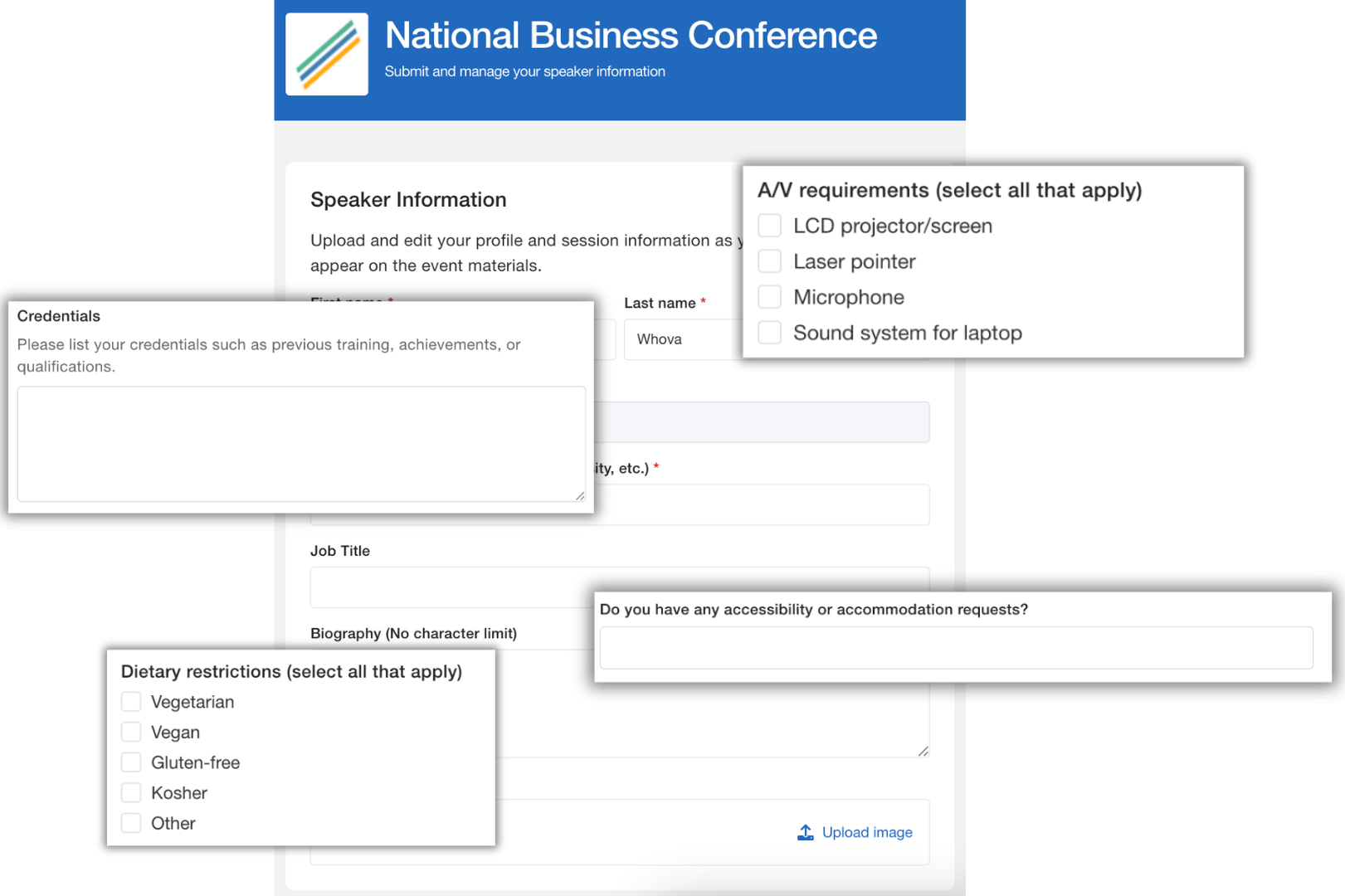
Customize speaker forms and let event speakers directly input bios, photos, talk details and more to build their speaker profiles.
- Reduce manual work with speaker forms that allow event speakers to add their own documents, bios, session information and more.
- Easily collect unique speaker information with custom fields such as A/V needs, dietary restrictions and accessibility needs.
- Save time contacting speakers individually by scheduling emails with links to their speaker forms.
Eliminate Manual Data Collection
Customize speaker forms and let event speakers directly input bios, photos, talk details and more to build their speaker profiles.
- Reduce manual work with speaker forms that allow event speakers to add their own documents, bios, session information and more.
- Easily collect unique speaker information with custom fields such as A/V needs, dietary restrictions and accessibility needs.
- Save time contacting speakers individually by scheduling emails with links to their speaker forms.

All Your Speaker Details in One Central Hub
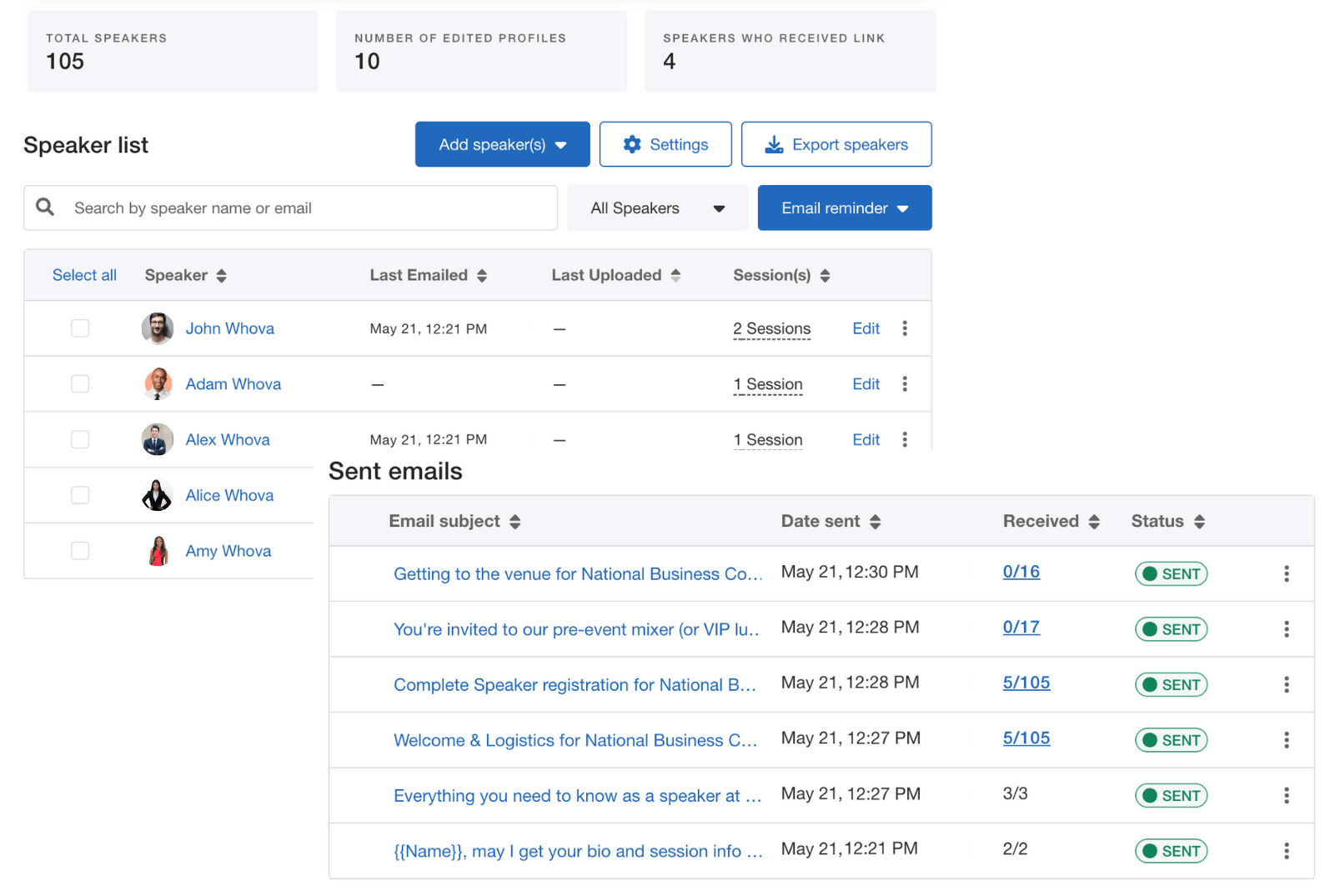
Get full visibility and control over speaker information in one place — no more scattered documents or manual follow-ups.
- Start managing speakers instantly – adding session speakers in the agenda automatically adds them to Whova’s Speaker Center.
- Correct errors effortlessly – update speaker information in one place and automatically sync in event app, website and more.
- Streamline communication with dedicated speaker email templates for welcome messages, logistics, registration and more.
- Get full control of the agenda in one place – handle scheduling through the visual agenda builder, manage session capacity and gate specific sessions by ticket type.
All Your Speaker Details in One Central Hub
Get full visibility and control over speaker information in one place — no more scattered documents or manual follow-ups.
- Start managing speakers instantly – adding session speakers to the agenda automatically adds them to Whova’s Speaker Center.
- Correct errors effortlessly – update speaker information in one place and automatically sync in event app, website and more.
- Streamline communication with dedicated speaker email templates for welcome messages, logistics, registration and more.
- Get full control of the agenda in one place – handle scheduling through the visual agenda builder, manage session capacity and gate specific sessions by ticket type.

Streamlined Speaker Submission Collection
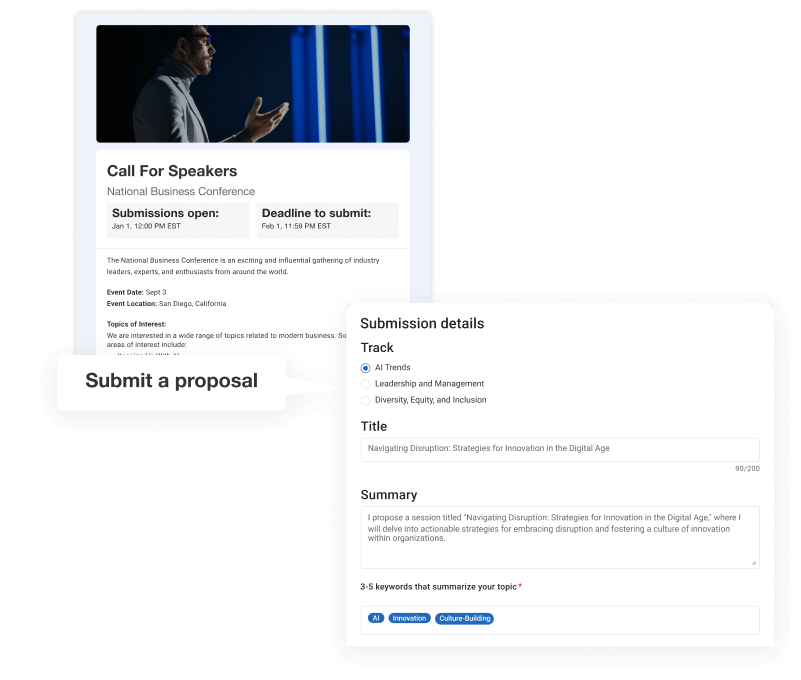
Forget about manual forms and spreadsheets. Launch a branded call for speakers page and let the applications directly flow into Whova.
- Eliminate manual submission collection with a customizable portal to handle speaker registration and applications.
- Increase speaker submissions through bulk email invitations or embed a submission form on your website.
- Easily track submissions with live status updates from incomplete to submitted.
- Automatically add speakers from accepted submissions to speaker management hub.
Streamlined Speaker Submission Collection
Forget about manual forms and spreadsheets. Launch a branded call for speakers page and let the applications directly flow into Whova.
- Eliminate manual submission collection with a customizable portal to handle speaker registration and applications.
- Increase speaker submissions through bulk email invitations or embed a submission form on your website.
- Easily track submissions with live status updates from incomplete to submitted.
- Automatically add speakers from accepted submissions to speaker management hub.

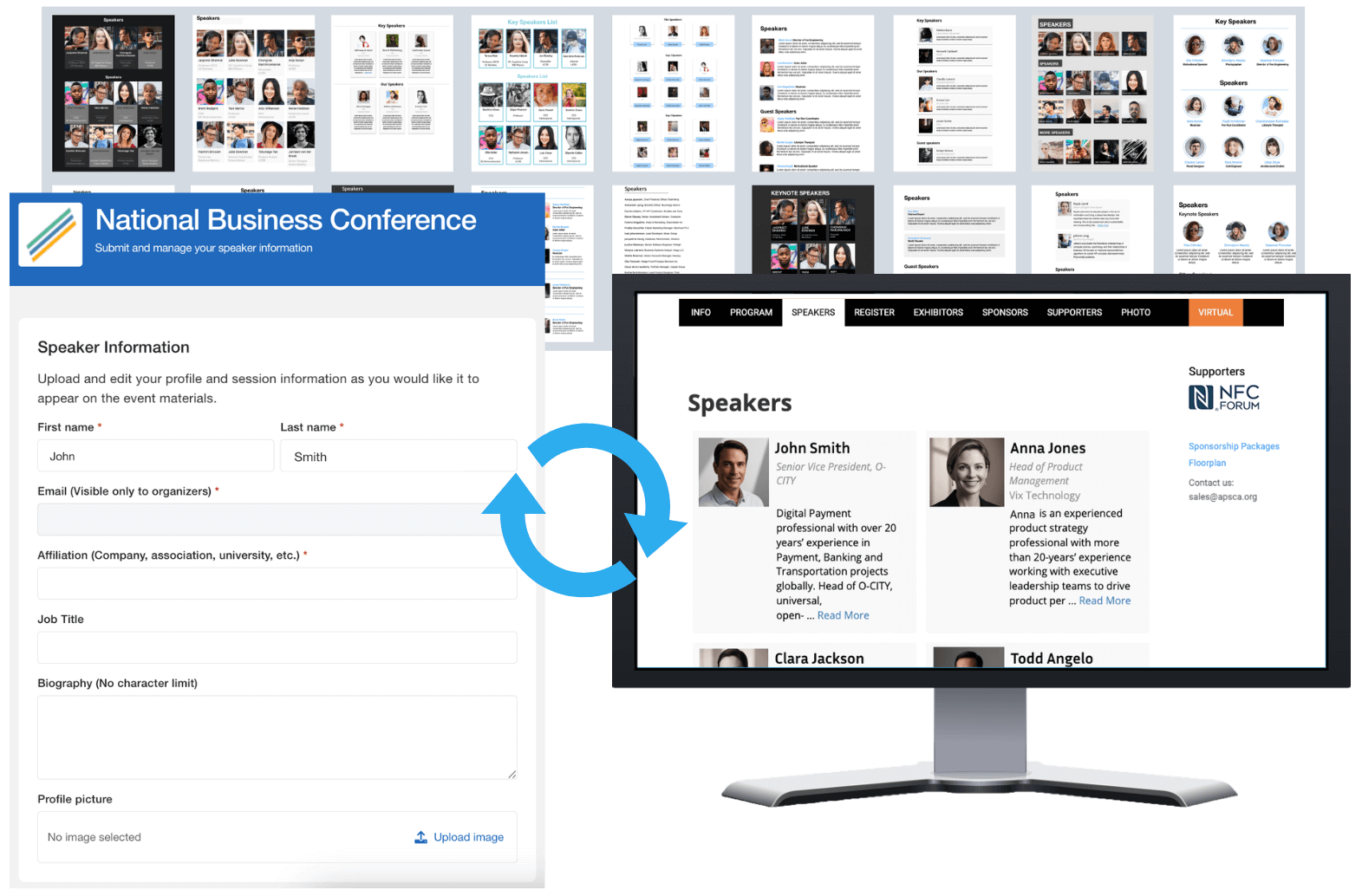
Increase Event Traction by Promoting Speaker Sessions
- No web design experience needed! Choose one of our professional, ready-to-use templates that best matches your event’s style.
- No technical skill needed. Effortlessly market your speakers in a Whova-hosted event website or embed them on your own website.
- Publish once, update anytime. All speaker information changes are automatically synced to reflect on the webpage.
Increase Event Traction by Promoting Speaker Sessions
- No web design experience needed! Choose one of our professional, ready-to-use templates that best matches your event’s style.
- No technical skill needed. Effortlessly market your speakers in a Whova-hosted event website or embed them on your own website.
- Publish once, update anytime. All speaker information changes are automatically synced to reflect on the webpage.
Frequently Asked Questions
What is speaker management software
What are the key features and benefits of a speaker management software?
- Online call for speakers: Software can create an online portal to accept potential speaker submissions with session information. It can facilitate the reviewing process as well as integration of accepted speakers into the event’s agenda.
- Information collection: Allow event speakers to update and add extra information such as bios, dietary restrictions, accessibility needs or AV needs.
- Communication: Provide basic event information such as venue information or itineraries through dedicated email or chat channels.
- Centralized management: As an organizer, have a single centralized hub to manage your speakers, allowing you to manually add, edit or delete any speakers
- Promotion: Send scheduled or automated emails to promote your speakers as well as create in sync speaker webpages to promote online
- Reporting: Collect and analyze speaker engagement and session attendance to evaluate your event’s performance
How can Whova help speakers complete their own profiles and submit materials?
Does Whova support abstract submissions and speaker selection?
Can organizers review and approve presentations?
How can Whova streamline communication with speakers?
Can AV requirements be collected and tracked?
If you need to customize the AV checklist or add specific options, you can uncheck the default AV field in the question form settings and then recreate it as a custom field. This allows you to tailor the questions and options to your specific needs.
Can speaker information automatically update the agenda and event app?
Does Whova support multi-track conferences with hundreds of sessions?
How can speakers interact with attendees during the event through Whova?
Whova’s speaker moderation tools and engagement features allow speakers to interact with attendees through direct messaging, Q&A panels, live session polls, community board discussions, 1-1 meetings, and networking tools. Speakers can directly messages attendees through the messaging tab. During the sessions, live Q&A and polls can help speakers get live reactions and responses from attendees. Speaker created community discussions groups can be a great way to interact with multiple attendees at the same time. Whova can also facilitate creating scheduled 1-1 meetings between speakers and attendees to even provide closer interactions.
Does Whova support virtual sessions for speakers?
Yes, Whova support virtual sessions for speakers by integrating with various live stream services and offering robust engagement tools. Organizers can create virtual sessions by integrating with major streaming platforms such as Zoom or Microsoft Teams. During the presentation, speakers are able to view attendee questions and responses. Additionally, organizers can play pre recorded videos during the session to present other materials during the live session.
How can speakers be promoted to attendees before the event through Whova?
Whova offers several ways to promote speakers to attendees before the event starts. Organizers can embed dedicated speaker webpages into their event website to highlight keynote speakers beforehand to increase registration sign ups. Within Whova, organizers can also send automated email campaigns to list of attendees in which they can list out important speakers based on interest. Additionally, Whova provides ready to share social media images to be shared to LinkedIn, Facebook and X. Speakers are also provided with promotional images to share details about their sessions and directly post in their social media platforms.