
June 8, 2026
Your registration page is often the very first interaction attendees have with your event. After investing time and resources into driving traffic there, organizers want the checkout experience to feel fast, professional, and effortless.
Whova’s registration system is designed to simplify both the organizer and attendee experience. Organizers can easily manage complex ticketing setups, create different registration forms for different attendee groups, restrict access with Invite-Only or Member-Only Ticketing, and even simplify reimbursement workflows with our Receipt Add-On.
At the same time, attendee expectations for online checkout continue to evolve. Apple Pay and Google Pay have become standard parts of everyday purchasing, especially on mobile devices. Digital wallets now account for over half of global online purchases, giving users a faster and more convenient way to check out without manually entering card numbers, billing addresses, or expiration dates.
To help organizers deliver a smoother and more modern checkout experience, Whova Registration now supports Apple Pay and Google Pay for ticket purchases. If the organizer enables these payment options, attendees can make payments with their digital wallet, making checkout faster and more convenient.
With this update, you can:
- Capture more registrations by reducing checkout friction: Let attendees complete registration quickly with Apple Pay or Google Pay, without interrupting the process to manually enter payment details or search for a credit card.
- Offer the modern payment experience attendees expect: Support the payment methods attendees already use for everyday purchases, helping registration feel more seamless and mobile-friendly.
- Stay in control while offering modern payments: Choose whether to enable Apple Pay and Google Pay for your event, and supported attendees will automatically see the appropriate payment option during checkout.
For attendees, registration becomes faster and more convenient. For organizers, it’s an easy way to modernize the checkout experience without adding extra operational complexity.
Ready to modernize your registration experience? Read on.
Let Attendees Purchase Tickets with Apple Pay and Google Pay
In the Tickets tab under Registration Settings, you’ll now find an option to let attendees purchase tickets using Apple Pay and Google Pay.
Simply enable the setting, and attendees will automatically see the digital wallet option supported by their device and browser during checkout.
This gives attendees a faster way to complete registration while letting organizers offer a modern payment experience with just a couple clicks.

Easily enable digital wallet purchases in Registration Settings.
If your preferences change, you can disable the feature at any time by selecting Disable in the same settings section.
How Attendees Check Out with Apple Pay and Google Pay
Once enabled, attendees will automatically see Apple Pay or Google Pay as a payment option during registration, depending on their device and browser compatibility. For example, Apple Pay may appear for attendees using an iPhone or Safari on Mac, while Google Pay may appear for attendees using Android devices or Google Chrome on their laptop or desktop.
To pay with a digital wallet, attendees simply select their preferred payment method during checkout. After clicking “Register,” they’ll be prompted to proceed with Apple Pay or Google Pay using their stored payment information.
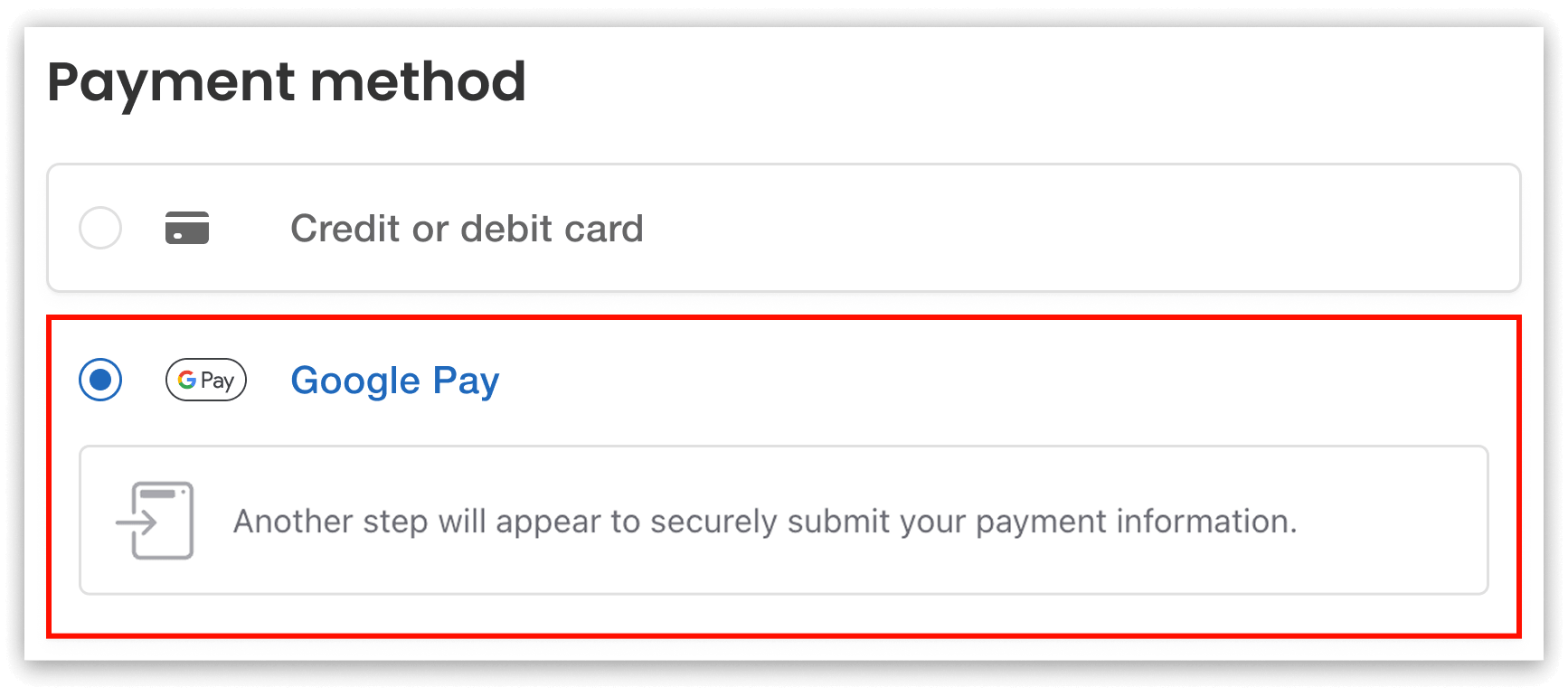
If enabled, attendees can choose to pay with Apple Pay or Google Pay at registration.
After completing registration, attendees can view their payment method in the confirmation email, and on their receipt (if the organizer has enabled the receipt add-on).
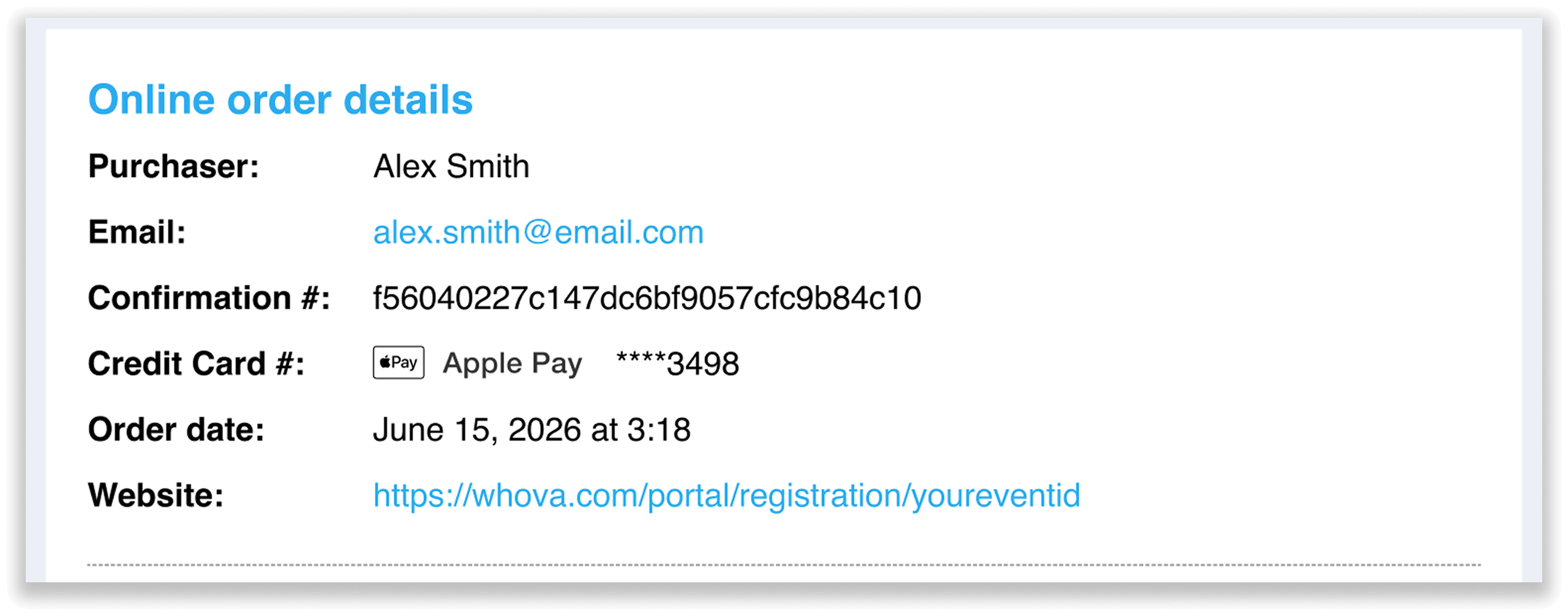
Attendees can view their payment method in the confirmation email, and on the receipt if enabled.
Prefer Not to Enable Apple Pay or Google Pay?
No problem. Apple Pay and Google Pay are completely optional and disabled by default. You can continue accepting payments through the standard credit card checkout experience that Whova Registration already supports.
Many organizers may choose to enable digital wallets to reduce checkout friction, particularly for mobile users. Others may prefer to keep their existing payment setup. The choice is entirely yours, and you can enable or disable Apple Pay and Google Pay at any time in your registration settings.
Deliver a Faster, More Convenient Registration Experience
With Whova Registration, you can enable Apple Pay and Google Pay in seconds, giving attendees a faster path to purchase while helping your team capture more completed registrations.
Enable digital wallet payments in your registration settings today to create a smoother registration experience, or request a demo to learn more.