
July 29, 2026
If your team organizes recurring events, you’ve probably seen requests like these before:
“Can someone share last year’s registration form?”
“Who can send me the Call for Speakers setup?”
“Can I reuse the sponsor email templates from our annual conference?”
At Whova, one of our biggest priorities has been helping organizers build on previous events instead of starting from scratch. In fact, reuse has become a guiding principle behind nearly every major feature we’ve introduced. Today, organizers can reuse content and settings in more than 30+ places across the Whova platform – from reusing name badge designs, agenda, survey forms, registration forms, to past call for speaker forms and settings, gamification settings and much more.
In addition to letting organizers reuse settings from events they manage, a few months ago we introduced Template Sharing, allowing teams to share registration forms, email templates, website designs, and other event configurations with fellow organizers—without granting access to the original event or any attendee data.
Today, we’re taking another big step.
Introducing Organization-Wide Template Sharing.
Instead of sharing templates one organizer at a time, you can now share them with an entire organization based on its email domain. Every current and future organizer from that organization can immediately reuse your approved templates—without requesting access or waiting for someone to manually share them.
To give you the right balance between collaboration and security, you can choose from three levels of access:
- Forms & Designs—Share registration forms, badge templates, certificates and other reusable design assets.
- Forms, Designs & Selected Settings—In addition to forms and designs, share website and gamification settings to help organizers replicate your event setup more quickly.
- Forms, Designs, Selected Settings & Email Templates (same as individual sharing)—Share everything above, plus event essentials (e.g., tickets and agenda), engagement content, and email templates for the most comprehensive template library.
This tiered approach lets you decide how much of your event configuration to make available. For example, you might share only forms and designs with a chapter organization, while giving your own internal event teams access to the full set of templates.
As always, Organization-Wide Template Sharing does not grant admin access to the original event or expose attendee data. Organizers can reuse only the template types you’ve chosen to share, while sensitive event information remains protected. You can also change or revoke an organization’s access at any time.
Use Organization-Wide Template Sharing to:
- Reduce repetitive sharing requests like “Can someone send me last year’s registration form?” by making approved templates available automatically to everyone in your organization.
- Standardize event planning across your organization so every event starts from the same proven forms, designs, and best practices.
- Manage associations with regional or local chapters by sharing headquarters-approved templates that each chapter can build on and customize.
- Build a centralized library of event best practices that grows over time, making every new event faster to launch than the last.
- Collaborate with partner or sister organizations by sharing successful event templates without exposing attendee data or granting admin access.
With Organization-Wide Template Sharing, your organization’s best event practices become reusable assets instead of knowledge that’s scattered across inboxes, shared drives, and individual team members.
Let’s take a look at how it works.
Share Templates With Organizations By Domain
To share event templates with an organization, first navigate to Admin Settings in the Attendees tab. Then scroll down to the “Share event templates and settings” section, where you’ll see a new “Share with an organization” option.
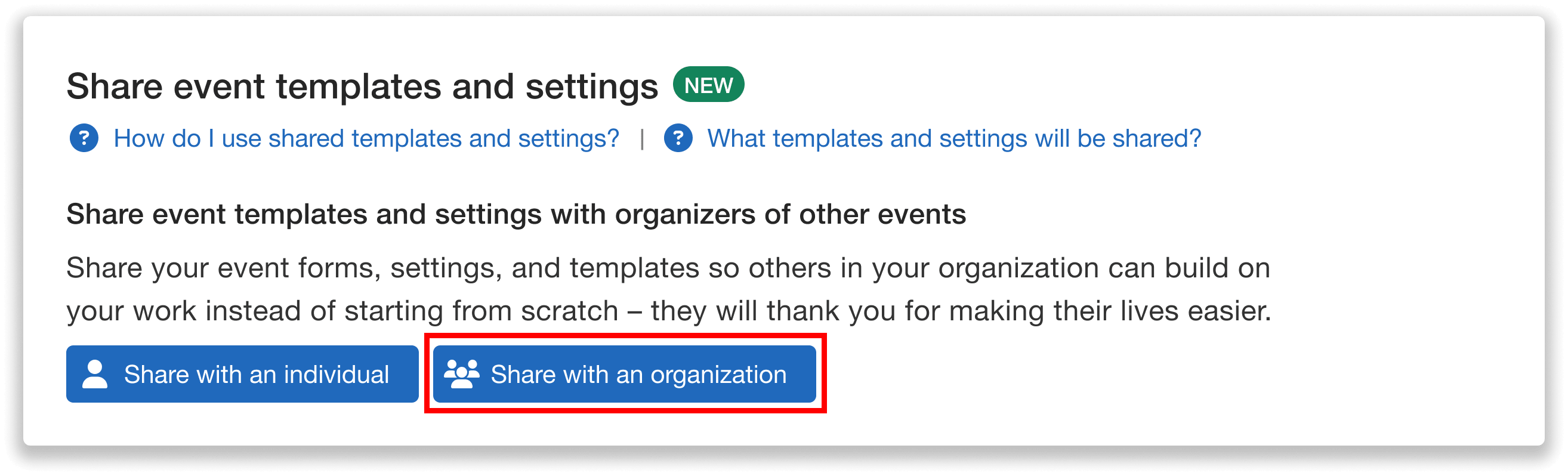
Share event templates and settings with an entire organization.
Enter the email domain of the organization you’d like to share templates with (for example, “harvard.edu”). Any organizer with an email address from that domain will be able to reuse the event content you choose in the next step.
Please note that general email domains such as gmail.com, yahoo.com, outlook.com, and hotmail.com cannot be used for organization-wide sharing.
Just like with individual template sharing, organization-wide sharing does not provide admin access to your original event or expose sensitive information like attendee lists, registration data, or event analytics. Instead, it allows organizers to reuse shared content while keeping your original event data private.
Because templates shared with an organization are available to any organizer with that email domain who joins Whova as an admin of a future event, it’s important to ensure you’re sharing only with organizations you trust. In larger organizations, this may include many users.
To help organizers make informed decisions, Whova requires several acknowledgements before organization-wide sharing is enabled, confirming that you have permission to share these resources, understand who may gain access, and accept responsibility for ensuring the recipients are appropriate and trustworthy.
Unlike individual template sharing, sharing with an organization does not send notification emails to recipients. This makes it easy to establish organization-wide template libraries without disrupting your team.
Note: You can share templates with up to three organizations per event.
Choose Which Access Level to Give the Organization
After selecting an organization, you’ll choose what level of access its members should receive. This determines which templates and event configurations they can reuse.
You can choose from three access levels:
Forms and Design Templates Only
This option includes all event forms and design templates, such as:
- Name badge templates and certificates
- Registration forms and speaker forms
- Other reusable form assets
This is a great option when you want to standardize branding and forms while keeping event settings private.
Forms, Design Templates, and Selected Settings
In addition to everything above, this access level also includes selected event settings, including:
- Gamification configuration
- Web widget settings
This allows teams to reuse common event experiences without sharing broader event content.
Forms, Selected Settings, Design, and Email Templates
This provides the most comprehensive level of template sharing and matches the permissions available when sharing templates with an individual organizer.
This includes everything above, plus reusable event content such as:
- Event essentials like tickets and agenda setup
- Engagement content like Community Board topics
- Email templates
This option is ideal for organizations that want to standardize nearly every aspect of their event planning process.
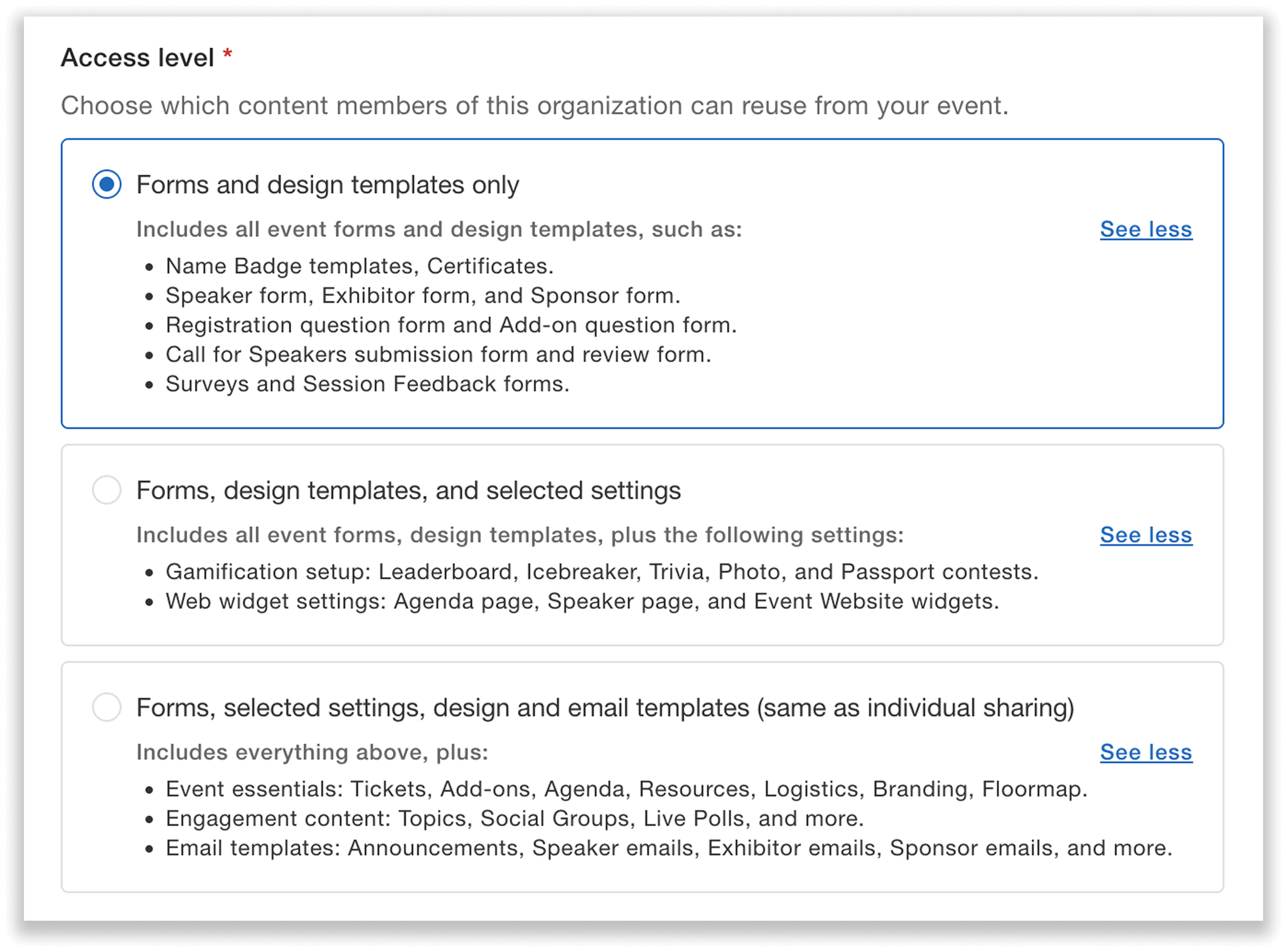
Choose between three different access levels when sharing templates with an organization.
Edit or Revoke Template Access at Any Time
After granting template access, you can view all organizations—and individual organizers—you’ve shared with from the Share event templates and settings dashboard.
To modify an organization’s permissions, open the Actions dropdown for its domain and select Edit access.
From there, you can either upgrade the organization’s access or remove access to certain settings and templates as your needs change. Any content that organizers have already reused in their own events will not be affected.
No longer want an organization to access your templates? No problem. Simply choose Revoke access from the same Actions menu. This immediately removes reuse permissions for everyone in that organization—even if the original sharing was done by another event admin.
Individual organizers with templates shared directly with them will still keep their access.
You can optionally leave an internal admin note when revoking access to document the reason for your team.
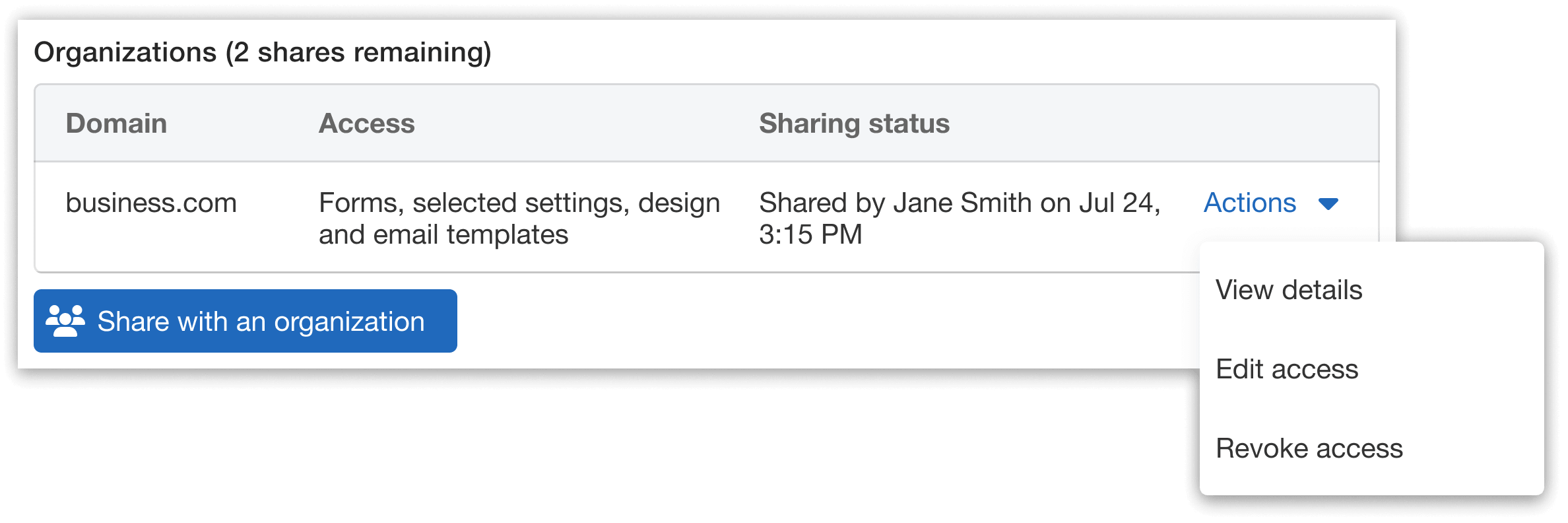
Update or revoke an organization’s template access at any time.
Easily Reuse Organization-Wide Shared Templates
When templates have been shared with your organization, reusing them is just as simple as reusing templates from your own events.
Within any Whova feature that supports reuse—such as Agenda, Speaker Forms, or Announcements—click the Reuse button.
When selecting an event to reuse from, choose the Shared with my organization option. If templates have been shared with your organization’s email domain, you’ll see the available events listed there.
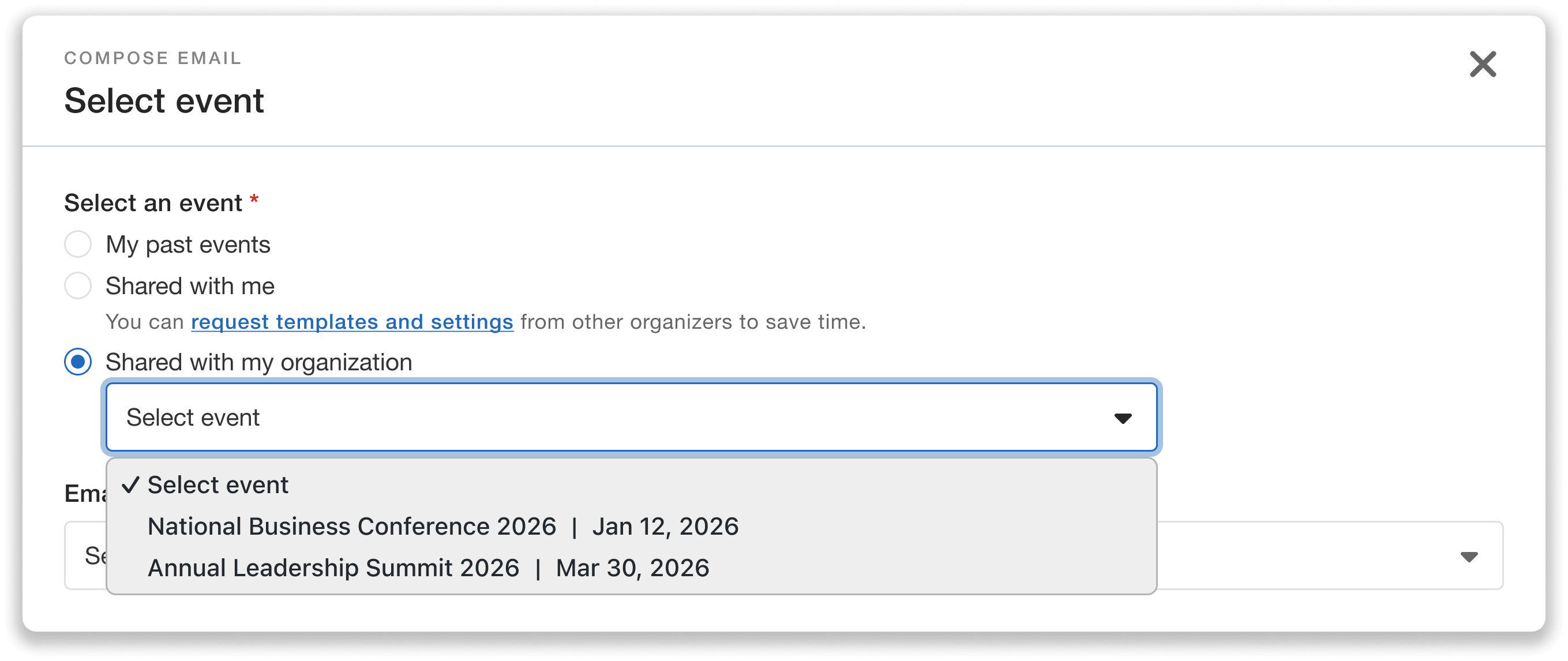
Organizers browse and reuse templates that have been shared with their organization.
Simply select the event you’d like to reuse from and customize the details after import to fit your current event.
For example, you might reuse a shared registration question form template from a previous event, and then add an additional question that’s specific to this year’s attendees. This makes it easy to build on proven configurations while still tailoring each event to your unique needs.
Help More Organizers Build on Proven Event Setups
Organization-Wide Template Sharing helps preserve institutional knowledge as teams evolve, and makes it easy to share proven event standards across departments, chapters, and partner organizations. Instead of manually sharing templates with each new organizer, you can provide trusted organizations with ongoing access to the resources they need—while maintaining control over exactly what can be reused.
Whether you’re onboarding new team members, standardizing events across chapters, or collaborating with partner organizations, this update helps every organizer get started faster and build on workflows that already work.
Ready to make your best event setups reusable across your organization and beyond? Try Organization-Wide Template Sharing today.