
May 18, 2026
For larger conferences, the self-service check-in station sets the tone for your entire event. A smooth, professional arrival experience helps attendees feel welcomed right away—while long lines and last-minute fixes can quickly create stress for both guests and staff.
Whova’s recently released Kiosk Check-In app has quickly become an organizer favorite, eliminating long lines and modernizing the arrival experience. It’s not only fast and modern, but also cost-efficient, helping organizers reduce temporary staffing needs and avoid expensive third-party onsite services. Many events have already used it to check in and print badges for 1,000+ attendees with speed and reliability. (If you missed our earlier blog posts about Kiosk Check-In and onsite badge printing, be sure to explore those as well—they’ll give you the full picture of what’s possible.)
As kiosk adoption grows, organizers have asked for more flexibility to handle real-world onsite needs. Sometimes attendees realize at check-in that they want to go by a shortened name instead of their legal first name, include a credential like “Dr.,” or simply fix a typo.
That’s why we’re taking it to the next level with Kiosk Check-In: Onsite Name Badge Editing. You can now let attendees edit the first names on their badges during check-in, so they can easily shorten long names or adjust prefixes without admin assistance.
To help protect your event’s admission control, last names cannot be edited at the kiosk. This safeguard ensures attendees cannot alter their identity in a way that could interfere with registration validation or badge-based access control. Organizers maintain full authority over official attendee records, preserving security and preventing unauthorized entry.
Plus, this feature is completely optional. Organizers can enable or disable onsite name editing, giving you flexibility based on your event’s security policies and operational preferences.
This new kiosk flexibility solves real-world check-in headaches:
- Offer more personalization without extra staffing. Attendees can adjust their display name instantly.
- Maintain admission integrity. Official attendee records stay protected while still allowing limited personalization.
- Stay cost-efficient onsite. Reduce manual badge reprints and minimize the need for dedicated correction support.
- Enhance networking comfort and confidence. A badge is an attendee’s business card—getting it right matters.
With this update, you can give attendees the freedom to make quick fixes and identify themselves exactly how they want, all with no added stress on the organizer side.
Read on to learn more.
How to Allow Attendees to Edit Badge Names for Kiosk
To enable onsite name badge editing for your kiosks, find the Attendees tab, open the “Attendee Check-in” section, and select “Kiosk Check-in.”
While customizing the kiosk settings, you’ll see a section called “Additional check-in options.” Here, you can decide whether attendees can edit the first name that appears on their badge during check-in (if you’re using kiosks for both self check-in and onsite badge printing).
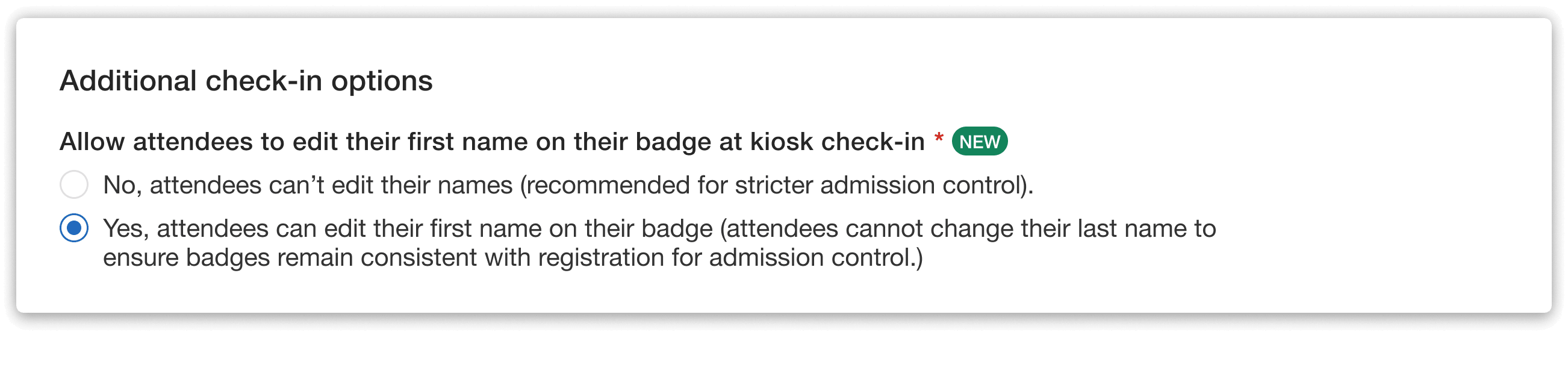
Simply click the option to let attendees edit the first names on their badges.
When you enable this option, attendees will only be able to edit their first name. This keeps badge information aligned with registration details so attendees can still be easily matched with their profiles in the backend.
What Attendees See During Check-In
If the organizer has enabled first name editing, attendees will see the option to edit their first name when they review their badge during kiosk check-in.
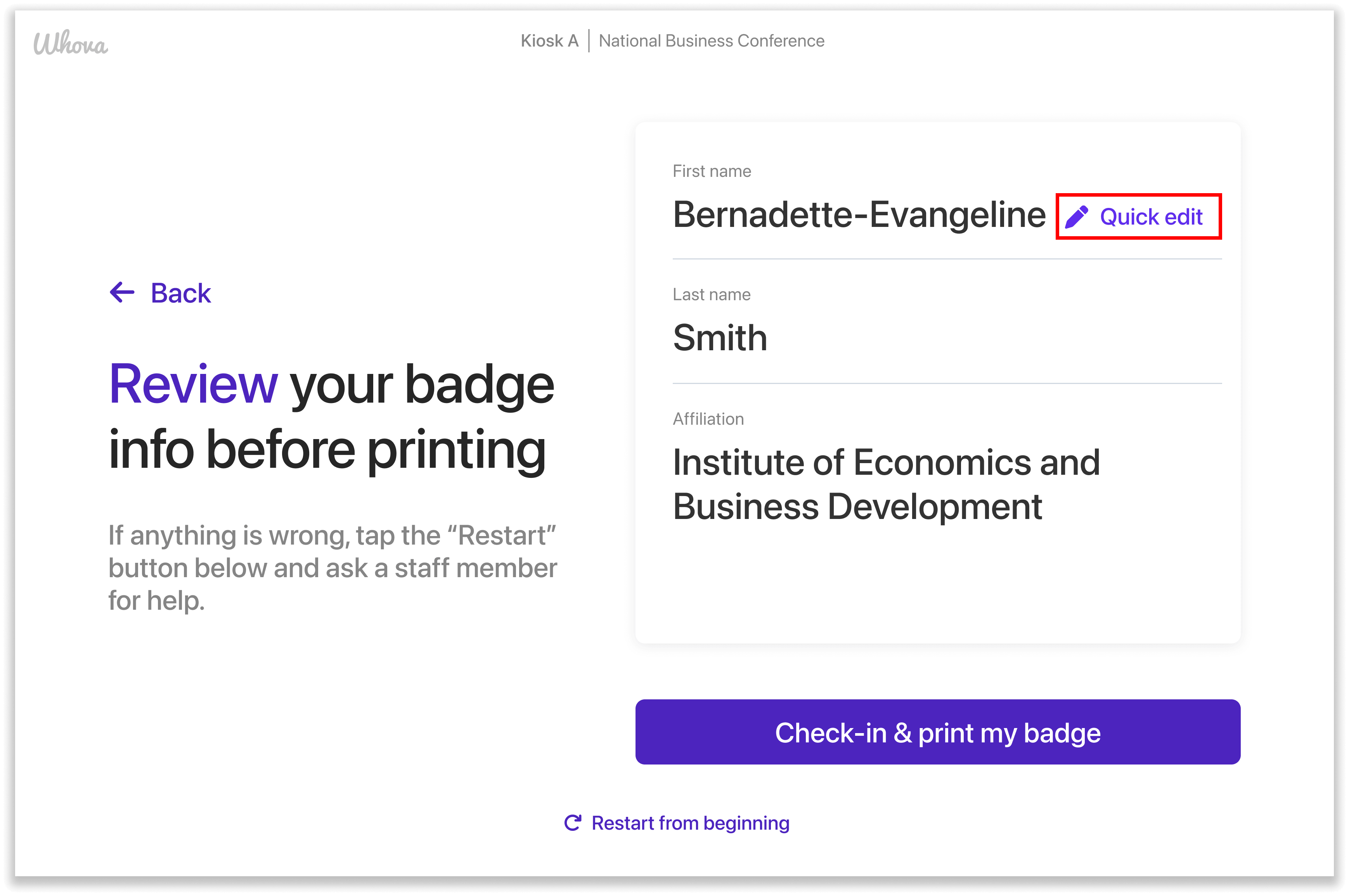
When badge editing is enabled, attendees can quickly adjust their first name before printing.
Here, attendees can quickly adjust the first name that will appear on their badge. For example, someone might choose to shorten a longer name or add credentials like a PhD or MD.
Once they confirm the change, the badge will print with the updated name. These edits apply only to the badge itself—the attendee’s profile in the organizer backend and in the event app will stay exactly the same.
Kiosk Check-In Is Now Even Easier
Badge details may seem small, but they matter—especially at professional events where clarity, accuracy, and credentials are important. By allowing attendees to quickly adjust their first name at the kiosk, organizers can keep check-in moving smoothly and still maintain accurate registration records.
Check out this option when setting up your kiosk to give attendees a quick way to ensure their badge looks exactly right. And if you’re not already using Whova to streamline your event management, request a demo to see our platform in action.