
May 18, 2026
When it comes to event compliance, organizers know it’s better to be safe than sorry. Whether it’s acknowledging event rules, confirming safety notices, or informing attendees about photography during the event, making sure guests understand key policies, such as the code of event conduct, is an important part of running a well-managed event.
For more detailed legal documentation—such as liability waivers or media release forms—Whova already provides Release and Consent Forms feature, allowing organizers to collect signatures, manage forms in one central dashboard, and automatically remind attendees who haven’t completed them before check-in.
But not every situation requires a full legal form. Sometimes organizers simply need attendees to acknowledge a few important terms before entering the event. Sending reminder emails or manually asking attendees to confirm policies at the door can slow down the check-in process and add extra work for your team.
About six months ago, we released the Kiosk Check-In add-on, which transforms iPads into sleek self-service check-in stations and even supports onsite badge printing. This solution helps events eliminate long lines, reduce staffing needs, and deliver a more modern arrival experience. In just a few months, Kiosk Check-In has quickly become a favorite among event professionals, helping organizers automate check-in while lowering overhead costs that often come with extra staff or third-party check-in services.
Since its release, we’ve continued improving the kiosk based on organizer feedback. For example, we recently added the option to allow attendees to edit their first name during check-in—helpful for fixing typos or using a preferred nickname. Organizers can easily enable or disable this option depending on their event policies.
Now, we’re introducing another enhancement to make onsite operations even smoother.
With this update, organizers can collect simple attendee consent directly during kiosk check-in. Instead of requiring a separate form, you can add short consent clauses—such as event rules, safety notices, or photography acknowledgements—that attendees confirm with a quick “I agree” before completing check-in. For example, a clause could state: “I understand that photos or videos may be taken during the event.”
Because attendees must acknowledge these notices before finishing check-in, organizers can feel confident that everyone has seen and accepted the key terms—without sending repeated reminder emails or stopping guests at the door to confirm policies.
This enhancement helps streamline the entry process while ensuring important event policies are acknowledged, offering:
- Stronger compliance at the door: By integrating consent prompts directly into the check-in flow, attendees are asked to acknowledge key notices before completing check-in. This helps ensure your policies are seen and confirmed without needing staff to manually collect acknowledgements.
- Clear visibility for event rules. Highlight “can’t miss” notices, such as photography policies, safety reminders, or conduct expectations, right when attendees arrive.
- Quick and simple setup. Add up to three consent clauses in minutes, and even view example clauses from other organizers to help you get started.
Instead of spending time tracking down missing acknowledgements, you can now integrate essential notices directly into your kiosk check-in flow—keeping entry fast, organized, and stress-free. Read on to learn how to set it up.
Add Consent Clauses When Setting Up the Kiosk
To set up Kiosk Check-in, go to the Attendees tab, open the “Attendee Check-in” section, and select “Kiosk Check-in.”
For example, you could include:
- A quick agreement to event rules
- A short safety notice
- A photo and video usage acknowledgement
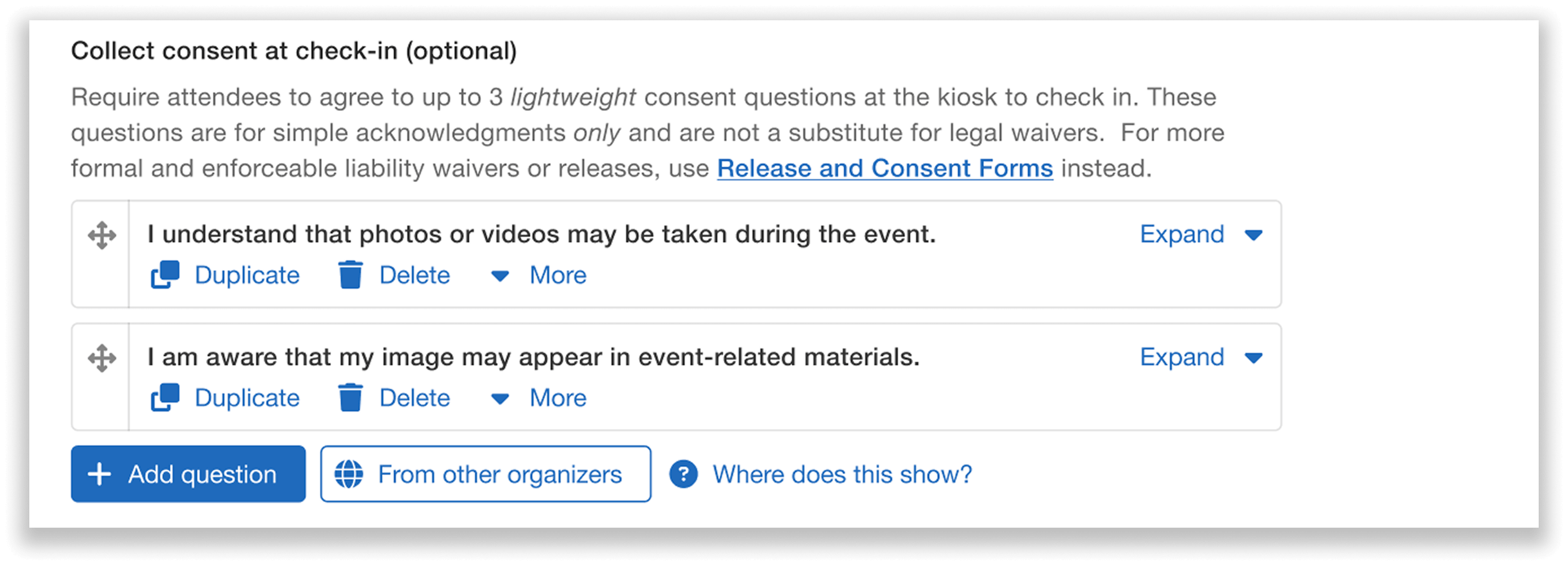
Easily add lightweight consent clauses to fit your event needs.
You can also view examples of consent acknowledgements from other organizers—helping you quickly put together clear and effective clauses.
Note: These questions are intended for simple acknowledgements only and are not a substitute for legal waivers. For more formal and enforceable liability waivers or releases, we recommend using our Release and Consent Forms feature.
Attendees Accept the Consent Clauses Before Checking In
If you’ve added consent clauses, attendees will see them as part of the kiosk flow. Before completing check-in, they’ll be prompted to review the terms and click “Agree and check in.”
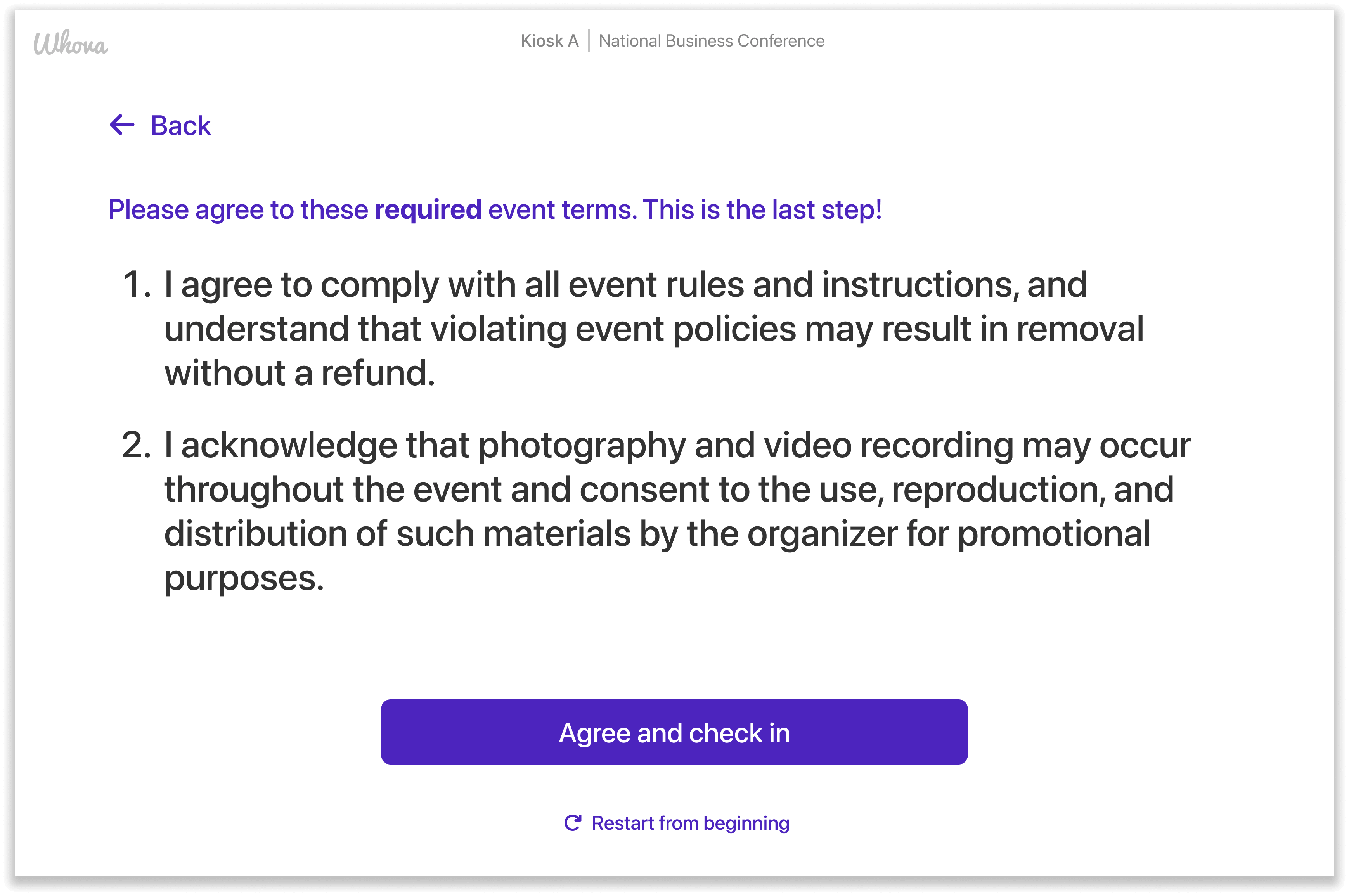
Attendees agree to simple event terms at kiosk check-in.
This helps you ensure that everyone who has checked in has viewed and consented to your statements—keeping check-in effortlessly quick, organized, and centralized.
Need to Collect Signatures?
If your event requires more formal signatures, Whova’s Release and Consent Forms are built for exactly that. They let you distribute, collect, and organize various paperwork, such as:
- Speaker media release forms
- Liability waivers
- Code of conduct agreements
- Photo and video consent
Use this feature in cases where you need structured form signatures beyond a simple check-in acknowledgment. Whova makes it easy to manage form responses in a centralized dashboard, and ensure each attendee has signed the proper paperwork before checking in to your event.
Bring Visibility to Your Most Important Event Rules Right At Check-In
With simple consent acknowledgements included in Whova’s kiosk, you can highlight key event terms right at the door, from safety reminders and media release to general participation guidelines.
If you’re already using the kiosk, this enhancement fits right into your workflow. And if you’re just getting started, it’s another reason to bring your check-in process into one streamlined system.
Explore Kiosk Check-In in your Whova dashboard and add consent clauses to your next event, or reach out to your Account Manager for more information.