
December 11, 2025
No organizer would describe event planning as easy, but not everything has to be hard. From annual conferences to trade shows, many details stay the same year after year with just minor updates. Leveraging last year’s framework, while adjusting as needed, is often the most efficient set-up strategy.
Whova already supports reusing nearly every feature from past events, from the agenda, surveys, registration forms, announcements, and email templates, to exhibitor and sponsor registration and gamification features. Organizers love this capability—it saves hours, boosts efficiency, and delivers polished consistency every time.
With Template Sharing, reuse also becomes collaborative. You can share your event setup with colleagues or partner organizations, or request theirs, without needing to add each other as admins or expose any attendee, exhibitor, or speaker lists. It’s a secure and efficient way to “borrow” what works.
But productivity doesn’t stop with agendas and forms. Organizers often spend hours each year recreating detailed logistics, such as venue info, CEU instructions, hotel details, welcome notes, local recommendations, and other information. These items rarely change, especially when events return to the same location, yet they take time to gather and polish. So why start from scratch every year?
That’s why we’re introducing Logistics and Speaker Profile Form reuse. You can now import event logistics and speaker form settings, from both past and shared event templates, for a smoother event setup experience, enabling effortless reuse from year to year and event to event!
This makes it easy to leverage past setups for…
- Event logistics, such as CEU handbooks, hotel information, links to donation pages, accessibility guidelines and on-site instructions.
- Venue logistics, such as directions, parking instructions, onsite check-in instructions, local restaurant recommendations, attractions, and transit tips.
- Speaker Profile Form settings, where you can collect all the final details you need from speakers in one place, including custom questions about AV needs, travel preferences, hotel requirements, or bio details.
- And more, including safety guidelines, emergency contacts, or medical resources for large events.
With Logistics and Speaker Profile Form reuse, you can keep important details consistent, and change exactly what needs to be changed. At Whova, we keep your event setup process smooth and simple, so you can focus on delivering a seamless experience for your attendees.
Quickly Import Logistics from Past or Shared Events
Reusing your event’s logistical information is simple. First, navigate to the Logistics Center, found under the Content tab.
Start by selecting Reuse past logistics, then choose whether you’d like to import from one of your own past events or from a shared event template. Once you’ve selected an event, you’ll see a list of items you can bring into your current event, such as handbooks and venue details.
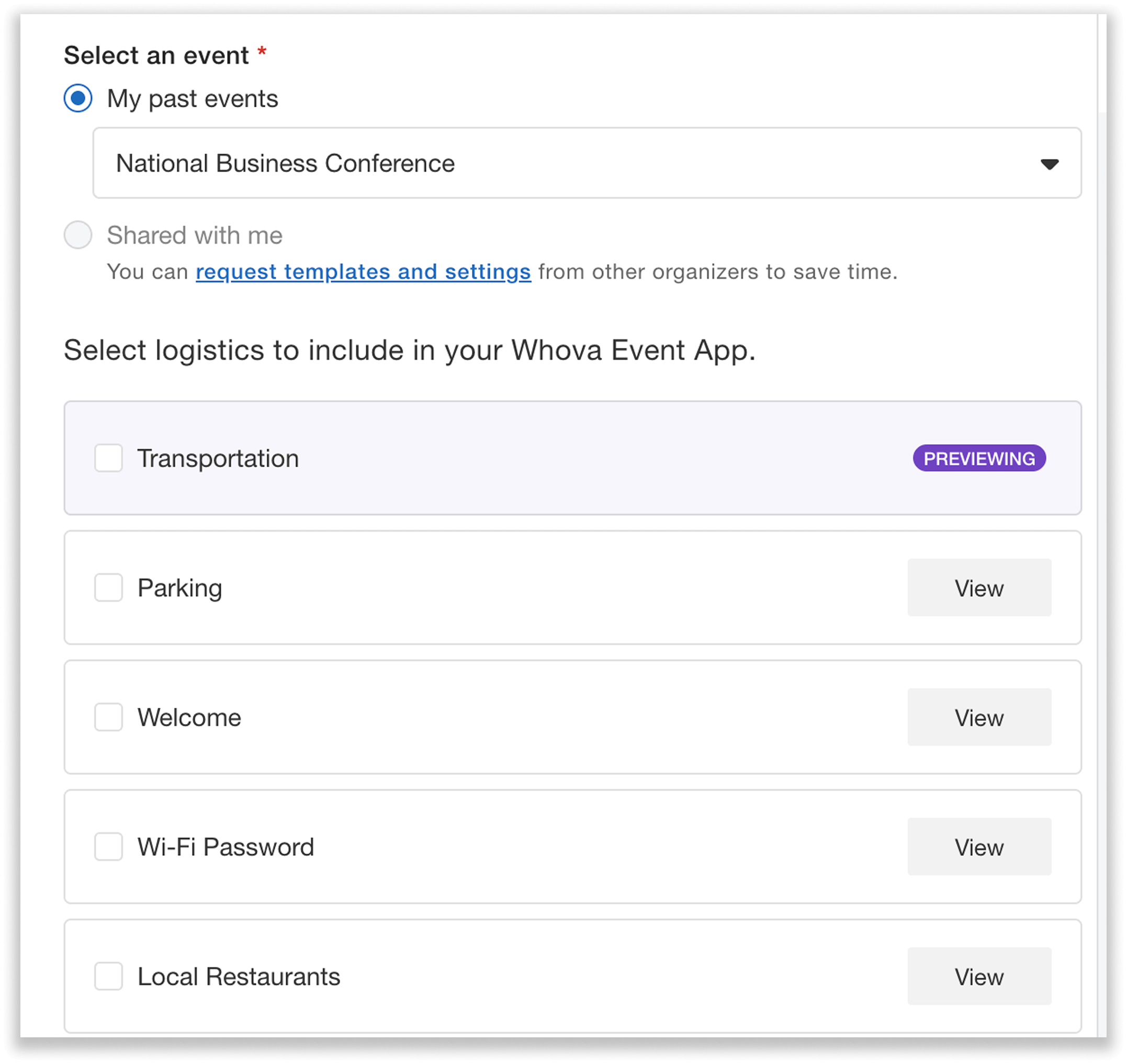
Preview and select logistics to import from past or shared events.
Before importing, you can preview each item’s title and content, so you know exactly what you’re pulling in. For example, if you’re reusing a CEU handbook link, you can review both the title attendees will see and the URL you previously uploaded.
After you import, everything remains fully editable. Adjust the title, revise outdated details, or expand the content as needed. With just a few quick tweaks, your logistics are ready to go—no need to rebuild everything from scratch.
Reuse Custom Event Resources
Custom Resources can also be reused to streamline your setup. You’ll find them under Customize Resources, in the Branding Center within the Content tab.
To start, click Reuse past resource and select the event you want to import from. You can choose from your own previous events, or from events shared by other organizers.
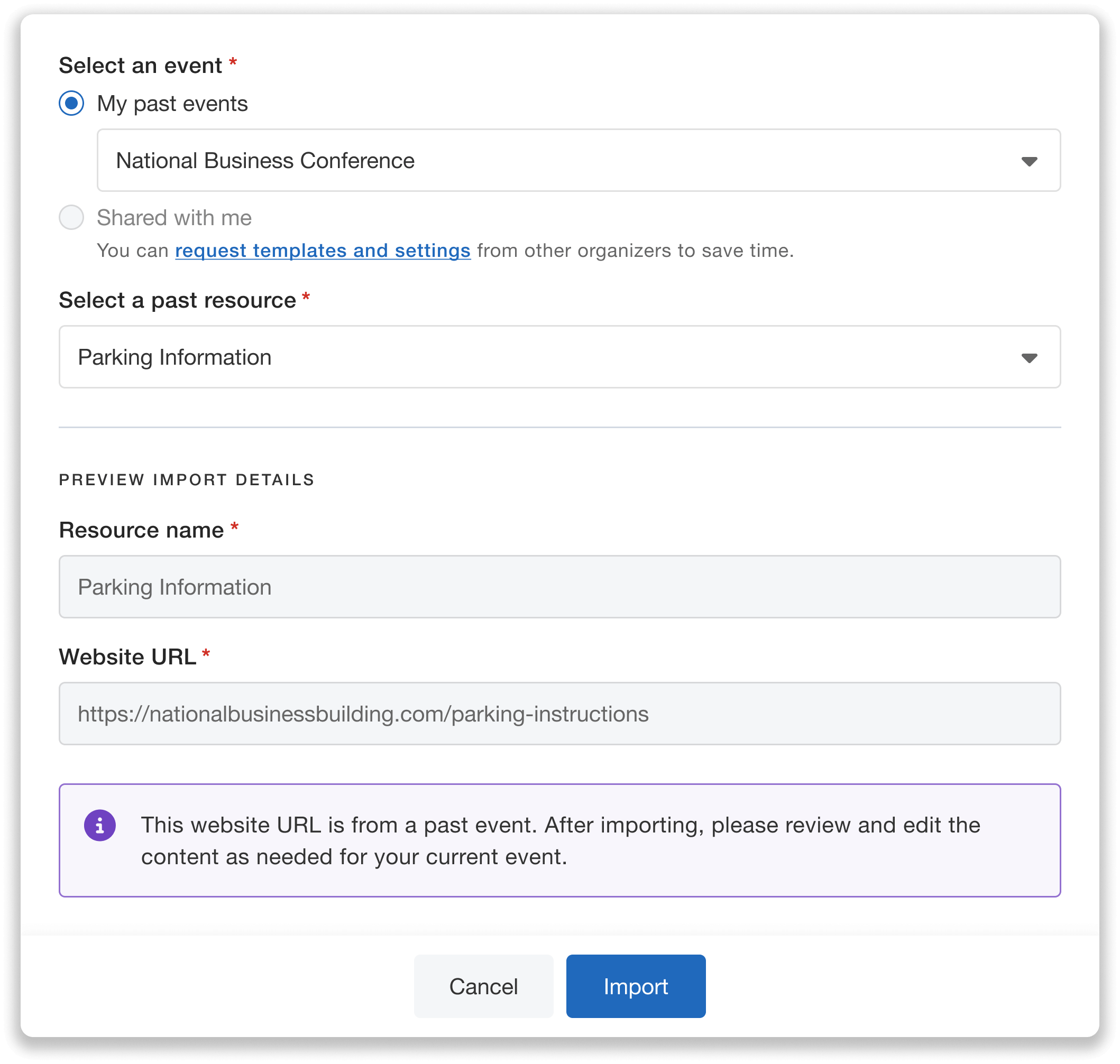
View each resource’s name and other details before reusing to make sure the correct materials carry over.
After choosing an event, you can select a custom resource to import, such as venue directions, CEU guideline links, or any custom reference materials you created previously. Select the resource you want and preview its details, including the resource name, and either the URL it links to or the text/HTML content.
Once imported, the resource becomes fully editable. Just save your changes, and you’re all set.
Import Speaker Forms from Previous Events
Easily collect information from speakers by reusing past or shared Speaker Profile Forms in the Speaker Manager, located in the Speaker Center under the Content tab.
Select Reuse past form, and choose whether you want to import a form from one of your own past events or from a template shared by another organizer. From there, you can preview the full form before importing it.
When you import a form, Whova brings over all settings, including:
- Which default fields are included
- Whether those fields are required or optional
- Any custom questions you previously added
This gives you an instant, ready-to-edit setup of a speaker form that matches previous event needs.
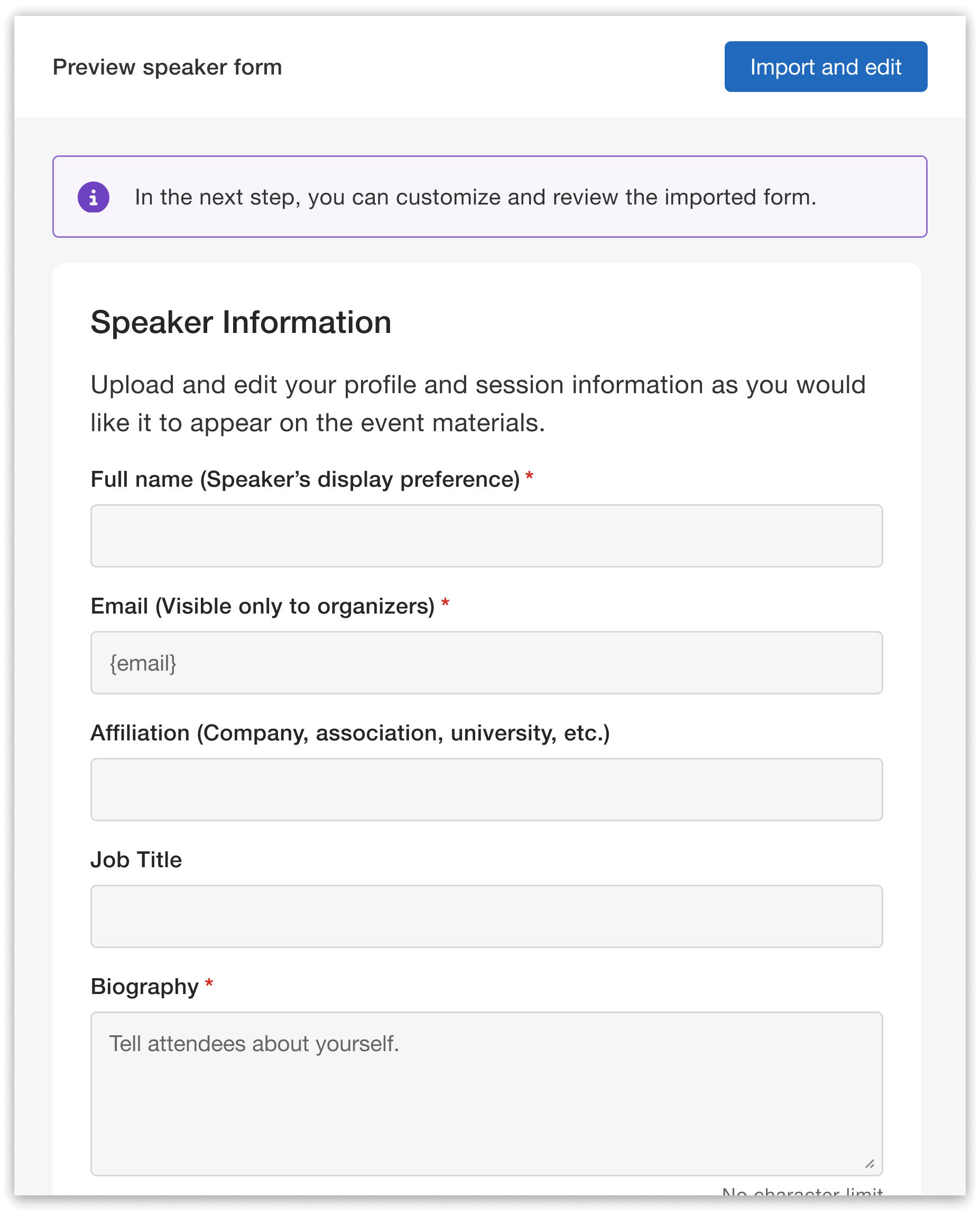
Preview your past Speaker Profile Form before importing and editing the settings.
Remember: Importing a previous speaker form will overwrite any edits you’ve already made to your current form. And after importing, make sure to double-check that any consent clauses or attached terms and conditions are accurate and up to date for your current event.
Edit Imported Items as Needed
Once your logistics, custom resources, or speaker forms are imported, everything remains fully customizable. The imported items provide a foundation, while still giving you complete freedom to tailor each detail to the needs of your current event.
For example, if you bring in a logistic that lists top local restaurants, but want to highlight a few new favorites, you can easily update the text.
This same flexibility applies to speaker forms: even if fields like LinkedIn profile or dietary restrictions were required last year, you can switch them to optional or even remove them entirely. You can also add new custom questions, such as for travel preferences or hotel arrangement needs.
Make any updates you need, save your changes, and your reused materials are immediately ready to go. It’s the easiest way to stay consistent year after year—without being locked in to past choices.
Rebuild Less, Reuse More
With reusable logistics, custom resources, and Speaker Profile Forms, Whova gives you the tools to build each new event on a solid, familiar foundation. By carrying over past success—and refining only what needs to change—you can reduce repetitive setup tasks, maintain consistency, and free up more time to focus on the attendee experience.
If you’d like to explore these features or see how they can support your event, request a demo or reach out to your Whova representative. We’re here to help you create your smoothest event yet.