
November 16, 2026
What if you could simply ask Whova how to do something—and get an instant, detailed answer, anytime, day or night?
Wondering how to set up member-only registration? Need to update dozens of sessions at once? Looking for a particular report, or trying to figure out which Whova feature can help you accomplish something?
Now, instead of searching through help articles, watching tutorials, or waiting for assistance, you can simply ask Whova AI!
We’re thrilled to introduce the Whova AI Organizer Chatbot—your new 24/7 AI-powered event setup assistant, built right into your Whova dashboard!
Whether you’re setting up your first event or you’re an experienced organizer exploring advanced features, your new AI assistant is ready to help. Just describe what you want to accomplish in your own words, and get instant, comprehensive guidance on the features, settings, and steps you need.
And it doesn’t stop at one question! Ask follow-up questions, request clarification, or explore different ways to accomplish a task. It’s like having a knowledgeable Whova guide at your fingertips, ready whenever inspiration—or a question—strikes.
Ask Anything. Get Answers Instantly. Keep Your Event Moving!
With Whova’s new AI Organizer Chatbot, you can:
- Get instant, detailed answers, 24/7. Have a question at midnight or while preparing for your event over the weekend? Simply ask! Get step-by-step guidance without interrupting your workflow.
- Discover powerful features you might not know about. Not sure whether Whova can help with a particular task? Describe what you’re trying to achieve, and let AI guide you to relevant features and settings.
- Ask follow-up questions, just like a conversation. Need more details? Want to understand another option? Keep asking until you have the guidance you need. You can also revisit previous conversations.
- Get help right where you’re working. Access the AI chatbot from any page in your Whova dashboard, without having to leave your event setup workflow.
- Enjoy AI convenience with human support when you need it. Whova’s dedicated support team is still here! If you need additional assistance, you can connect with our team and pass along your chat history, so you don’t have to explain everything again.
Another Big Step Forward in Whova’s AI-Powered Event Management
Whova has already introduced several AI-powered tools to make event planning easier and more effective:
- AI Writing Companion: Create and refine event descriptions, announcements, and other communications in less time.
- AI Question Generator: Instantly generate customized trivia questions to make event gamification more fun and engaging.
- AI-Generated Event Summary & Highlights: Turn event achievements into professional, shareable highlights with less manual effort.
- AI-Generated Interests: Automatically suggest relevant interests to help attendees build their profiles, discover common ground, and make meaningful connections.
- AI-Generated Discussion Topics: Generate engaging conversation starters to help organizers spark discussions and build a more active event community.
Now, we’re taking a major step forward—bringing AI assistance directly into your everyday event setup experience.
Instead of using AI for just a few individual tasks, you can now turn to Whova AI whenever you have questions about setting up and managing your event.
Less time searching for answers. More time getting things done. And more ways to make the most of everything Whova offers.
Your new AI event assistant is ready. Just ask Whova AI! 🚀
Keep reading to see how it works and what you can accomplish with your new AI assistant.
Get Started With Your New AI Assistant in Seconds!
Ready to give Whova AI a try? Getting started is easy!
Who can access it?
The AI Organizer Chatbot is included with all paid Whova events at no additional cost. Whether you’re setting up your first event or exploring more advanced features, you can get instant, AI-powered guidance whenever questions arise—without having to search through help articles or wait for answers.
The chatbot is available throughout your event preparation, during the event itself, and for up to one month after your event ends. This gives you plenty of time to get help with everything from initial setup and last-minute adjustments to post-event tasks, such as reviewing event data and preparing for your next event.
Note: The AI Organizer Chatbot is not available for trial events.
Where can you find it?
Getting started is easy! Simply log in to your Whova Organizer Dashboard (EMS) and select an upcoming paid event or a paid event that ended within the past month. Once you’re inside the event’s management dashboard, you’ll find the AI Organizer Chatbot in the bottom-right corner of your screen.
Click the chatbot icon to open it and start asking questions—whether you’re setting up registration, managing your agenda, customizing your event app, or exploring features you haven’t used before.
The best part? The AI Chatbot stays with you as you work! As you navigate between different sections of your event dashboard, the chatbot remains easily accessible in the bottom-right corner. Whenever a question comes up, you can get instant guidance without interrupting your workflow or searching through help articles.
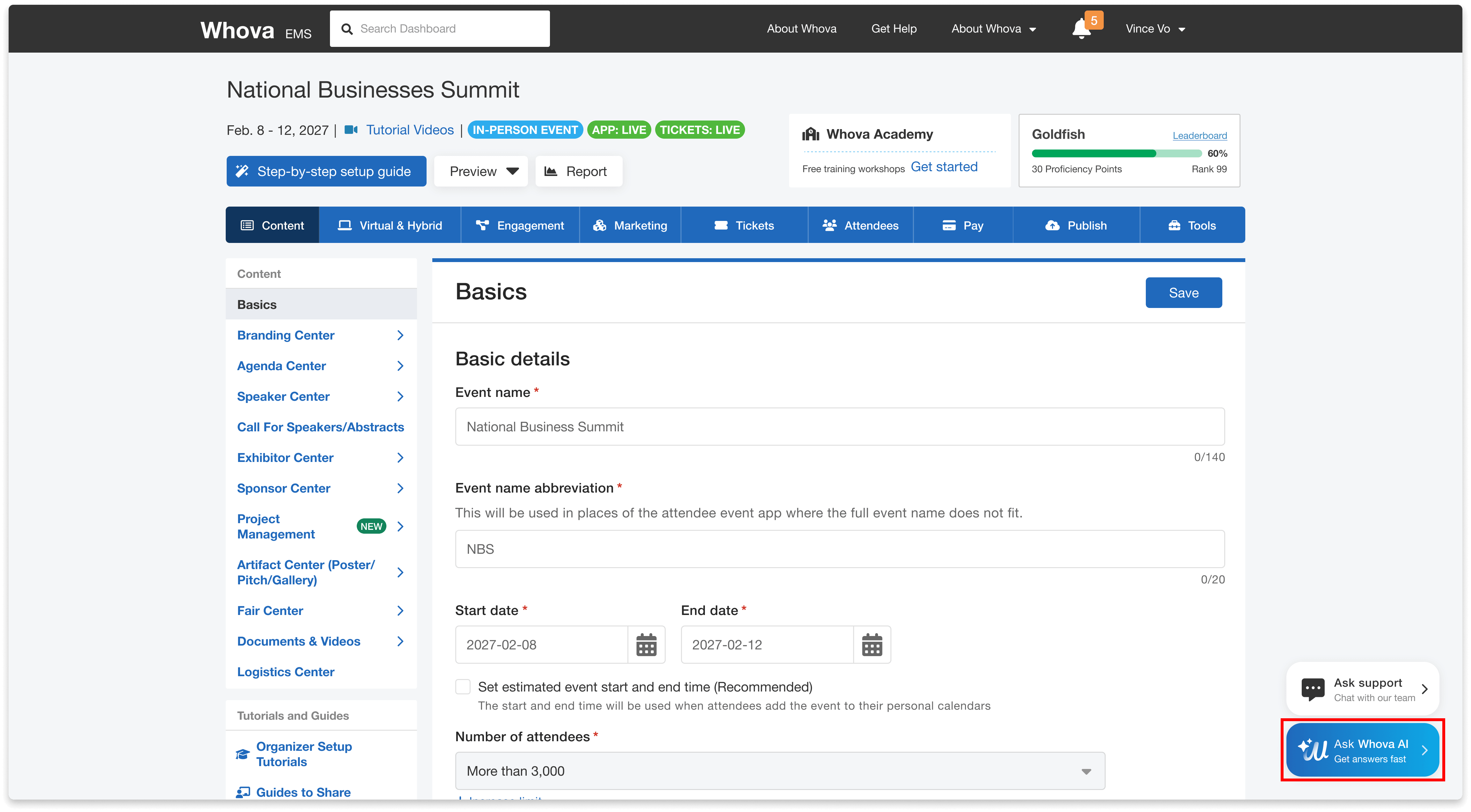
Start asking questions from any page in your event dashboard.
How does it work?
No need to learn special commands or search through help articles. Simply type your question in everyday language, just as you would ask a colleague. Whether you’re trying to find a feature, understand a setting, troubleshoot an issue, or learn how to complete a task, Whova AI provides detailed, step-by-step guidance in seconds.
Not sure what to ask first? To help you get started, the chatbot offers three suggested questions based on the page you’re currently viewing. For example, if you’re working on event registration, you might see questions about setting up ticket types, configuring discounts, or managing registration settings. Just click a suggested question to get an instant answer!
You can also ask follow-up questions to explore a feature in more depth or clarify any instructions. This makes it easy to learn as you go, discover useful capabilities you may have overlooked, and get more out of Whova.
Before your first chat, you’ll be asked to review and agree to the AI terms and conditions, which provide additional information about the chatbot’s capabilities and limitations.
A few things to keep in mind: Whova AI provides guidance but cannot access or view your specific event or account data, change settings, or perform actions on your behalf. Like other AI tools, it may occasionally provide inaccurate, incomplete, or outdated information, so please review and verify important instructions before relying on them.
Once you’ve accepted the terms, you’re ready to start exploring everything Whova AI can help you accomplish!
Stop Searching for Answers. Just Ask!
Know what you want to accomplish, but not sure which Whova feature to use or where to find it? Just ask Whova AI!
You don’t need to remember exact feature names, figure out the right search keywords, or dig through help articles. Simply describe what you’re trying to achieve in your own words, and Whova AI can help you discover the right features and walk you through how to use them.
For example, you might ask:
- “How can I make certain tickets available only to association members?” Discover how to restrict ticket access based on membership or other eligibility requirements.
- “Can I send different emails to different groups of attendees?” Learn how to segment attendees and customize communications for each group.
- “How can I track who attended a particular session?” Find out which session check-in and attendance tracking options best fit your needs.
- “How can I encourage more attendees to visit exhibitor booths?” Explore features such as the Passport Contest and Exhibitor Trivia to boost engagement.
Not sure how to explain what you need? That’s okay, too! If your question is unclear or needs more context, Whova AI can ask follow-up questions to better understand your goal and guide you toward a suitable solution.
Whether you’re discovering a feature for the first time or figuring out how to use one you’ve already found, you can focus on what you want to achieve—and let Whova AI help you figure out how.
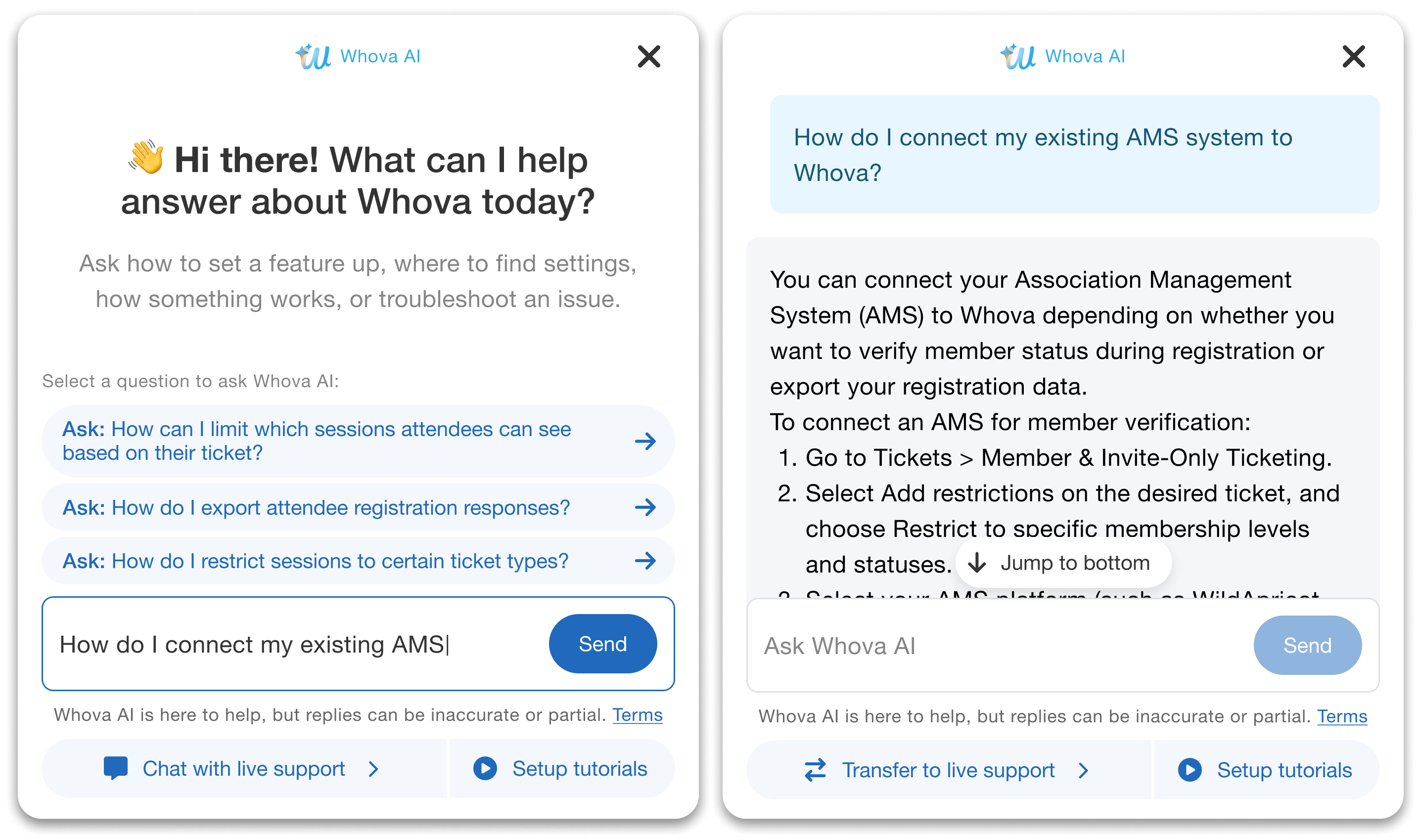
Explain what you want to accomplish, and the Chatbot will tell you where to start.
Discover More Whova Features You Might Be Missing!
Whova offers a wide range of powerful event management tools, and you may not even realize some of them are available! Instead of spending time searching through different settings or wondering whether Whova supports a particular task, simply tell Whova AI what you want to accomplish. It can help you discover useful features you may have overlooked and explain how to take advantage of them.
For example, you can ask:
- “How can I track attendance for individual sessions?” Explore session check-in and attendance tracking options.
- “Can I collect and review speaker proposals?” Discover Whova’s Call for Speakers and submission management tools.
- “How do I restrict certain tickets to members only?” Learn about ticket eligibility and purchasing restrictions.
- “Can I export attendee registration information?” Find out how to access and export registration data.
- “How can I increase attendee engagement with exhibitors?” Discover interactive features that encourage booth visits and participation.
Want to learn more? When relevant, Whova AI also provides direct links to helpful resources, including Whova blog posts and FAQ pages. You can explore detailed instructions, discover related capabilities, and learn additional ways to get the most out of Whova.
You might come looking for an answer to one question—and leave having discovered several new ways to improve your event!
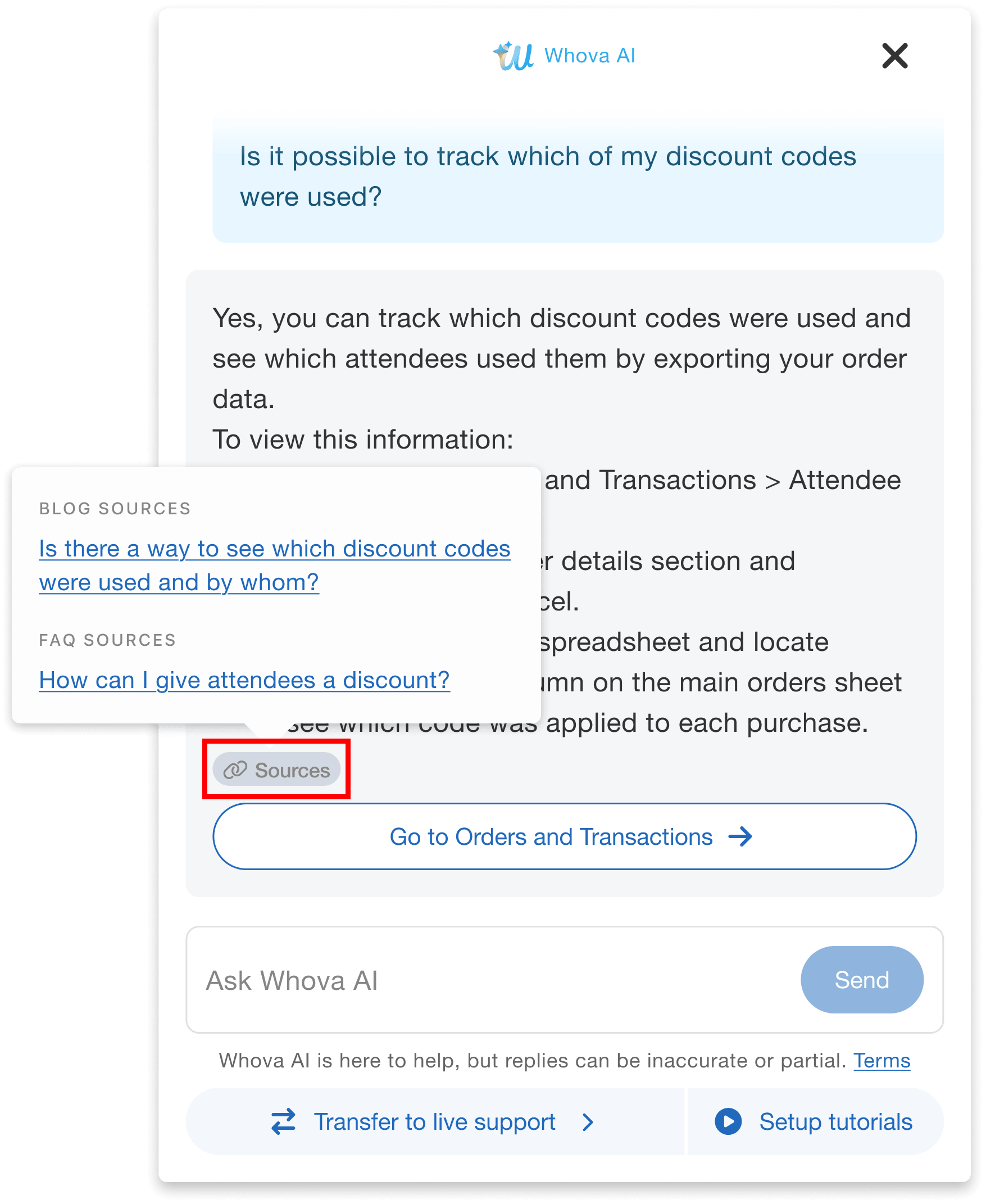
Quickly access related support resources.
Keep The Conversation Going
Have more questions after receiving an answer? Just keep asking! Whova AI remembers the context of your current conversation, so you can ask follow-up questions, request more detailed instructions, or clarify something you didn’t understand—without having to repeat your original question.
For example, after asking how to set up member-only registration, you might follow up with “Can I restrict tickets to specific membership types?” or “Can I offer different prices to different member groups?” Whova AI builds on your previous questions to provide more relevant guidance.
Got interrupted? No need to start over! Whether you’re stepping into a meeting, switching to another event setup task, or returning later to double-check instructions, your previous conversations are automatically saved for up to 10 days.
Want to start fresh? Simply click New chat in the top-left corner of an open conversation or select Start a new chat at the bottom of your conversation history.
To keep conversations organized, Whova AI automatically starts a new chat after two hours of inactivity. Don’t worry—your earlier conversations remain accessible within the 10-day retention period, so you can return to them whenever you need.
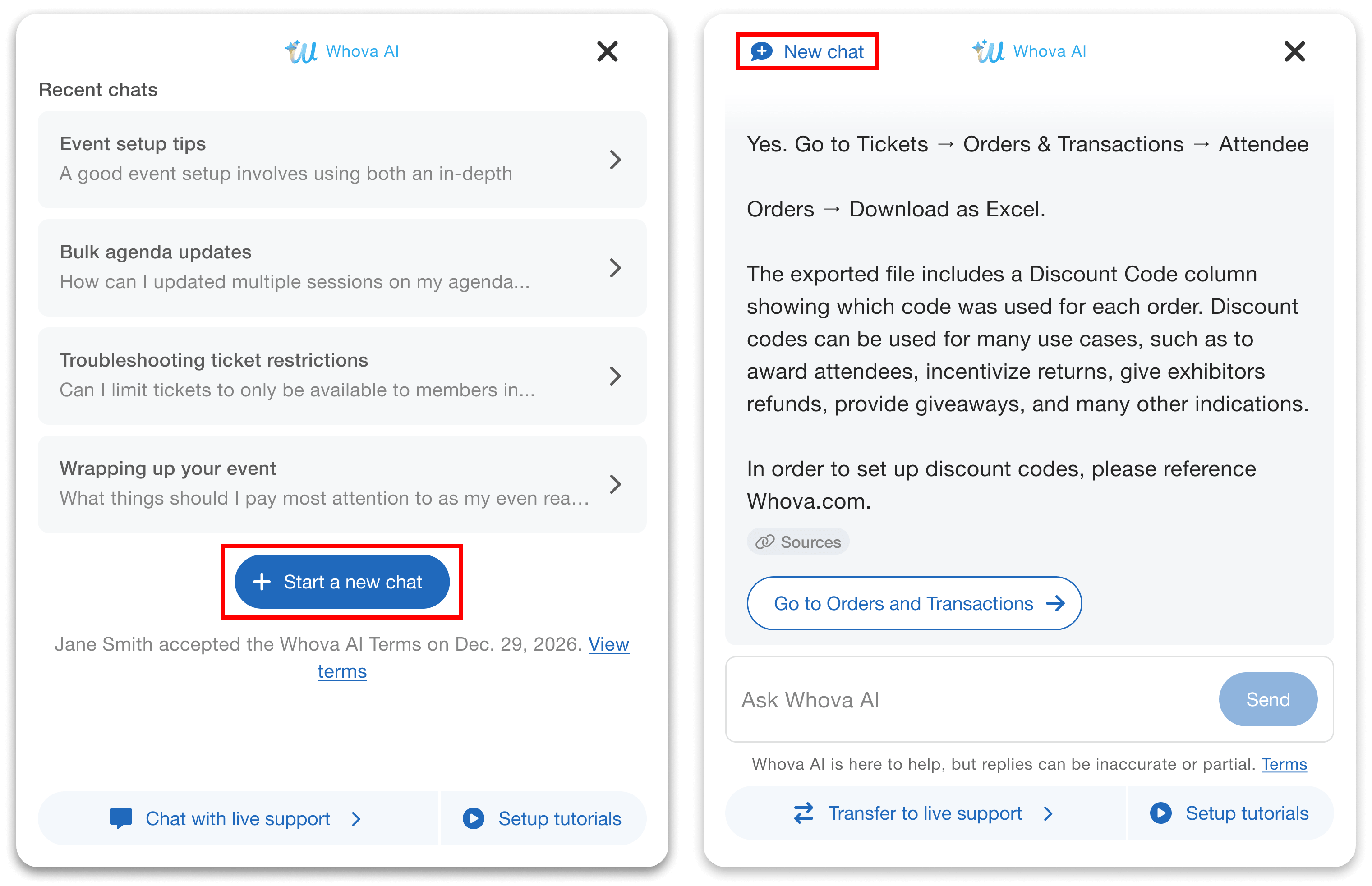
Easily start a new conversation from the chat history page or from inside your existing chat.
Revisit Previous Conversations Anytime
Got interrupted while setting up your event? Or need to double-check instructions you received earlier? No need to search for the same answers or start from scratch!
Whova AI automatically saves your conversations for up to 10 days, making it easy to revisit previous questions and answers whenever you need them.
For example, if you asked how to set up member-only registration but didn’t finish the process, you can return to that conversation later, review the step-by-step instructions, and ask additional questions if you get stuck.
You can even continue an earlier conversation! Simply open it from your chat history and pick up where you left off. Whova AI retains the conversation context, so you don’t have to repeat your questions or explain what you’re trying to accomplish all over again.
AI-Powered Answers, Backed by Real Human Support
With Whova’s AI Organizer Chatbot, you can get instant answers to your setup questions anytime. But sometimes you need help with a specific issue, personalized troubleshooting, or assistance that goes beyond what AI can provide. That’s why Whova’s dedicated customer support team is still here for you!
During our regular support hours (Monday–Friday, 6 a.m.–5 p.m. PT), you’ll see two convenient options on each page of your event dashboard:
- Ask Whova AI: Get instant answers, discover useful features, and receive step-by-step guidance on how to use Whova.
- Ask Support: Connect directly with Whova’s customer support team for personalized assistance with your event.
Seamlessly Switch from AI to Human Support
Started with Whova AI but need more help? You don’t have to start over or explain everything again!
Simply click “Chat with live support” at the bottom of your AI conversation to connect with a support representative during regular support hours.
Even better, your AI conversation history will be passed along to the support representative, so they can quickly understand what you’ve already asked, what guidance you’ve received, and where you need additional assistance. This helps you get more targeted support without repeating the same information.
Need Help Outside Regular Support Hours?
Event preparation doesn’t always happen during business hours. Whether you’re working late at night, over the weekend, or across different time zones, Whova AI is available to answer your questions anytime.
Outside regular support hours, only the Ask Whova AI option will appear on your event dashboard.
If you need assistance from our support team, you can also email customer-success@whova.com or submit a support request. A Whova representative will follow up during regular business hours.
Get More Out of Whova. Make Every Event Better!
A successful event takes more than getting everything set up. It’s about making the most of the tools available to you—attracting more attendees, increasing engagement, delivering greater value to sponsors and exhibitors, and creating an experience people want to return to.
With Whova’s new AI Organizer Chatbot, you have an AI-powered guide ready to help you take full advantage of Whova’s capabilities.
- Discover features you may have overlooked that can help you solve challenges and achieve your event goals.
- Make better use of Whova’s powerful tools with step-by-step guidance on setting up and customizing features for your event.
- Explore new possibilities by describing what you want to accomplish, even when you’re not sure which features can help.
- Get instant guidance whenever inspiration strikes, whether you’re planning your event during the day, late at night, or over the weekend.
- Get personalized assistance from Whova’s support team whenever you need additional help.
Already organizing an event with Whova? Log in to your event dashboard and give Ask Whova AI a try! You might discover a feature or a new way to use Whova that makes a real difference for your next event.
Want to learn more about how Whova can help you deliver more successful events? Reach out to your Whova representative or schedule a demo with our team.