
Aug 18, 2026
Opening registration is one of the biggest milestones in planning an event. Before the first attendee registers, organizers want to be confident that everything is ready—from ticket pricing, registration pages, discount codes, invite-only and member-only ticket restrictions, and early bird promotions.
Over the past year, we’ve continued expanding Whova Registration to support increasingly sophisticated ticketing strategies. Organizers can create exclusive tickets using email lists, organization restrictions, organization types, AMS integrations, and uploaded Member ID lists. We’ve also introduced features like copying ticket restrictions to save setup time and Apple Pay and Google Pay support to give attendees a faster checkout experience.
As registration becomes more powerful, however, reviewing everything before launch also becomes more challenging. Organizers often have to jump between multiple pages to verify tickets, restrictions, discount codes, registration forms, payment settings, and more. If a teammate or supervisor needs to approve the setup, they usually have to repeat the same process.
That’s why we’re introducing Registration Setup Review.
Instead of checking each registration component individually, organizers can review their entire registration setup from a single page. Ticket details, restrictions, discount codes, registration pages, payment settings, and other key configurations are organized into one comprehensive overview, making final verification much faster and easier.
Need a second set of eyes? You can also generate a polished PDF summary to share with teammates or supervisors, making it simple to review and approve your registration setup without requiring everyone to navigate the organizer dashboard.
Registration Setup Review helps organizers:
- Review your entire registration setup in one place: See ticket details, restrictions, discount codes, registration pages, and payment settings together instead of checking each configuration separately.
- Quickly catch issues before registration goes live: It’s easy to spot incorrect pricing, ticket visibility, restrictions, and more before attendees begin registering.
- Save time checking complex ticket configurations: Eliminate the need to jump between multiple setup pages or verify each ticket one by one, even for events with dozens of ticket types.
- Share your registration setup for approval: Send a clear, polished PDF overview to teammates or supervisors for review and feedback without requiring them to navigate each page in the organizer dashboard.
Whether you’re doing a final check yourself or sharing details with teammates, Registration Setup Review makes the last step before publishing registration faster and easier.
Want to see everything included in the review? Read on.
Review Registration Setup in One Place
You’ll now see a Review registration setup button in the top right corner of the following pages in the Tickets tab. Each button opens the same registration review page, giving you a complete overview of your setup.
- Attendee tickets
- Discount codes
- Member & Invite-Only Ticketing
- Attendee registration pages
- Attendee registration settings

Find “Review registration setup” in the top right corner of the ticket setup page.
You can also access this same overview of your registration setup immediately after publishing tickets.
The registration review page includes sections on the following:
- Tickets – Basic Information: Includes details like each ticket’s description, price, sales window, early bird price, and early bird sales window.
- Tickets – Advanced Settings: Includes details like which add-ons each ticket can purchase, whether Session RSVP is enabled, and which question forms are assigned to each ticket.
- Ticket Restrictions: Includes details about ticket restrictions, such as the email addresses, domains, organization types, or membership levels that are eligible to purchase each ticket.
- Discount Codes: Includes details like each discount code’s amount, duration, and available uses.
- Registration Pages: Includes details like each page’s URL, assigned tickets, whether a password is required to access it, and highlighted sponsors.
- Registration Settings: Includes details like whether Apple Pay, Google Pay, offline payment methods, and payment receipts are enabled.
These sections are all searchable, so you can quickly find exactly the ticket, discount code, or registration page you’re looking for.
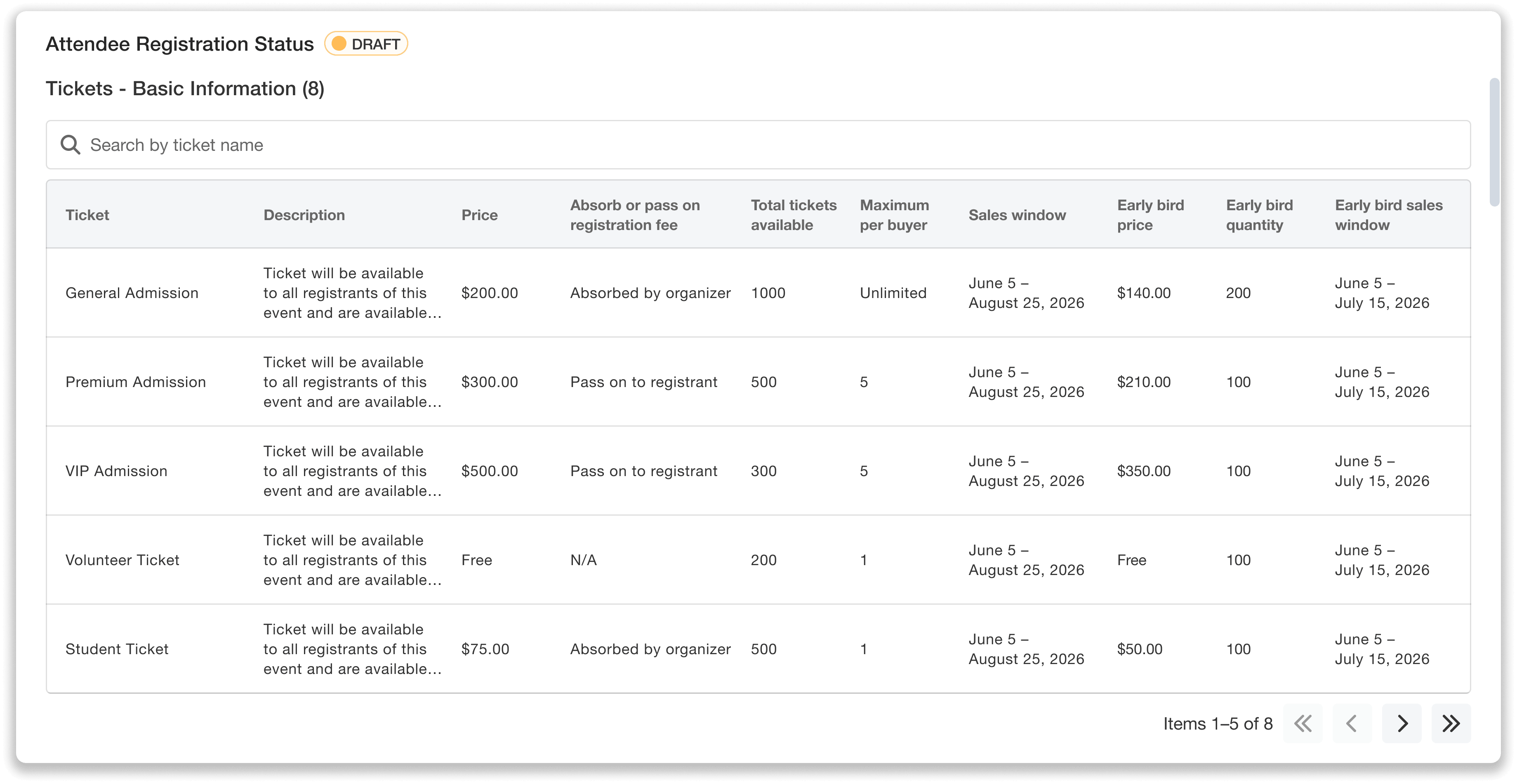
Review registration information in bulk: ticket details, pricing, and more.
Share a Polished PDF With Team Members for Review
Getting your registration setup reviewed and approved by your team just got much easier. Instead of asking team members to click through each page in the organizer dashboard, you can now simply share a review-ready PDF that summarizes your registration configuration in one place.
For example, you could share the PDF with your supervisor so they can verify that ticket pricing, promotions, registration pages, and registration timelines are all configured correctly before registration opens.
Or, you could send it to your finance team so they can review ticket pricing, offline payment options, and other payment settings without navigating through the organizer dashboard.
At the bottom of the registration review page, you’ll see a Send PDF button. You can then enter up to 20 email recipients to send the registration overview to.
Before sending, you can customize details like the sender name, reply-to email address, and subject line. You can also add an optional custom message, preview the email, and even send yourself a test email before sending.
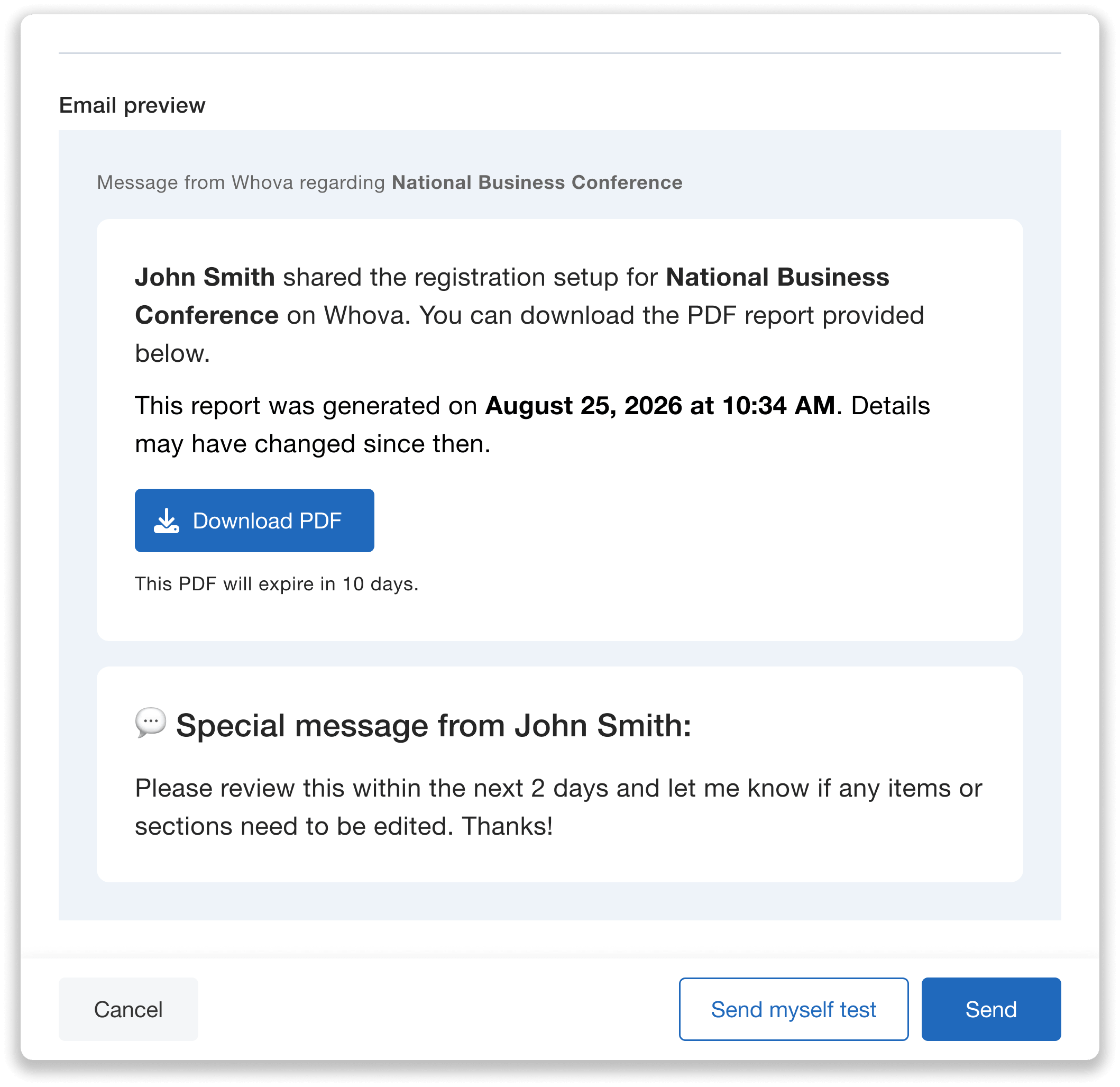
Preview email details before sharing your registration setup PDF.
Recipients simply click the Download PDF button in the email to access the registration overview.
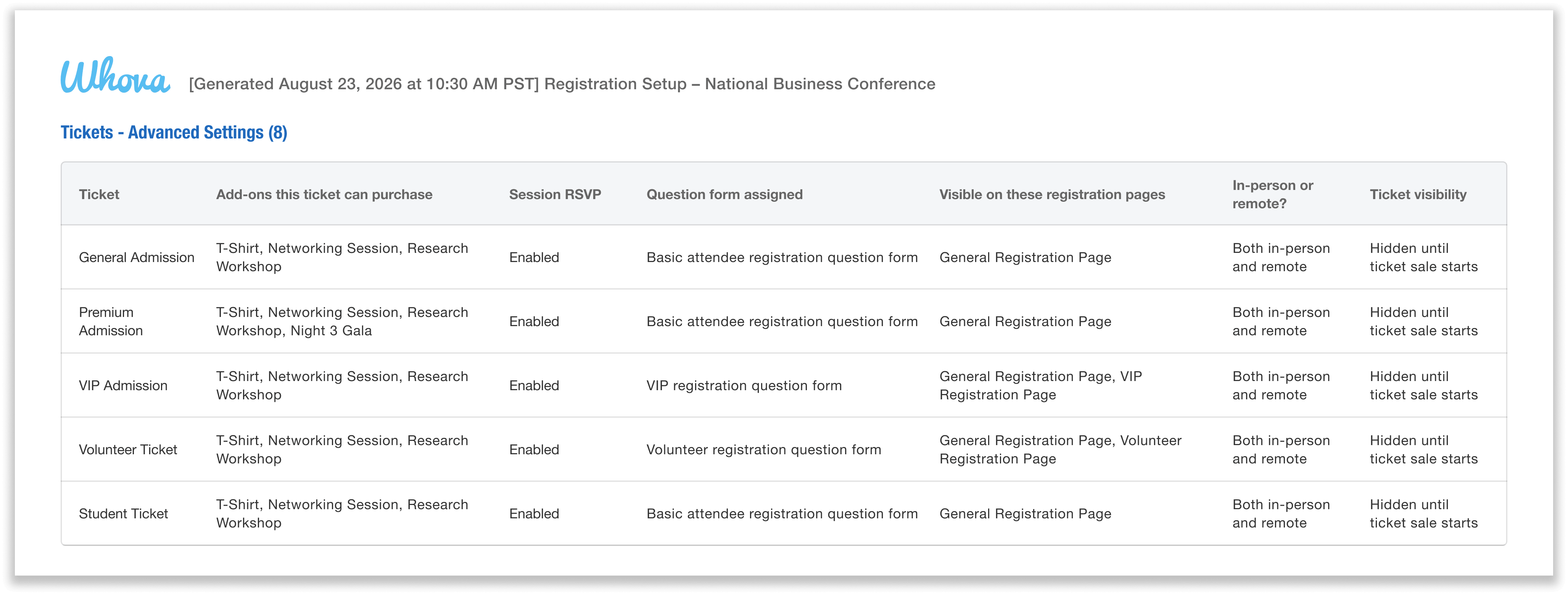
Recipients access a polished PDF overview of your registration setup, including advanced ticket settings and more.
Launch Registration With Confidence
The new Registration Setup Review option helps simplify one of the most important yet tedious parts of launching registration: confirming each detail before tickets go live.
Instead of jumping between multiple pages, you can now review your entire registration setup in one searchable summary—and quickly catch errors before registration opens. It’s also easy to share a polished PDF with teammates for feedback and approval.
Want to see how Whova can help you open registration with confidence? Request a demo today.