Last updated: August 20, 2026

AI’s moment has arrived. While 50% of major corporations (from explodingtopics.com) are just beginning to explore artificial intelligence, event professionals are leading the charge, with 67% (from gevme.com) already using AI for event planning.
As events grow more complex and organizers face mounting demands, AI offers a cost-effective way to streamline work and increase efficiency. Whether you’re using AI event tools like ChatGPT or others, the principles are pretty much the same.
Let’s discuss how the pros are actually using these tools, what’s delivering real results, and where you need to proceed with caution.
Why Should You Use AI for Event Planning in 2026
Broadly speaking, AI saves time and money. It handles the grunt work – assistant, writer, planner, brainstorming partner – without complaining or needing leave, working 24/7. Tasks that take you days, like creating multiple social posts, detailed schedules, or personalized emails, can be done in a fraction of the time.
With so many free AI tools for event planning, you can work smarter, not harder, planning more events, reducing stress, and focusing on the high-value work that only humans can do, like building relationships and making creative decisions.
What Should You Use AI For While Planning An Event?
Here’s how using AI for event planning makes work faster, smarter, and more efficient:
Get Professional Document Frameworks
Feed ChatGPT your event specifications and get a structured starting point for sponsorship proposals, event briefs, and marketing materials. While the initial draft will need your professional touch, laying out the core elements saves valuable planning time.
Solve Venue Problems Fast
Input your challenging venue requirements, and ChatGPT will provide multiple practical layouts and configurations. Whether you’re working with an awkward space, tight capacity limits, or complex setup restrictions, it offers fresh perspectives on space utilization.
Fix Guest Communication Headaches
When 50 guests email asking about parking or dietary requirements, paste their questions into ChatGPT and your bullet-point answers. ChatGPT can do the finessing. Edit quickly and send a mass email – no need to type the same info repeatedly.
Turn Vague Client Requests into Plans
When a client says, “We want something innovative,” – ask ChatGPT to translate that into concrete event concepts. “Generate three event concepts for a tech company that wants innovative but not gimmicky, budget $100k, 150 guests.”
Make Budgets Work
Input your budget constraints and let AI suggest where to save. “How can I create a luxury feel at a corporate dinner for 100 people with only $15k?” It’ll break down realistic options across catering, decor, and entertainment.
6 Practical Ways to Use AI for Event Planning
Applying AI for event planning can deliver immediate optimizations across the entire event lifecycle. Below are six operational workflows where AI tools and native software platforms such as Whova can drive immediate results.
1. Use AI to Write Event Website Content
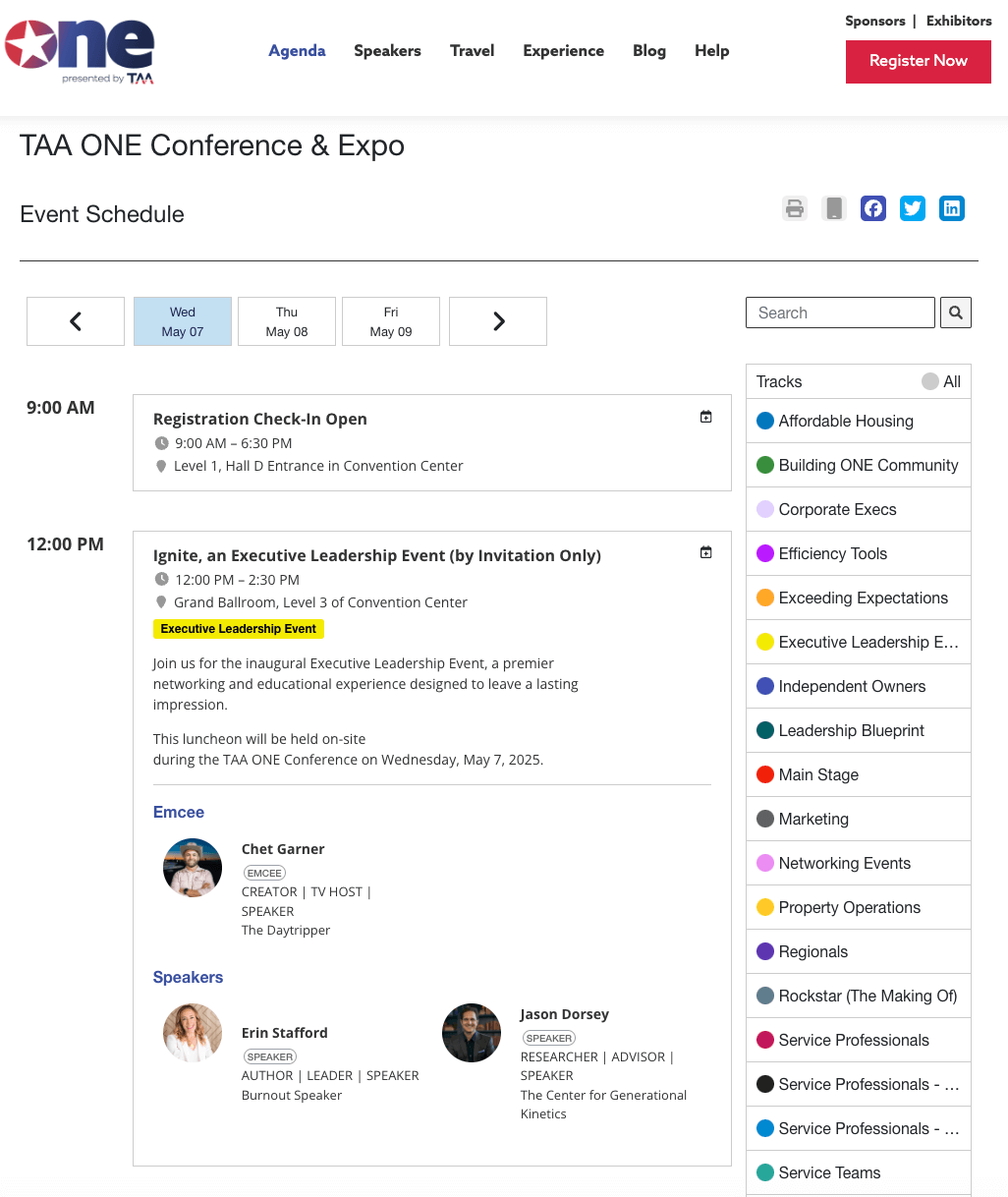
Whova’s event agenda webpage
The Challenge
Writing website copy for your event can take a lot longer than expected. You may need descriptions for sessions, speakers, registration pages, agendas, and landing pages. Then comes the editing.
If you’re doing all of that yourself, it can easily turn into hours of work.
How AI Can Help
AI can take a rough outline and turn it into a first draft of your event copy.
Give it a few details such as who the event is for, what the session is about, and what kind of tone you want, and it can help write session descriptions, registration messages, and agenda summaries.
You don’t have to use the wording exactly as it comes out. In fact, you probably shouldn’t. Use it as a starting point, then adjust it so it sounds like you and fits your event.
Later on, AI can help refine clunky sections, tighten wordy paragraphs, and maintain a consistent voice across your site.
Bored of the same old “Register Now” button? Ask AI for fresh call-to-action phrases that still drive sign-ups.
Whova Feature
Whova has an AI Companion that can help enhance your event descriptions which you can add to your event website. Organizers can use it to get inspired with new descriptions, clean up drafts, and highlight specific speakers.
Sample Prompt
“Act as an expert event marketing manager. Write a compelling 150-word session overview for an upcoming panel titled ‘[Session Title]’. The target audience includes [Audience Persona]. Highlight three key takeaways and end with an actionable call-to-action encouraging attendees to add it to their agenda.”
2. Use AI to Come Up With Live Poll Questions
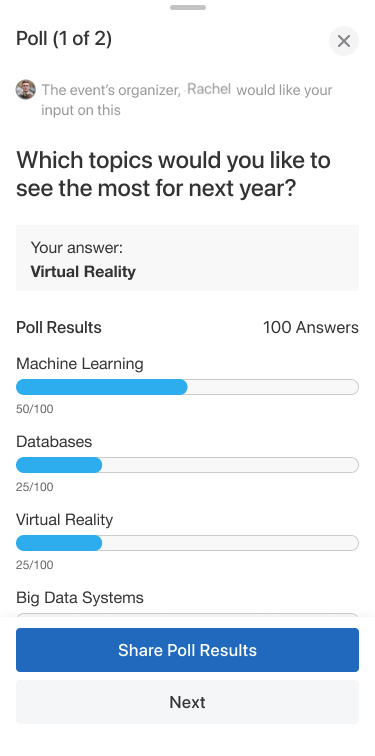
Whova’s live poll questions on the event app
The Challenge
Live polls are an easy way to get people involved during a presentation. The tricky part is coming up with good questions that actually fit the session and audience.
And when you’re planning several sessions at once, creating those questions can end up on the bottom of your to-do list.
How AI Can Help
AI can give you ideas for poll questions based on your session topic, speaker, and audience.
Simply input your topic or theme and get questions tailored to your specific sessions. One important specification is giving the AI your audience’s seniority level and industry to get questions that hit the right note.
You can then pick the questions that make sense for your session and change them to match the way your speaker talks.
Whova Feature
With the Whova, organizers can run the newly created polls in real time and share the results with attendees. Results can also be displayed on screens during the session, giving speakers an easy way to see what the audience is thinking.
Sample Prompt
“Generate 5 interactive live poll questions with multiple-choice options for a 45-minute keynote on ‘[Topic]‘. The audience consists of senior executives in [Industry]. Include 2 icebreaker questions and 3 strategic challenge questions.”
3. Use AI to Build Event Planning Checklists
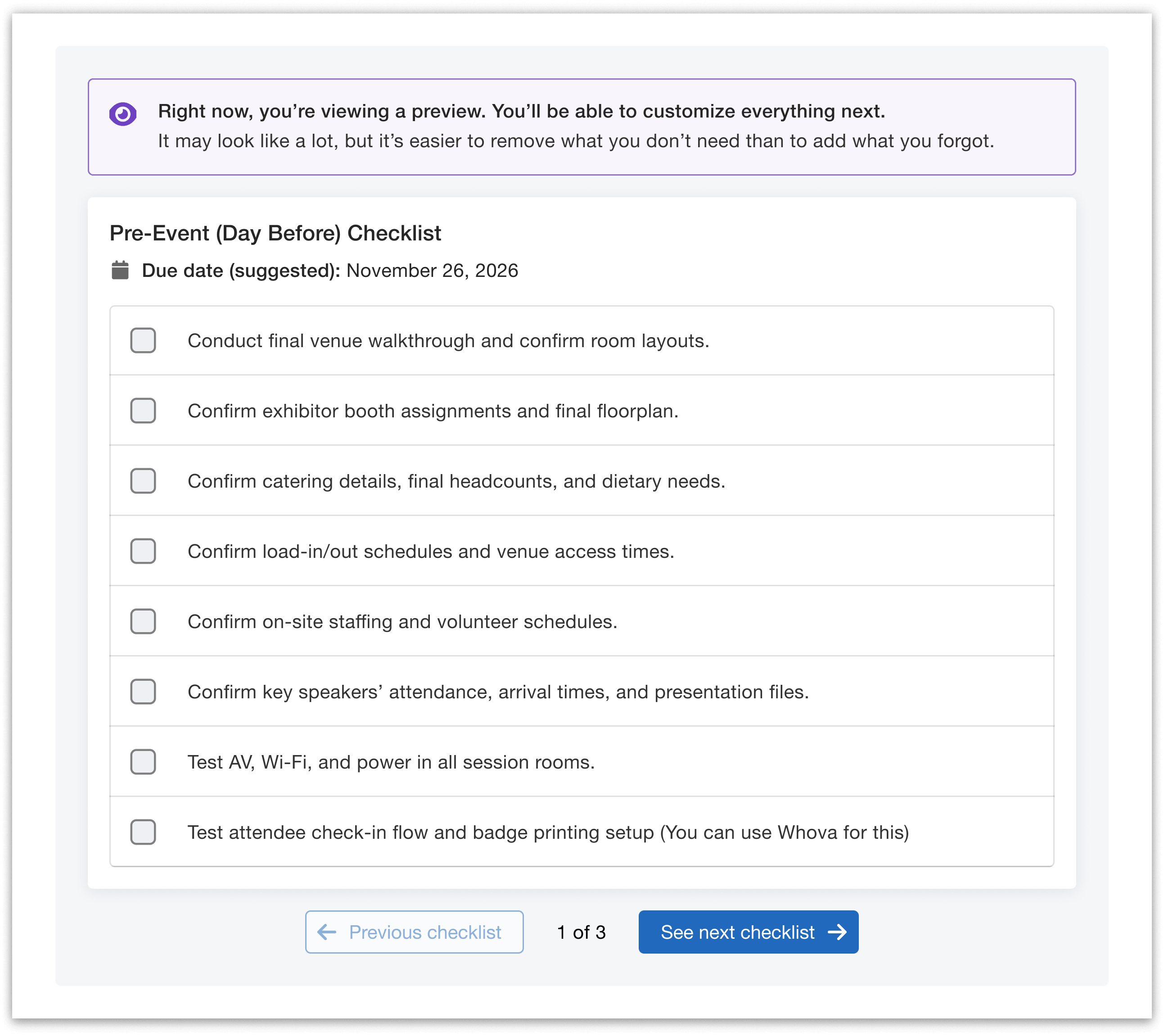
Whova’s project management
The Challenge
It’s easy to forget the little things when you’re planning an event.
Did someone test the microphones? Is there enough time between setup and registration? Has catering been finalized? Are vendors clear on when they need to arrive?
One missed detail can turn into a much bigger problem on event day.
How AI Can Help
Instead of building a checklist from scratch, you can ask AI to create one based on your event.
Tell it what kind of event you’re planning, how many people are attending, and how long the event will run. It can then help you build a list of tasks and organize them by time.
The more specific your prompt, the more detailed your event planning checklist will be, covering everything from early planning through to post-event tasks.
It’s still a good idea to go through the list yourself. AI won’t know every little detail about your venue or event unless you tell it.
Download Whova’s free event planning checklist template to get you started
Already have a checklist? Use AI to spot anything you might have missed, from backup power to dietary tracking. Get help to organize your timeline in a way that makes sense. It’s like having an experienced AI event planner double-check your work.
Whova Feature
Organizers can add their AI-generated checklists into Whova’s Event Management Software to keep their checklist visible to all team members and stay on top of important deadlines. A project management dashboard will keep everyone on track to deliver a successful event.
Sample Prompt
“Create an hour-by-hour operational planning checklist for a 1-day corporate conference with 200 attendees. Include tasks from 7:00 AM venue setup through 6:00 PM breakdown, highlighting critical buffer times for registration and AV.”
4. Use AI to Clean Up Speaker Bios
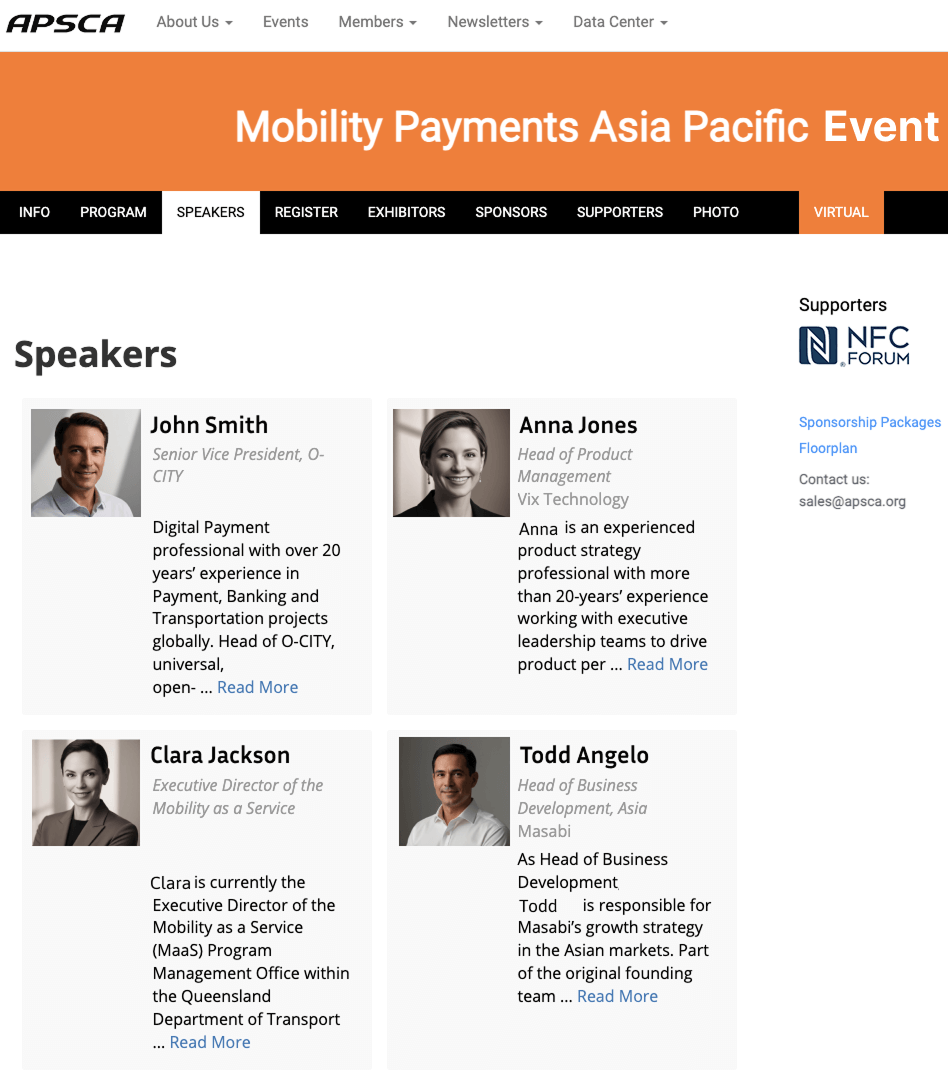
Whova’s speaker webpage
The Challenge
Speaker bios rarely come in the same format.
One speaker might send a three-paragraph biography. Another might send two sentences. Someone else might send a full page copied from their company website.
Trying to make all of those bios look consistent can take more time than you’d expect.
How AI Can Help
AI can turn those rough bios into shorter, more consistent profiles. Give your speaker’s information (experience, achievements, current role), and it will create bios highlighting what matters to your audience.
If you are also looking for better networking, you can also ask it to focus on a particular accomplishment or add a question attendees could use to start a conversation with the speaker.
Just make sure you check the final version against the original bio. You don’t want AI accidentally changing someone’s job title, accomplishments, or other important details.
Whova Feature
Whova’s Abstract Management and Speaker Management make it easier to collect, edit, and publish speaker bios across your event website and mobile app. You can easily export the information and feed it to your AI tool. Once revised bios and informations are finished, you can update it on the platform once you it immediately gets reflected in your event website and event app.
Sample Prompt
“Rewrite this raw speaker bio into a 100-word profile written in the third person. Focus on [Key Industry Achievement] and end with a networking question that attendees can ask them during roundtable discussions.”
5. Use AI to Create Post-Event Summaries
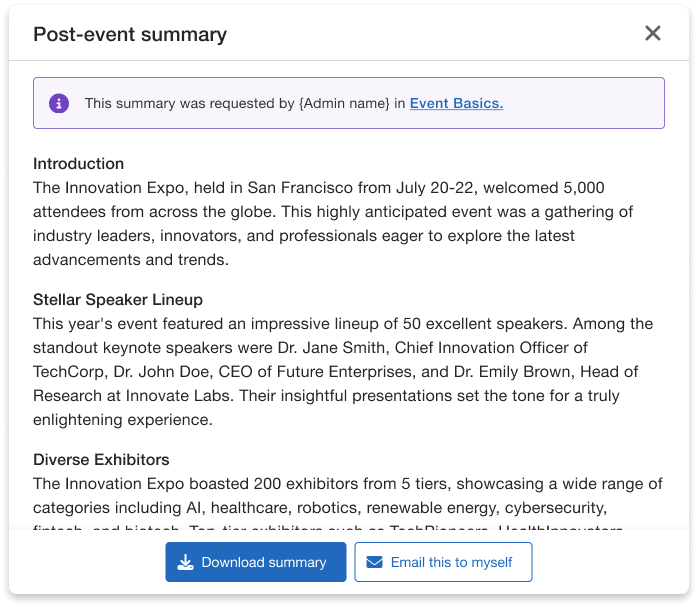
Whova’s AI event summary is a great tool to save time and get your summary right after your event.
The Challenge
The work doesn’t stop when the event ends.
You may have attendee surveys, session numbers, feedback, and comments to sort through. Turning all of that information into a report for your team, leadership, or sponsors can take a lot of time.
How AI Can Help
AI can help make sense of all that information and turn it into a shorter summary. For sponsors, ask it to focus on ROI and engagement numbers. For attendees, request summaries of key learnings and next steps. For speakers, have it highlight their session impact.
Share your numbers, highlights, and feedback, and AI can organize in any format from bullet points to a detailed report outline. It can help pull out things like which sessions were most popular, what attendees liked, where people were less satisfied, and what you might want to change next year.
Whova Feature
Whova’s AI-Generated Event Summary feature automatically pulls together your key metrics and produces a report with basic event details, attendance numbers, session counts, speaker highlights, registration revenue, and exhibitor and sponsor participation to share to your stakeholders.
Sample Prompt
“Summarize the following raw survey feedback into a 3-paragraph executive brief for event sponsors. Categorize takeaways into Key Highlights, Attendee Satisfaction Ratings, and Recommended Enhancements for Next Year.”
6. Use AI to Create Trivia and Other Fun Activities
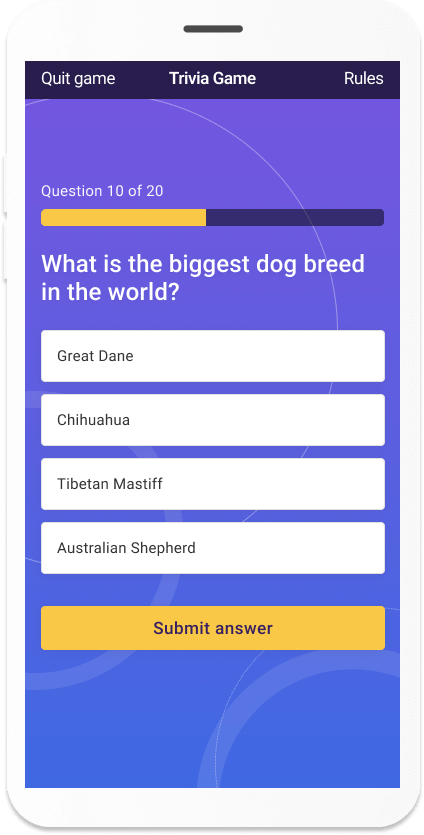
Whova’s AI trivia question generator is an easy to use tool to create questions on the fly for your attendees.
The Challenge
Keeping people engaged during breaks and networking sessions can be harder than it looks.
You might want to add a trivia game or another quick activity, but creating all the questions and answers takes time, especially when you already have a hundred other things to do.
How AI Can Help
AI can quickly come up with trivia questions based on your industry, event theme, or even a sponsor’s products.
If you don’t have too much time to organize engagement activities for attendees, just put a theme and the number of questions in the prompt and the AI search engine will take charge on coming up with interesting questions.
You can also feed in more context about your event and your exhibitors in order for the AI search engine to come up with event related questions. These questions will serve as a great engagement tool for attendees to go around the venue and look for the right answers to the trivia.
You can then pick your favorites, change the wording, and make sure the answers are correct before using them.
Whova Feature
Whova’s Gamification AI features lets organizers create trivia questions that will be shown to attendees through the mobile app. It can be a simple way to give attendees something fun to do between sessions.
Sample Prompt
“Generate 10 multiple-choice trivia questions focused on recent developments in [Industry Field]. Provide 4 answer options for each, mark the correct answer, and include a 1-sentence fun fact explanation for each answer.”
How to Write Successful Prompts for AI Event Planning
ChatGPT delivers best when fed specifics. Vague prompts get vague results. So, like any tool, output quality directly matches your input.
Here are five simple tips to help you get better results from ChatGPT:
- Give it the basics. Tell AI what kind of event you’re planning, how many people are attending, how long it will be, where it’s taking place, and who the audience is. “Create a checklist for our sustainability conference – 50 people, Saturday morning in July, 6 hours” clearly states what you need.
- Tell it who you’re talking to. A message for a group of CEOs will probably sound different from one written for college students or first-time conference attendees. Give AI some context about your audience.
- Be specific about length and format. If you need three bullet points, say so. If you need something that’s 100 words, include that in the prompt. The more specific you are, the less editing you’ll usually have to do later.
- Give it some background. You can tell AI to approach the task as an experienced event planner, marketer, copywriter, or another type of professional. This can help give the response the right perspective.
- Tell it how you want it to sound: Words like “friendly,” “professional,” “casual,” “energetic,” or “conversational” can help guide the tone. “Write as if you’re a director of one of the best AI conferences explaining key trends” or “Respond as an experienced tech event organizer sharing engagement strategies” to get more targeted, industry-specific insights.
Limitations, Hallucinations, and Safeguards for AI in Events
AI can crunch numbers and generate schedules in seconds, but it can’t replicate human intuition (yet!). It’s important to review anything it creates before you use it.
- Check the facts. AI can sometimes make up information or confidently give you an incorrect answer. For example, it might recommend a vendor that doesn’t exist or provide outdated information about an entertainment act. Double-check vendor details, venue information, and software features before relying on them.
- Make sure it sounds like you. AI writing can sometimes feel a little too polished or generic. If something doesn’t sound like something you would actually say, change it. Reading the copy out loud is a surprisingly easy way to spot awkward wording.
- Don’t take the human part out of event planning. AI can handle some of the busywork, but it can’t replace your relationships with speakers, sponsors, vendors, and attendees. It also can’t make the final call when something unexpected happens. Your experience and judgment still matter. Use AI to handle the heavy lifting of schedules and budgets, but let your human expertise shine through!
The Shift Isn’t Coming; It’s Here.
According to Amex GBT Meetings & Events 2025 Global Forecast, 50% of meeting planners worldwide were predicted to use AI in 2025. While you can use ChatGPT for specific tasks like writing copy or creating checklists, consider how much time you could save with an all-in-one solution.
Whova’s event management software has already integrated AI capabilities into our core features. Instead of juggling different tools, you get AI-powered content creation, attendee engagement, analytics, and essential planning features all in one.
Don’t wait until AI becomes industry standard. Start exploring these tools now, understand their capabilities, and give yourself a competitive edge.
Learn more how AI can help your event planning.
Ready to see how AI can transform your event planning? Schedule a Whova demo today.