
October 16, 2026
You put months of work into making your event successful. Why let all that hard-earned work end when the event does?
Along the way, you’ve figured out what works. You refined your registration forms, built your agenda, perfected your badge designs, set up surveys, created multiple attendee announcements and reminders, and made countless small decisions that helped your event run smoothly.
Passing that work along doesn’t just help the next organizer—it makes your own transition easier, too. A good handoff means fewer emails and questions months later asking how you did things, where to find something, or what worked last time. Spend a few minutes now, and you can truly wrap up your event knowing the next team has what they need.
Whova has been steadily making it easier to build on what already works instead of starting from scratch. With our extensive reuse capabilities, organizers can carry forward agendas, registration forms, badge designs, surveys, email templates, gamification setups, and much more. They can also reuse more specialized setups, from logistics and speaker forms to sponsor and exhibitor registration and event webpage customizations.
And all that work doesn’t have to benefit only you. With the recent popular individual template sharing and organization-wide template sharing, the forms, settings, communications, and processes your team has refined can become a proven starting point for other organizers as well.
Now, we’re making it even easier to pass that hard-earned work forward at exactly the right moment—when you wrap up your event.
With New Organizer Template Handoff, when completing your Post-Event Report survey, you can share your event templates and settings directly with the organizer taking over next—and leave them a personalized handoff message.
Think of it as one final step in wrapping up a successful event: you’re not just closing out this year’s event; you’re giving next year’s team a better starting point.
This makes it simple to:
- Make months of your hard work live on: In just a few moments, pass along the templates and settings you spent months refining, so the next organizer can build on what already works instead of starting from scratch.
- Save yourself from answering the same questions later: Give new organizers the setups and context they need upfront, so you don’t have to repeatedly explain how things were configured, where to find them, or how you handled them last time.
- Preserve your team’s event knowledge: Keep proven forms, settings, designs, and best practices from getting lost when organizers change. Each event can build on the experience of the one before it.
- Share the know-how behind your setup: Add a personalized handoff message with helpful context—what worked especially well, what you recommend reusing, and what the next organizer may want to adjust.
- Set the next organizer up for success: Give new team members a strong starting point, helping them get up to speed faster while maintaining the consistency and best practices your team has worked hard to establish.
Your event may be wrapping up, but the work you put into it can keep creating value long after it ends. Take a few minutes to pass the torch, preserve what worked, and give the next organizer a head start. A few minutes now can preserve months of your work, save the next organizer hours, and save you from having to explain everything again later.
Ready to make your hard work count for the next event? Read on to see how it works.
Use Your Event Wrap-Up as a Template Sharing Opportunity
Make sure nothing gets lost in the transition to a different team by sharing your templates and settings while wrapping up your final post-event tasks.
After your event ends, navigate to the Tools page under Report. Before accessing your Post-Event Report, you’ll be prompted to complete a brief survey. This questionnaire includes an opportunity to share your event templates and settings to set up future organizers for success.
For Question 3, “Will you be the organizer for this event next time?,” select “No, it will be organized by someone else” to see your sharing options:
- Yes, share directly with the next organizer (I know who will run the next event)
- Yes, share with my organization (I do not know the specific person yet)
- No, don’t share at this time
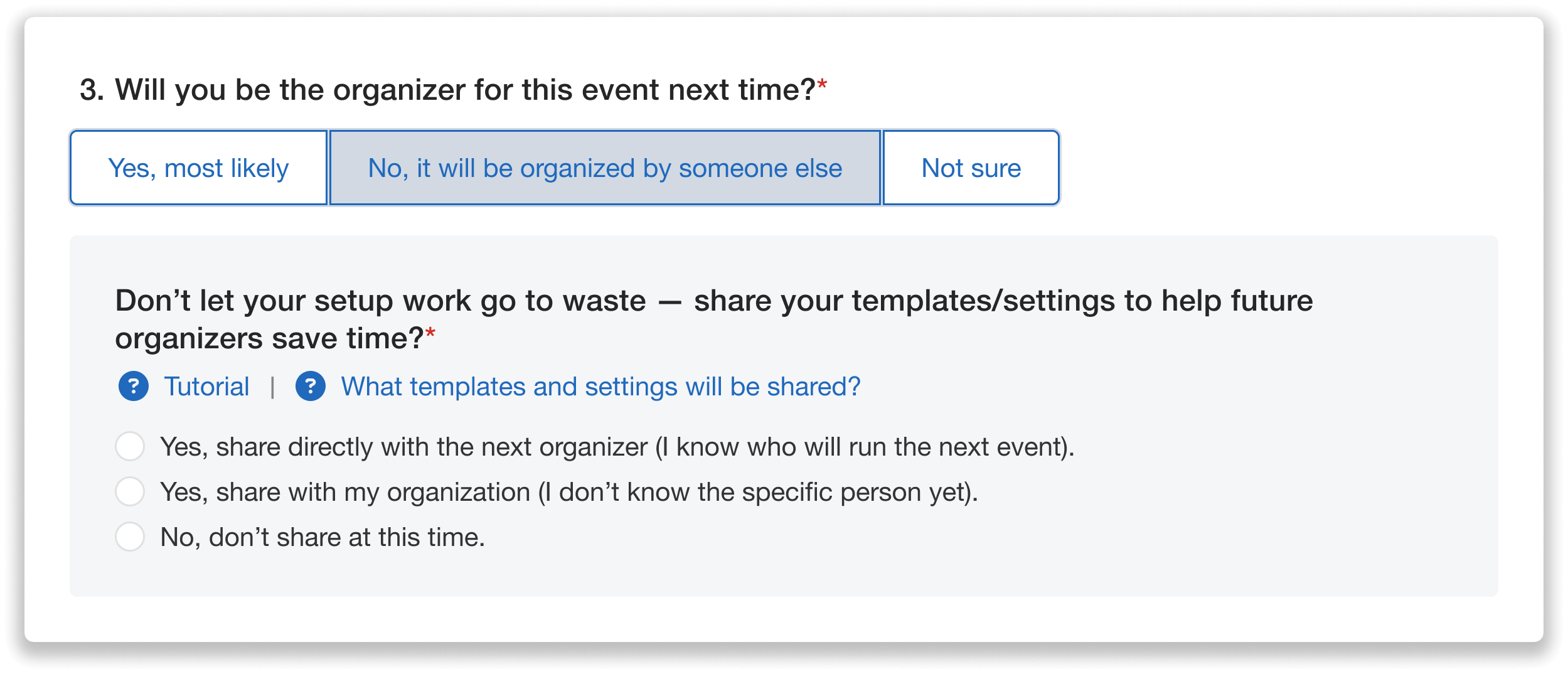
Share your event templates and settings with the next organizer through the Post-Event Survey.
If you already know who will be taking over, select “Yes, share directly with the next organizer.”
Next, enter the new organizer’s full name and email address. You can also include two optional fields: a personalized note to include in the notification email sent to the new organizer, and an internal admin note to track your reason for sharing.
You can use the custom handoff note to pass on helpful tips or best practices, helping the new organizer identify your most useful templates, decide what needs adjusting or keeping, and understand the strategy behind your setup.
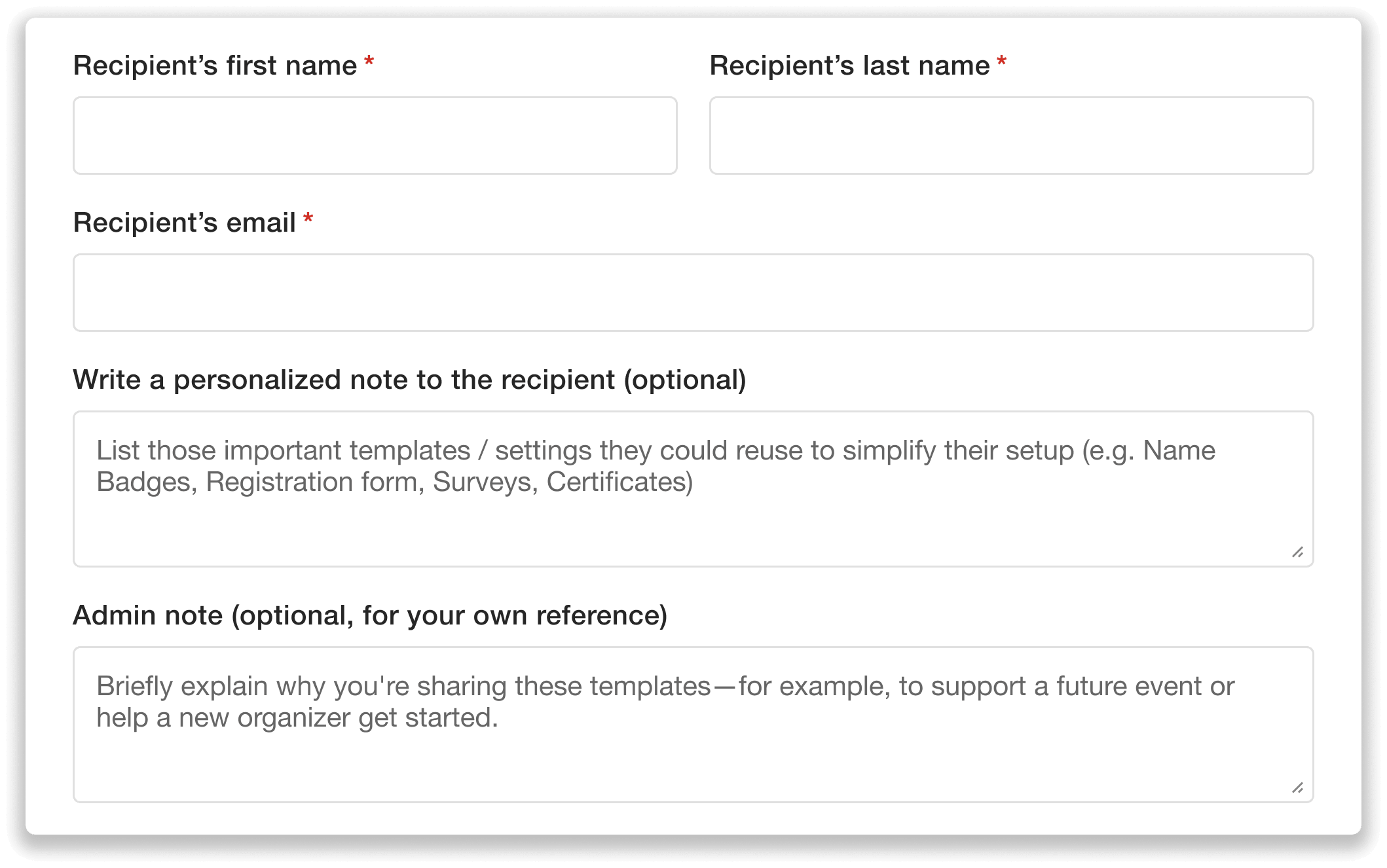
Enter the incoming organizer’s contact information and add optional notes.
Complete the rest of the survey and click Submit. You’ll then be prompted to acknowledge and consent to sharing your templates and settings with the new organizer to complete the transfer process.
Share Templates with a New Organizer Before The Event Ends
You don’t have to wait until your event ends to pass along your setups. If you already know who will be taking over your event or want to share your templates and settings with an entire organization, you can do so at any point through your admin settings.
Start by navigating to the Attendees tab and opening Admin Settings. Scroll down to Share Templates and Settings, where you can share resources with an individual or your organization. Under the individual-sharing option, click Share with an Individual.
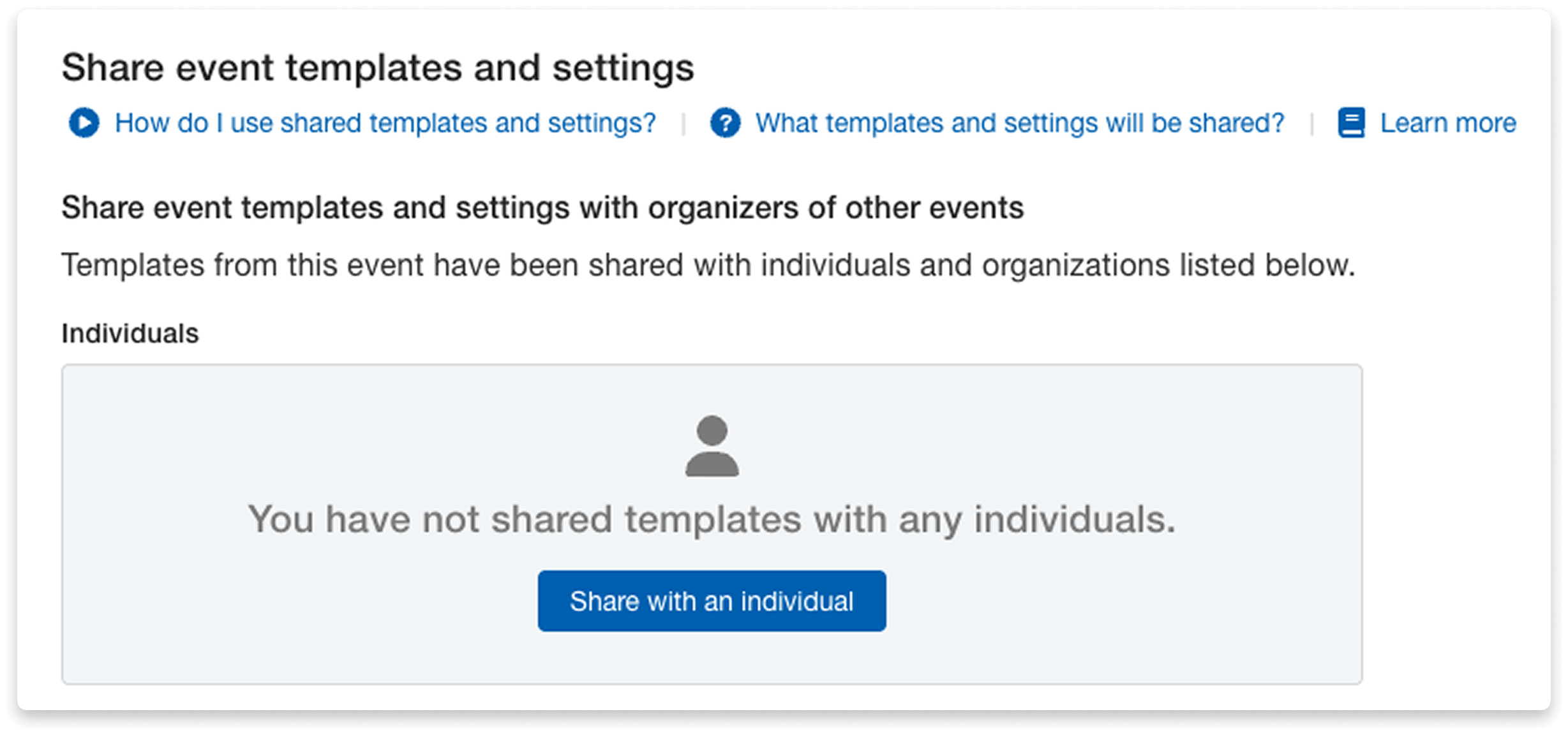
Simply choose to “Share with an Individual” to start the handoff process.
In the popup, select who you’re sharing the templates and settings with:
- The person organizing this event next time
- Colleague in my organization
- Other (specify)
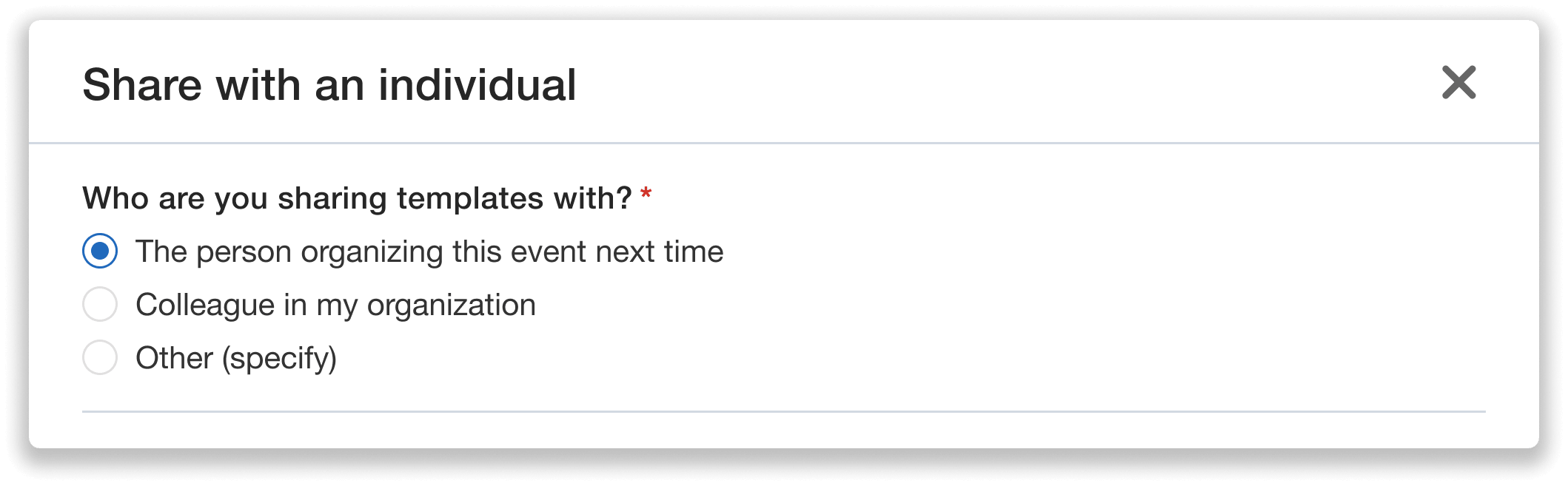
Specify who you want to share your templates and settings with.
To hand your resources over to the next organizer, select “The person organizing this event next time.”
Enter the new organizer’s full name and email address. Just as when sharing from the event survey, you can also add a personalized handoff note to provide guidance to the next organizer along with an optional internal admin note to record why you’re sharing the templates.
Once you’ve filled out the required fields, click Share templates. Review Whova’s Template Sharing Terms and Conditions, then click Confirm.
After sharing, the new organizer will receive an automated Handover Kit email with a link to the shared resources and any personalized guidance you’ve included.
Sensitive details from your event like participant information and email lists are not shared through this process. Sharing templates and settings lets the new organizer build on your existing work without granting them admin access to your current event.
Help New Organizers Get Started—Without Coming Back to You For Every Question
Once you’ve handed templates and settings over, the new organizer can find and reuse your existing setups on their own, so they don’t need to come back to you for every question. Instead of asking how registration was configured, which badge design to use, or how particular features were set up, they can start directly from the templates and settings you’ve already shared.
The Handover Kit email that incoming organizers receive explains what was shared, provides a direct link to access the resources, and includes any personalized guidance, tips, or insights you added.
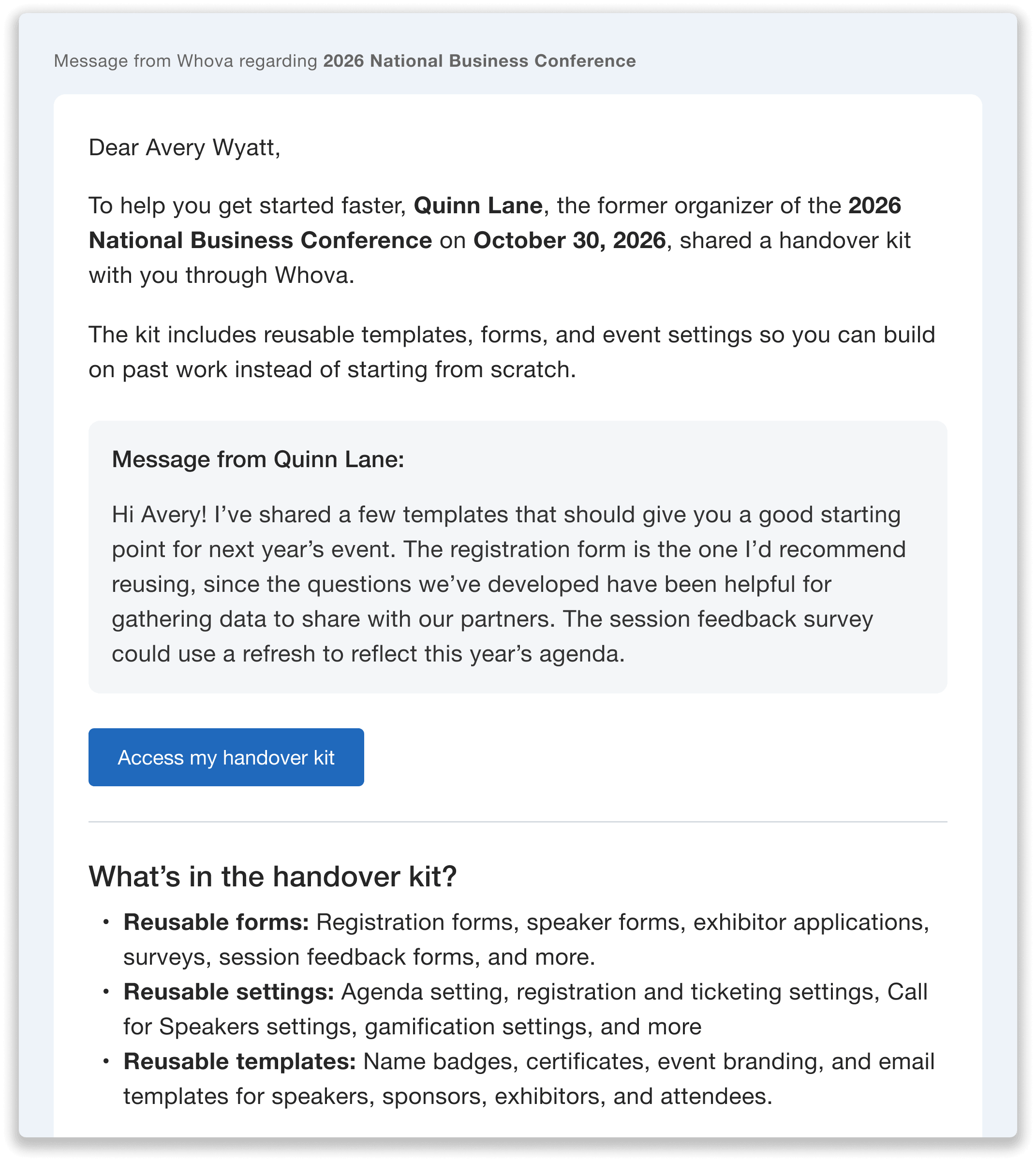
The Handover Kit email gives the new organizer direct access to shared templates and settings, along with your personalized message.
To access the resources, the recipient can simply click Access my handover kit and sign in to their Whova account. If they don’t have an account yet, they can create one first.
Even if the new organizer can’t find this email later, they can still access the shared templates when setting up their event. While in Whova, they simply need to navigate to a feature they want to set up, click Reuse, select Shared with me, and choose the appropriate template.
From name badges and registration forms to announcements and more, the new organizer can customize your existing setups for their event rather than starting from scratch—or coming back to you again and again for help.
You hand it off once, and they can refer back to it whenever they need it. That means less time recreating existing work for the new organizer and fewer setup questions for you to answer down the road.
Make Your Hard Work Count for the Next Event
Your event may be over, but the work you put into it doesn’t have to disappear. By sharing your templates and settings, you can preserve the knowledge your team has built, give the next organizer a stronger starting point, and make the transition easier for everyone involved.
Whether you share resources while completing your Post-Event Survey or through your admin settings, Whova’s New Organizer Template Handoff makes it easier to pass along what worked and help the next team build on it.
Ready to preserve and pass on your hard work? Discover how Whova empowers you to reuse resources, simplify transitions, and set up future organizers for success.