
By: Whova Team | Last Updated: March 04, 2026
Need to plan a conference?
If you haven’t done it before, the sheer number of things that need to happen in the right order can be overwhelming. Conference planning details will look different depending on your event’s size and format, but the process follows the same structure. This guide breaks it down stage by stage, with real examples from successful conferences and useful planning tips.
Key Takeaways
- Pre-planning comes first. Define your objectives, set a budget, choose a venue and date, and assemble your team. Every decision downstream depends on getting these right.
- During the planning phase, you’ll be booking speakers, building your agenda, setting up registration, and getting your marketing out. An event management platform helps here, especially once you’re juggling multiple tracks and hundreds of attendees.
- Post-conference, measure outcomes against the goals you set at the start and debrief while the details are fresh.
The Pre-Planning Phase
Define Your Conference Objectives and Theme
Inexperienced planners jump straight into managing event logistics — dates, catering, A/V — and figure the “why” will sort itself out. Who should you invite to speak? How should you price registration? What does your marketing emphasize? These all depend on what you’re trying to achieve.
Research from Fielddrive found that 49% of marketers rank audience engagement as the top measure of event success, but you can only measure engagement if you first define what kind of audience you are after. “Bring our industry together,” for example, isn’t specific enough to act on. Compare that to “generate 200 qualified leads from mid-level procurement managers,” which gives your team a target to plan around.
Your theme should follow from the objective. A conference aimed at educating newcomers about an industry will look and feel different from one designed to build partnerships between senior executives, and that difference should show up in everything from session formats to how you write your marketing emails.
Lock Down Your Conference Budget
Map out both sides of the ledger: income (registration fees, sponsorship deals, grants, organizational funding) and expenses (venue fees, catering, A/V, marketing, speaker fees, traveling, printed materials, staffing).
PCMA’s Meetings Market Survey found that event budget constraints are now the number one challenge planners report, with rising A/V, venue, and hotel costs all squeezing margins — which makes it even more important to get sponsorships and partnerships confirmed early.
A sponsor might cover a keynote speaker’s fee, underwrite your networking ideas, or fund the event app, and the sooner those commitments are on paper, the more accurately you can allocate what’s left.
Whatever number you land on, set aside 10 to 15% as contingency. Vendor quotes shift, last-minute A/V requirements pop up, and catering headcounts seldom land exactly where you estimated.
Pick Your Venue and Set a Date
If the conference is fully virtual, you can skip the site visit and focus on your platform instead. But for in-person or hybrid events, venue and date affect everything else on your timeline.
Check for competing industry events, public holidays, and any internal conflicts that could pull your target attendees away. And if you have some flexibility on timing, use it as leverage; many venues will offer better rates for off-peak days or seasons.
When evaluating venues, think about your audience first. Where are most of your attendees coming from? According to G2, 64.6% of attendees say the venue can make or break their event experience, and a lot of that comes down to practical things: proximity to public transport or an airport, nearby hotels, room capacity, A/V setup, and whether the layout works for your session formats.
Assemble Your Team and Timeline
Most conference planning takes 12-14 months, and that workload needs to be split across people with clear ownership of their objectives, whether that’s logistics, marketing, speaker management, sponsorships, registration, or A/V.
As a rough guide, the big-picture decisions like venue, budget, and theme should be locked in by 12 months out. Speakers, sponsors, and your marketing plan by six months. Registration, logistics, and A/V by three months. The final weeks are for rehearsals, troubleshooting, and confirming every detail with your vendors.
Build in regular check-ins across your team leads. A quick weekly or bi-weekly sync keeps everyone accountable and surfaces problems while there’s still time to fix them, rather than the week before doors open.
The Planning Phase
Secure Your Speakers and Plan the Agenda
Your speaker lineup is one of the biggest reasons people will or won’t register. Over 52% of event planners cite increasing attendance as their biggest challenge, and the quality of your speakers has a direct effect on that number.
Focus on finding speakers who are relevant to your target audience, not just well-known. A celebrity keynote might generate buzz, but a respected practitioner who can speak to the specific problems your attendees face will drive more registrations from the right people. Reach out early, too, since the best speakers tend to have packed calendars.
Once your speakers are confirmed, you can build the agenda: if the goal is education, lean on workshops and deep-dive talks. If networking is the priority, build in panels, roundtables, and open discussion time. Think about pacing as well. Mix up session formats and lengths to keep energy levels up throughout the day.
Having even a draft agenda locked in early also gives your marketing team something concrete to promote. Registration pages with named speakers and session titles convert better than ones that just promise “an exciting lineup of industry leaders.”
Choose the Right Event Management Platform
A clunky event registration process, a confusing agenda layout, or a lack of networking features can leave a bad impression before the first session even starts. That’s why 85% of event planners now use an event management software, and the trend is moving toward platforms that handle the full workflow in one place: registration, ticketing, marketing, agenda building, attendee engagement, and post-event analytics.
The benefit for your team is obvious (less tab switching, fewer integrations to manage), but the benefit for attendees is just as big. A single platform means a consistent experience from the moment someone registers through to the event app they use on the day.
If you’re managing multiple tracks, hundreds of attendees, sponsors, and speakers, trying to hold it together with disconnected tools usually costs more time and money than investing in one platform that covers it all.
Set Up Registration and Ticketing
You’ll want a system that supports multiple ticket types, collects attendee information, handles payments, and sends confirmation emails without you having to do it manually. If your event management platform already includes registration (Whova’s does, for example), you can skip the hunt for a separate tool.
Most conferences need more than one ticket option. In-person and virtual, early bird and standard, student and professional, single-day and full access. Different ticket types also let you tailor your communications later, like sending venue logistics only to in-person attendees or session reminders to specific ticket holders.
The United Nations World Data Forum did this well: they created distinct tickets for on-site and remote attendees through Whova, then used those groupings to send relevant updates to each audience.
Your registration form is also a good place to collect dietary restrictions, accessibility requirements, and session preferences upfront rather than chasing them later. Keep it short though, too many fields and people won’t finish it.
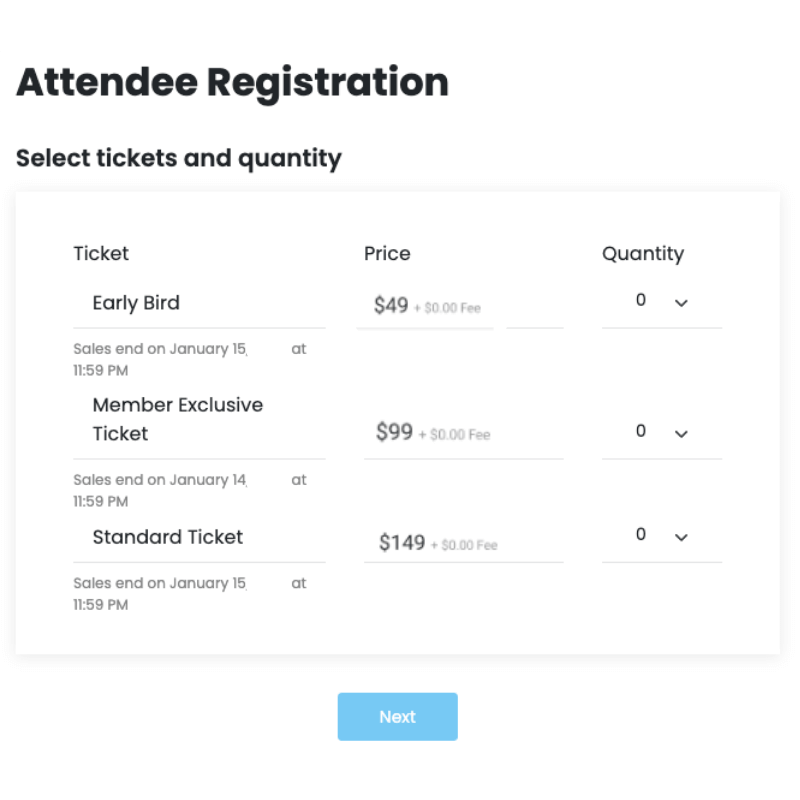
Create multiple ticket types that can help differentiate your audience
Finalize Venue and Logistics
Schedule a walkthrough with your A/V team. Test microphones, projectors, and screens in each session room. If you’re running a hybrid event, test the livestream that will show your speakers. Load-test the Wi-Fi with multiple devices. You want to catch technical problems before it’s too late to fix them.
Check accessibility too. Can someone in a wheelchair get to every room? Is there accessible seating in each space? Are bathrooms nearby and easy to find? If you collected accessibility needs during registration, cross-check them against what’s available.
Then finalize where signage goes, how check-in will work, where vendors load in, and where your team will be during the event.
Implement Marketing and Promotion Strategies
You’ll want to set up a conference website first. This is where attendees will go to check the schedule, look up speakers, and register, so it needs to be easy to find and easy to use. Make registration as frictionless as possible. Every extra form field is someone who gives up and closes the tab.
Email still converts really well as long as you segment your audience. Speakers will need session details and logistics info, while attendees want to know who’s talking and why they should attend. A personalized email will always outperform a blast that reads like it was BCC’d to 500 people.
Social media also helps, mostly in the weeks leading up to the event. Pick a hashtag, post speaker announcements, share behind-the-scenes stuff. It doesn’t have to be polished. The point is to get people talking before they even arrive.
One thing that works well for event promotion is getting your speakers to post about it themselves. The California Entrepreneurship Educators Conference had good results with this on LinkedIn. When a speaker shares what they’re presenting, it reaches their own network in a way that feels real, not like a marketing push from the organizers.
Conference Execution Phase
Getting People Through the Door
Have more check-in stations than you think you need. The first hour is always a crush, and a second line or self-service kiosk can keep things from backing up into the hallway. Keep a laptop or tablet at each station with a live attendee list for quick lookups, and set aside one station just for walk-ins and registration problems to avoid clogging everything else.
For badges, include the attendee’s name, organization, role, and which track they’re on. It gives people something to go on when they’re deciding who to talk to. Color-coding by attendee type helps with this too. Also consider including important information such as exclusive access, dietary restrictions or any specific information gathered during registration.
The National Association of School Resource Officers had a good setup at their National School Safety Conference. They used Whova to print badges on the spot as people checked in. Additionally, the organizers had built their template ahead of time and Whova pulled attendee info from the registration list, so walk-ins and late registrations got the same badge as everyone else without anyone scrambling to handwrite something.
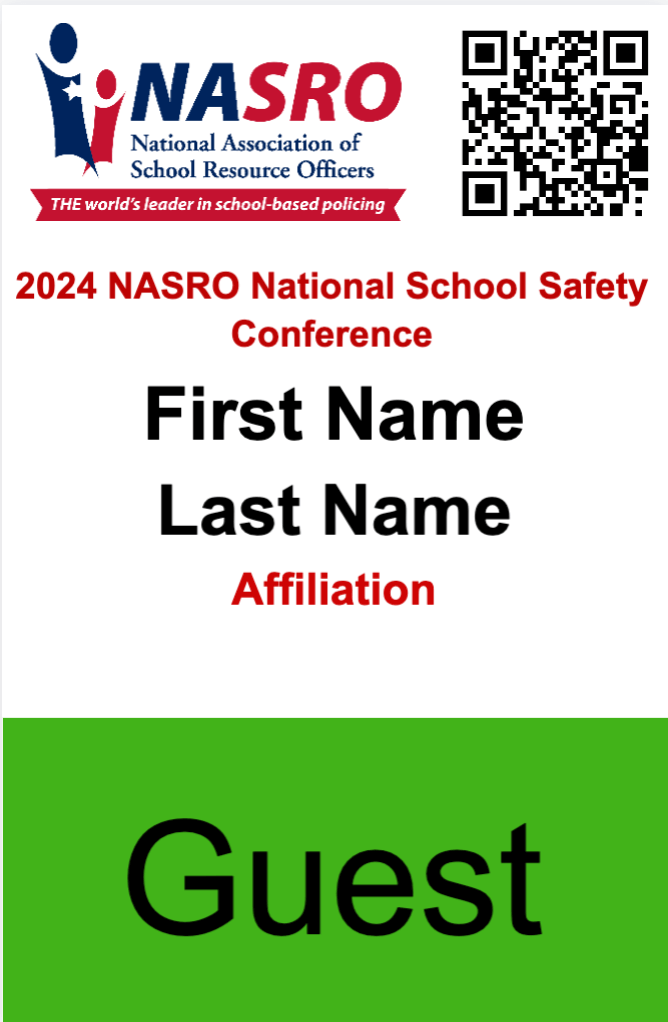
Print badges with the necessary information on the spot
Facilitate Networking and Engagement
Check in on how sessions, meetups, and icebreakers are going. If a roundtable discussion has four people in it and thirty in the one next door, that’s worth noticing and adjusting for. If an icebreaker activity isn’t landing, swap it out or redirect people toward something that’s getting traction.
Think about how you’re helping attendees start conversations, too, especially people who aren’t comfortable walking up to a stranger during a coffee break. The Mastercard Foundation EdTech Conference did this well with their 700+ attendees by running community boards, meetup sign-ups, and an icebreaker contest through Whova.
They also ran polls during sessions to give speakers something concrete to react to, which pulled in over 100 responses. By the end of the event they had 150 discussion topics, 46 meetups, over 360 shared photos, and more than 80 attendee introductions. That’s because their organizers were actively monitoring and prompting engagement throughout.

Enable attendees to discuss on engaging topics or provide default groups to spark connections
Collect Feedback and Manage Issues in Real Time
Short surveys throughout the day give you a direct line to what attendees are experiencing. A room that’s too cold, a session running over, a confusing floor layout between buildings — these are all things people will tell you about if you give them an easy channel, but most won’t bother tracking down an organizer in person.
Have someone on your team watching responses and community channels as they come in, with the authority to make small fixes without a chain of approval. The faster you respond, the more likely attendees are to keep giving you useful input for the rest of the event.
Post Conference Phase
Measure Your Conference ROI
If you used an event management platform, most of what you need is already there. Platforms like Whova track registration, check-ins, session attendance, and survey responses without you having to do anything manually during the event. Pull out your attendance figures, session engagement rates, survey scores, and any sponsor or lead generation data.
Then measure all of it against the goals you set at the start. If you wanted 500 attendees and got 480, that’s different than if you wanted 300 and got 480. Create a post-event report for your stakeholders so they can see what worked and what didn’t against actual targets.
Debrief with your team while everything is still fresh. These conversations lose detail fast, so do them within a week of the event. What went wrong, what went better than expected, and what would you change next time.
Finally, send personalized thank-you messages to everyone who made it happen. Not a mass BCC email, but something that acknowledges what each person or group actually contributed. It takes more time, but these are the relationships that make your next conference easier to put together.
Make Conference Planning Easier with Whova
Conferences involve coordinating a lot of people and processes at once. Marketing, registration, email campaigns, speaker logistics, catering, and venue setup. When all of that lives in separate spreadsheets and email threads, something will eventually go wrong.
An event management platform pulls everything into one place. Registration feeds into your attendee list, which feeds into badge printing, which feeds into check-in. Each step passes information to the next one automatically, so you’re not re-entering the same data three times.
It also means data is being collected as you go. By the time your event wraps, attendance figures, engagement metrics, and survey responses are already organized for your post-event report.
Whova is built to handle all of this, from registration and email campaigns through to check-in, networking, and reporting. If you want to see how it works, get started with Whova.
FAQs About Conference Planning
What is conference planning?
Conference planning is the process of organizing a professional event where people come together to learn, network, and discuss topics in their field. It covers everything from picking a venue and booking speakers to managing registration, coordinating catering, and running the event on the day. Most conferences take several months of planning and involve multiple teams working together.
What are the main steps needed for conference planning?
Conference planning starts with setting your goals and budget, then moves into the big logistical decisions like venue, speakers, and agenda. From there it’s about getting the word out through marketing and managing registration. On the day itself, you’re running check-in, keeping sessions on track, and making sure attendees are actually connecting with each other. After the event, you’ll want to measure how it went against the goals you set at the start.