
January 28, 2026
The more events you organize, the clearer it becomes: most of the hard work isn’t new—it’s repeating what you already figured out last time. You know which setups work, which details matter, and which mistakes to avoid. Yet, organizers still spend countless hours rebuilding forms, settings, and workflows from scratch, all while juggling dozens of other priorities.
That’s why reuse is such a big focus at Whova. We know organizers are busy, and every hour saved matters. Today, Whova supports reusing settings, forms, and templates across 40+ features, so you can build new events by standing on the shoulders of your past successes. From agendas and speaker forms to registration, announcements, call for speakers (abstract management), exhibitor and sponsor registration, and even gamification features—reuse gives you a huge head start while keeping your events consistent and polished year after year.
We’ve also expanded reuse beyond your own account. With Shared Templates, organizers can share setups with teammates or other organizers, making it easy to exchange best practices and get up and running faster. You’re no longer limited to reusing only your own past events, you can also benefit from templates others have already refined.
Now, we’re adding Exhibitor and Sponsor Form Reuse, as well as Passport Contest Reuse. Instead of rebuilding these important pieces every year, or worrying about missing a key field, you can import proven setups in seconds.
If you haven’t used these features yet, organizers can use exhibitor and sponsor forms to collect information for digital profiles on the Whova app, including details like shipping needs with custom fields, while the Passport Contest add-on provides a gamified way to drive traffic to exhibitors’ booths.
What’s new with this release?
- Exhibitor Form Reuse: Import past exhibitor form setups, including all fields, custom questions, and consent agreements, saving hours and optimizing organization.
- Sponsor Form Reuse: Bring in past sponsor form setups, including all fields and even previous banner rotation settings.
- Passport Contest Reuse: Import rules, prize info, and other participation details from previous contests to keep the experience consistent for attendees and exhibitors alike.
With these new reuse capabilities, setting up a new event becomes faster, simpler, and more reliable. You can focus on making small, event-specific tweaks instead of redoing setups you’ve already perfected.
At Whova, our goal is to reduce repetitive work so organizers can spend less time on setup and more time delivering (and enjoying) great events. This release is another step in that direction, with more to come.
Ready to see how easy event setup can be? Read on.
Import Past Exhibitor Form Settings
To reuse your exhibitor form settings (for the information you collect from exhibitors), you can navigate to the Content tab and find the Exhibitor Manager in the Exhibitor Center.
In the “Exhibitor Lists and Profiles” section, select “Exhibitor form settings.” You will then see an option to “Reuse past form.”
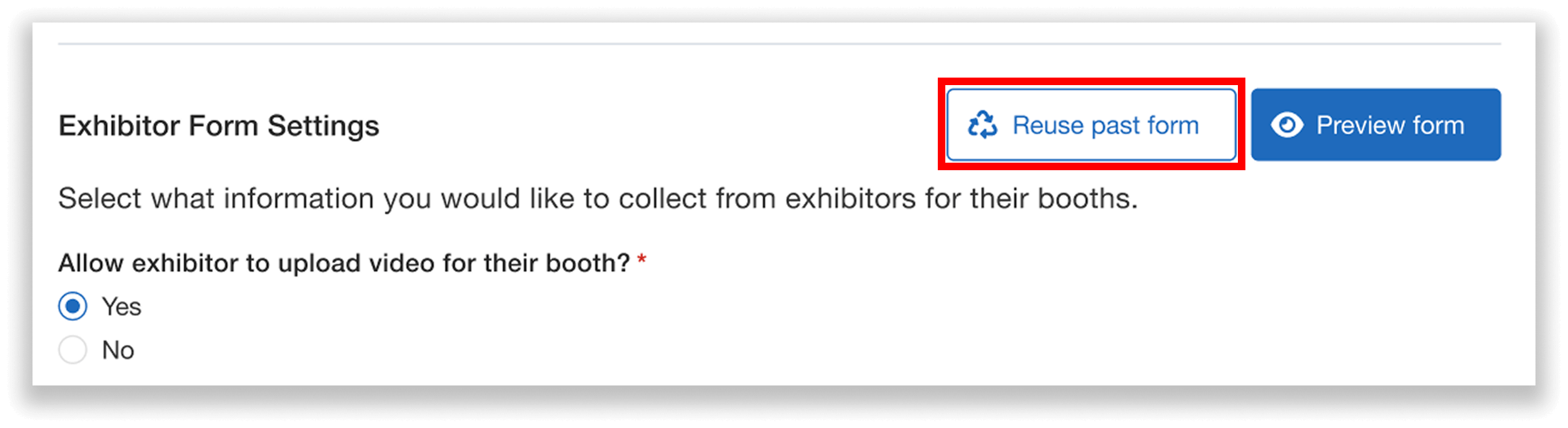
Select “Reuse past form” to import exhibitor form settings from previous events—keeping fields consistent year after year.
After clicking the button, you’ll select an event to import from. You can choose from your own past events, or from events shared with you by other Whova organizers.
Before importing, you can preview exactly what settings will be reused, including:
- Whether exhibitors can upload a video for their booth
- The video size limit
- The consent agreement
- Custom data fields (e.g., questions about equipment needs, logistics, booth setup requirements)
After reviewing the import details, it’s time to import and edit the form.
It’s important to note that importing a past exhibitor form will overwrite any edits previously made to your existing form.
If a consent agreement is being reused, be sure to review and update it carefully—check the wording, dates, and any attached files to ensure everything is correct for your current event.
You can also make any additional changes necessary to the settings. For example, you could add a new custom field to ask exhibitors about shipping needs. Once saved, your form is ready to go!
Import Past Sponsor Form Settings
To reuse a past sponsor form, find the Content tab and go to the Sponsor Manager in the Sponsor Center.
You can then click “Settings,” where you’ll see an option to “Reuse past form.” Click it and select an event to import from—either one of your own past events, or one shared with you by another Whova organizer.
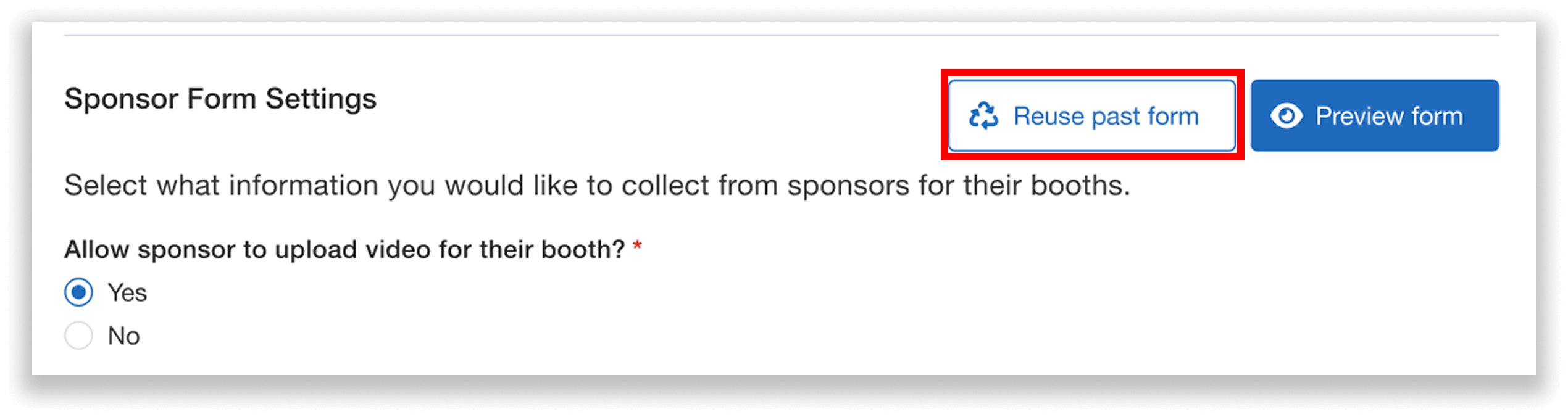
Reuse a past sponsor form by selecting “Reuse past form” in the Sponsor Manager Settings.
Before importing, you can preview the following details:
- Whether sponsors can upload a video for their booth
- The video size limit
- The consent agreement
- Custom data fields (e.g., questions about shipping or storage needs)
- Sponsor banner rotation speed
Next, you can import and edit your sponsor form.
Similar to with exhibitor forms, please note that importing a past sponsor form will overwrite any edits previously made to your current form.
If a consent agreement is included, make sure to review and update it carefully for accuracy. You can also make other changes needed—for example, you could change the settings to allow sponsors to upload videos this year if they weren’t able to last year.
Once you’re done editing, save your changes, and your sponsor form setup is complete.
Reuse Passport Contest Setup
To reuse past settings for the Passport Contest, go to the Content tab, find the Exhibitor Center, and select Passport Contest.
Note: this feature is a paid add-on.
You’ll see an option to “Reuse past settings.” Select it and choose an event to import from—either your own past event, or one shared with you by another Whova organizer.
You can then preview the settings that will be imported:
- How attendees earn stamps
- Which exhibitors are included in the contest (all, by tier, by category, or selected manually)
- How winners are selected
- Rules description and prize details
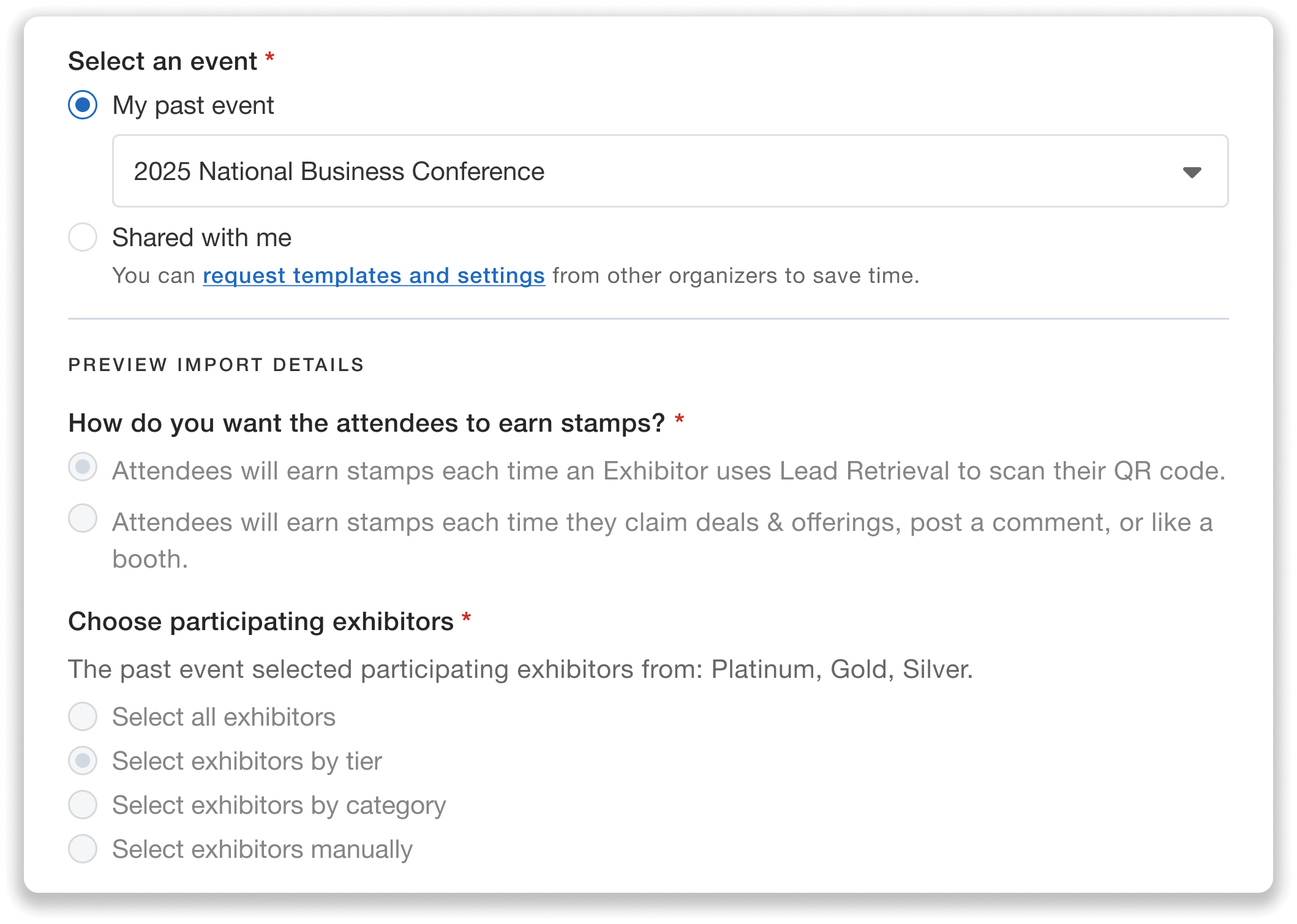
Reuse Passport Contest settings from past events to maintain consistent rules, participating exhibitor selections, and more—while saving time on configuration.
You can then import and edit the setup.
When reusing a contest that didn’t select all exhibitors as participants, you’ll need to define which specific tiers, categories, or individual exhibitors should be included for this event. You can reference the prior event’s selections, but you’ll make the final choices based on your current offerings. For example, if a previous event selected Platinum and Gold tiers to participate, and your current event only has Silver and Gold, you could simply select Gold.
You can also make any other updates necessary, such as adjusting the prize description to increase the gift card value for this year’s contest.
Edit Freely After Import
When reusing exhibitor forms, sponsor forms, or Passport Contest settings, everything remains fully editable after import.
Use the imported setup as a foundation, then customize it however you like to meet the needs of your current event. This makes it easy to reuse what already works while still accommodating changes year after year.
One important reminder: if your forms include consent fields, make sure to review them carefully—especially when they include years or dates.
Build Faster, Stay Consistent, and Avoid Setup Mistakes
Reusing exhibitor/sponsor forms and Passport Contest settings means you no longer have to rely on memory or rebuild last year’s setup from scratch. Instead, you can carry forward configurations that already worked, keep requirements and rules consistent across events, and reduce the risk of missing important details.
Whether you’re planning an annual conference or working with a new team, reuse gives you a reliable starting point—so you can spend less time recreating forms, and more time fine-tuning what makes each event successful.
Ready to simplify exhibitor and sponsor management while maintaining high-quality experiences year after year? Request a demo or reach out to your Whova representative to get started.