
March 31, 2026
For associations, managing member-only tickets can be surprisingly complicated. Organizers want to protect exclusive member pricing and perks, but doing so often means choosing between imperfect options.
Some rely on their AMS (Association Management Software) or CRM (Customer Relationship Management)’s built-in registration tools to keep membership data synced, but those platforms are typically designed primarily for membership management, so their event registration tools may not be as comprehensive or flexible as a dedicated event platform like Whova. Others choose a specialized event system—but then spend hours cross-checking spreadsheets to verify member eligibility and protect member-only tickets.
Whova gives you another way.
Our powerful registration software gives organizers control and flexibility while streamlining every step of the attendee experience. Event organizers use Attendee Segments to categorize registrants based on the information they fill out and send targeted communication. Invite-only ticketing protects exclusive discounts and perks with restrictions by email, organization, and even organization type.
To make member verification even easier, Whova also integrates with leading AMSs. We’ve already introduced integrations with WildApricot, MemberClicks, iMIS, YourMembership, and GlueUp, allowing organizers to automatically verify member status – and even membership tiers – during registration.
Today, we’re expanding that ecosystem even further.
Introducing: Novi and Neon CRM Integrations for secure member-only registration. If your association uses either system, you can now connect it directly with Whova to automatically verify membership during ticket purchase.
This makes it easy to protect member benefits while simplifying registration for everyone.
These AMS integrations make it easy to:
- Create secure member-only tickets that automatically verify membership before purchase.
- Offer ticket tiers based on membership level, such as for Student, Associate, or Full Members.
- Restrict access to special sessions or workshops using Whova’s Ticket Session Mapping and Add-On Session Mapping.
- Manage all ticket types together, from member-only to general admission, in one place.
Whova gives associations a single, powerful platform to manage complex ticket structures while keeping the registration process smooth and intuitive. In fact, our registration system was recently shortlisted for Best Ticketing Technology at the Event Technology Awards.
By connecting your AMS with Whova, you can protect member benefits, reduce manual work, and deliver a seamless registration experience for every attendee.
Keep reading to learn how to connect your system and start using secure member-only ticketing today.
Instantly Verify Membership with Your Novi or Neon CRM Account
You can connect your Novi or Neon CRM account to verify membership during registration in just a few simple steps.
1. After creating your ticket types, go to “Member & Invite-Only Ticketing” under the Ticket Setup tab. From there, select “Add restrictions” on the ticket you’d like to restrict.
2. Choose “Restrict to specific membership levels and statuses.”
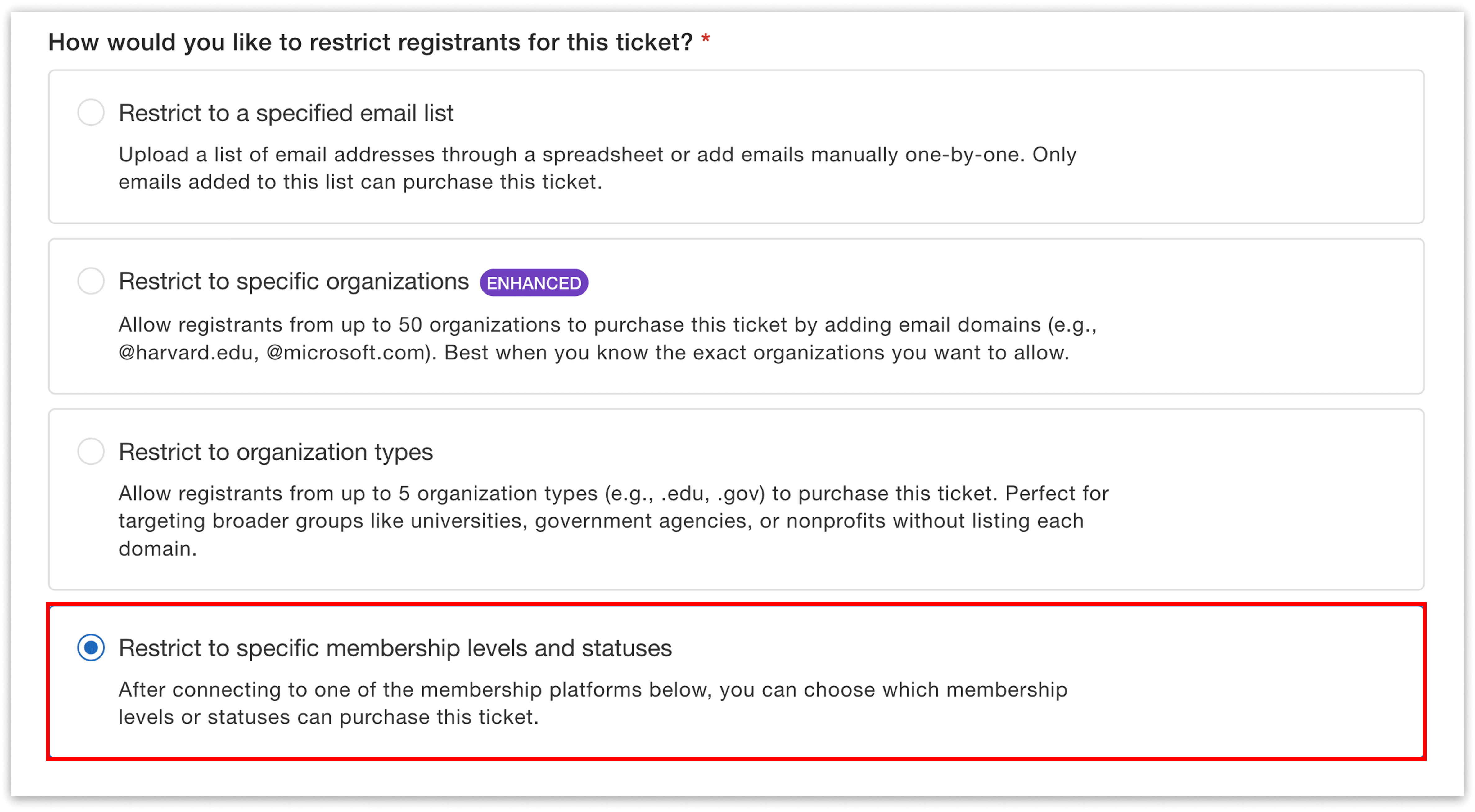
Enable membership-based access for the ticket you’d like to restrict.
3. Then, select either Novi or Neon CRM and follow the provided instructions to sync your account. Once you’ve connected, Whova will be able to verify each attendee’s membership in real time using their Member ID or Account ID.
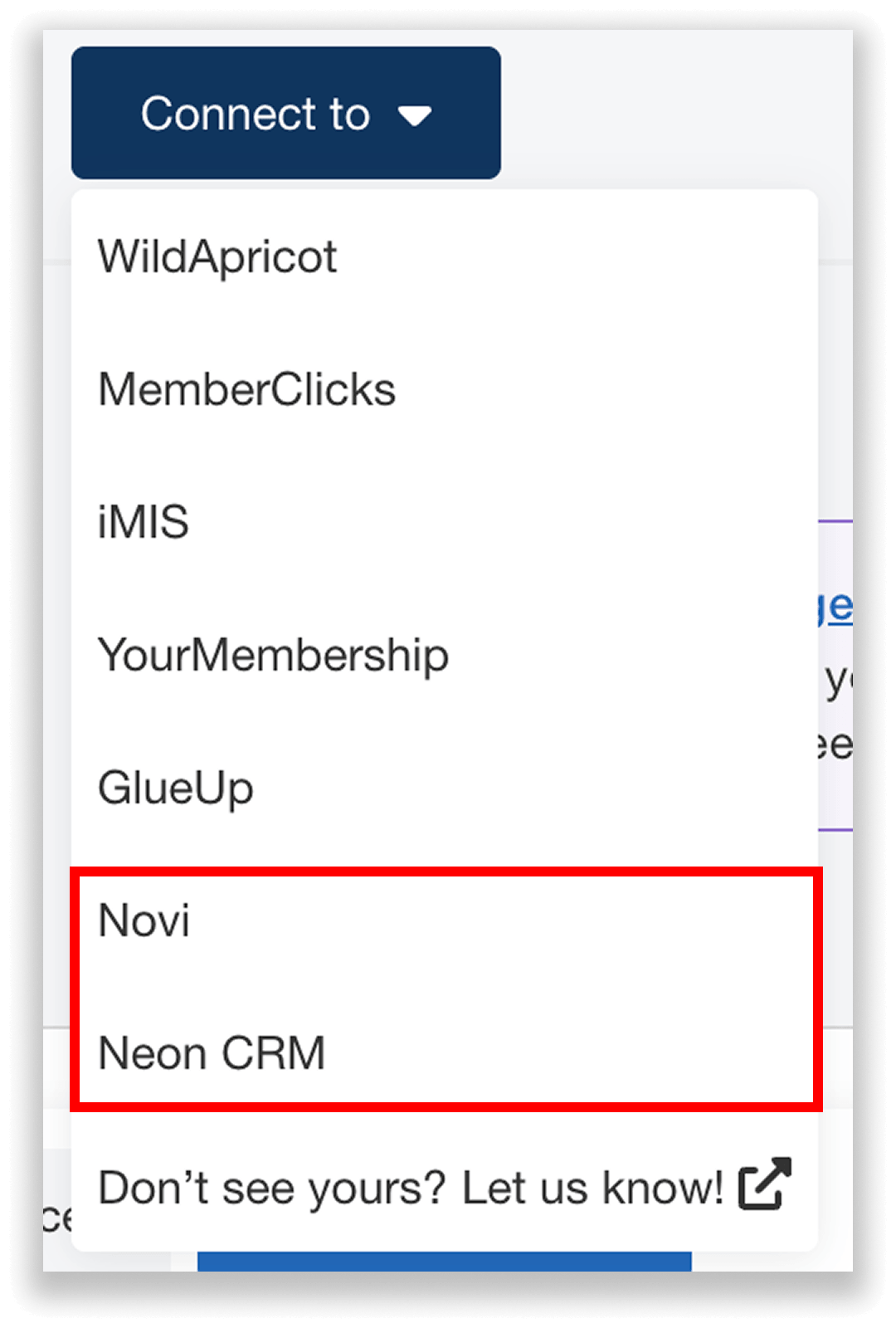
Seamlessly connect your Novi or Neon CRM account for secure member-only tickets.
To connect with Novi, you’ll need to input the following information:
- API Key (generated in your Novi account)
- Base URL of your Novi AMS website (typically formatted like: https://yourorganization.noviams.com)
To connect with Neon CRM, you’ll need:
- API Key (generated in your Neon CRM account)
- Organization ID (found in your Neon CRM account settings)
For additional guidance, you can reference the instructions available directly in the Whova dashboard.
4. Once your account is connected, you can customize the ticket’s restrictions and define exactly who is eligible to purchase it. You’ll choose which membership levels can purchase the ticket here. For example, if you offer Associate, Full, and Premium memberships, you might restrict a ticket to Premium members only.
If you’re using Novi, you can also filter by membership status. For instance, you can allow members with “Current” or “Grace Period” status to purchase tickets, while excluding “Prospect” members.
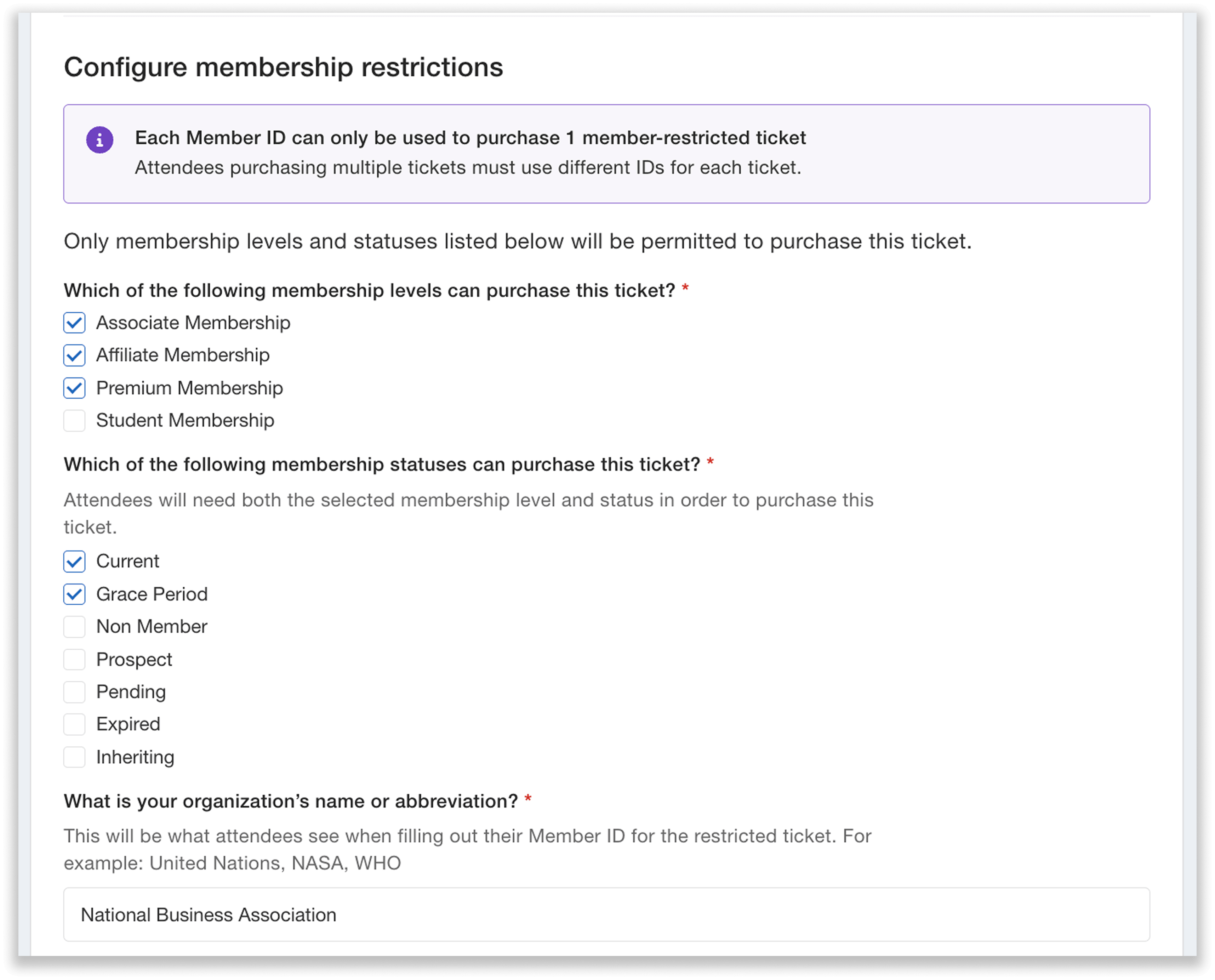
Define which membership levels and statuses can purchase your ticket.
These restrictions can be applied across multiple tickets. So, if you have three different member tickets—such as Student, Standard, and Premium—you can configure unique restrictions for each one.
Note: Whova is SOC2 compliant, the industry gold standard for data security and privacy. Our AMS integrations use secure connections and encrypted data transfer, so your membership information stays protected while organizers can easily verify member status during registration.
How Do Attendees Purchase Member-Only Tickets?
Membership verification is simple and built directly into your registration flow.
When attendees select a member-only ticket on your event registration page, they’ll be prompted to enter their Member ID or Account ID before completing their purchase.
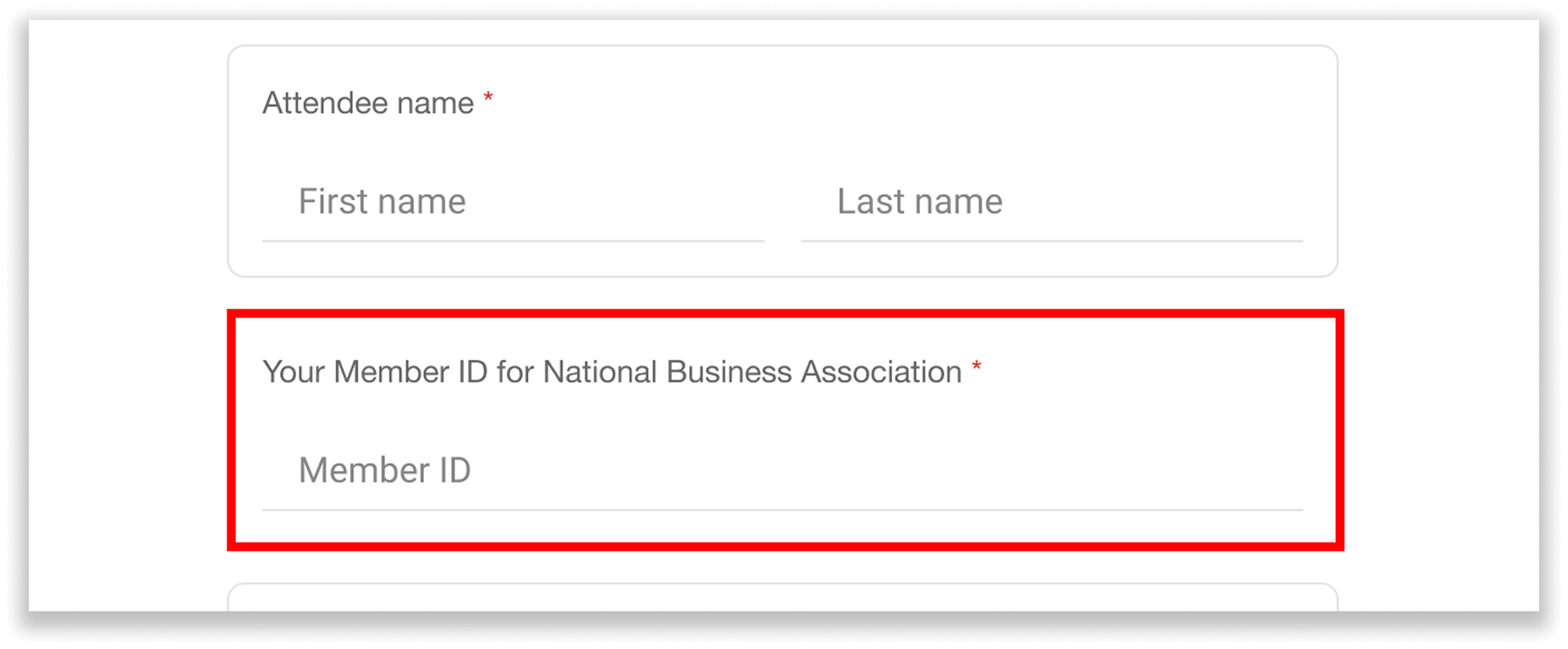
Registrants enter their Member ID/Account ID to verify eligibility before purchasing a member-only ticket.
Whova then instantly verifies their membership status and level against your connected Novi or Neon CRM account. Only attendees who meet your specified criteria can proceed, keeping your tickets exclusive to eligible registrants.
Each ticket must be associated with a unique Member ID or Account ID. So, if an attendee wants to purchase multiple member tickets, they’ll need to enter a separate ID for each one. This ensures every ticket is properly verified and tied to an eligible member.
Sync Membership Data in Real Time
Membership data doesn’t stay static, and your registration system shouldn’t either.
As members join, renew, or let their memberships lapse, your Novi or Neon CRM database is constantly updating. Once connected, Whova syncs with these changes, so there’s no need for manual edits or uploads.
This keeps your ticket restrictions accurate and up to date. For example, if a new member joins, our system will allow them to purchase a member-only ticket without action required from your team.
Simplify Member-Only Ticketing with Whova
With Novi and Neon CRM now part of Whova’s growing AMS integration ecosystem, it’s easier than ever to manage member-only tickets while reducing manual work behind the scenes. Protect exclusive member benefits, configure precise restrictions, and keep your registration running smoothly, all in one place.
Ready to streamline your member-only ticketing? Request a demo to see these integrations in action, or reach out to your account manager to learn how you can start using Novi or Neon CRM with your next event.